Author name: Prasanna

Basics of Python – Built-in Types

In this Page, We are Providing Basics of Python – Built-in Types. Students can visit for more Detail and Explanation of Python Handwritten Notes Pdf.

Basics of Python – Built-in Types

Built-in types

This section describes the standard data types that are built into the interpreter. There are various built-in data types, for e.g., numeric, sequence, mapping, etc., but this book will cover few types. Schematic representation of various built-in types is shown in figure 2-1.
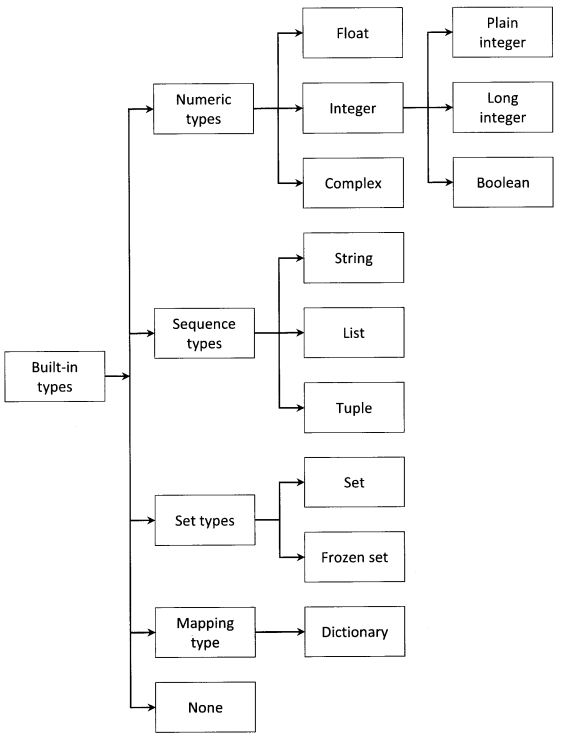
Python Handwritten Notes Chapter 2 img 1

Numeric types

There are three distinct numeric types: integer, floating-point number, and complex number.

Integer

Integer can be sub-classified into three types:

Plain integer

Plain integer (or simply ” integer “) represents an integer number in the range -2147483648 through 2147483647. When the result of an operation would fall outside this range, the result is normally returned as a long integer.

>>> a=2147483647 
>>> type (a) 
<type ' int '>
>>> a=a+1
>>> type (a)
<type ' long '>
>>> a=-2147483648 
>>> type (a)
<type ' int '>
>>> a=a-1
>>> type (a)
<type ' long ’>

The built-in function int(x = 0) converts a number or string x to an integer or returns 0 if no arguments are given.

>>> a =' 57 '
>>> type (a) 
<type ' str '>
>>> a = int (a)
>>> a 
57
>>> type (a)
<type ' int '>
>>> a = 5.7
>>> type (a)
<type ' float '> 
>>> a = int (a)
>>> a 
5 
>>> type (a)
<type ' int '>
>>> int( )
0

Long integer

This represents integer numbers in a virtually unlimited range, subject to available memory. The built-in function long (x=0) converts a string or number to a long integer. If the argument is a string, it must contain a possibly signed number. If no argument is given, OL is returned.

>>> a = 5 
>>> type (a) 
<type ' int '> 
>>> a = long (a) 
>>> a 
5L
>>> type (a) 
<type ' long '> 
>>> long ( )
OL
>>> long (5)
5L
>>> long (5.8) 
5L
>>> long(' 5 ') 
5L
>>> long(' -5 ')
-5L

Integer literals with an L or 1 suffix yield long integers (L is preferred because 11 looks too much like eleven).

>>> a=10L 
>>> type (a) 
<type ' long '>
>>> a=101 
>>> type (a)
<type ' long '>

The following expressions are interesting.

>>> import sys 
>>> a=sys.maxint 
>>> a
2147483647
>>> type (a)
<type ' int '>
>>> a=a+1
>>> a
21474836 48L
>>> type (a)
<type ' long ’>

Boolean

This represents the truth values False and True. The boolean type is a sub-type of plain integer, and boolean values behave like the values 0 and 1. The built-in function bool ( ) converts a value to boolean, using the standard truth testing procedure.

>>> bool ( ) 
False 
>>> a=5
>>> bool (a)
True
>>> bool (0)
False
>>> bool( ' hi ' )
True
>>> bool(None)
False
>>> bool(' ')
False
>>> bool(False)
False
>>> bool("False" )
True
>>> bool(5 > 3)
True

Floating point number

This represents a decimal point number. Python supports only double-precision floating-point numbers (occupies 8 bytes of memory) and does not support single-precision floating-point numbers (occupies 4 bytes of memory). The built-in function float  ( ) converts a string or a number to a floating-point number.

>>> a = 57 
>>> type (a)
<type ' int '>
>>> a = float (a)
>>> a
57.0 
>>> type (a)
<type ' float '>
>>> a = ' 65 ' 
>>> type (a)
<type ' str ' > 
>>> a = float (a) 
>>> a
65.0 
>>> type (a)
<type ' float '>
>>> a = 1e308 
>>> a 
1e+30 8 
>>> type (a)
<type ' float '>
>>> a = 1e309 
>>> a
inf 
>>> type (a)
<type ' float '>

Complex number

This represents complex numbers having real and imaginary parts. The built-in function complex () is used to convert numbers or strings to complex numbers.

>>> a = 5.3
>>> a = complex (a)
>>> a 
(5 . 3 + 0 j)
>>> type (a)
<type ' complex '>
>>> a = complex ( )
>>> a
0 j 
>>> type (a)
<type ' complex '>

Appending j or J to numeric literal yields a complex number.

>>> a = 3 . 4 j 
>>> a 
3 . 4 j
>>> type (a)
<type ' complex '>
>>> a = 3 . 5 + 4 . 9 j 
>>> type (a)
<type ' complex '>
>>> a = 3 . 5+4 . 9 J
>>> type (a)
<type ' complex '>

The real and imaginary parts of a complex number z can be retrieved through the attributes z. real and z. imag.

a=3 . 5 + 4 . 9 J
>>> a . real
3 . 5
>>> a . imag 
4 . 9

Sequence Types

These represent finite ordered sets, usually indexed by non-negative numbers. When the length of a sequence is n, the index set contains the numbers 0, 1, . . ., n-1. Item i of sequence a is selected by a [i]. There are seven sequence types: string, Unicode string, list, tuple, bytearray, buffer, and xrange objects.

The sequence can be mutable or immutable. The immutable sequence is a sequence that cannot be changed after it is created. If an immutable sequence object contains references to other objects, these other objects may be mutable and may be changed; however, the collection of objects directly referenced by an immutable object cannot change. The mutable sequence is a sequence that can be changed after it is created. There are two intrinsic mutable sequence types: list and byte array.

Iterable is an object capable of returning its members one at a time. Examples of iterables include all sequence types (such as list, str, and tuple) and some non-sequence types like diet and file, etc. Iterables can be used in a for loop and in many other places where a sequence is needed (zip(), map (), …). When an iterable object is passed as an argument to the built-in function iter (), it returns an iterator for the object. An iterator is an object representing a stream of data; repeated calls to the iterator’s next () method return successive items in the stream. When no more data are available, a Stoplteration exception is raised instead.

Some of the sequence types are discussed below:

String

It is a sequence type such that its value can be characters, symbols, or numbers. Please note that string is immutable.

>>> a=' Python : 2 . 7 '
>>> type (a)
<type ' str ’>
>>> a [2 ] =' S '
Traceback (most recent call last) :
File "<stdin>", line 1, in <module>
TypeError: 'str' object does not support item assignment

The built-in function str (object =’ ‘ ) returns a string containing a nicely printable representation of an object. For strings, this returns the string itself. If no argument is given, an empty string is returned.

>>> a=57.3
>>> type(a) 
<type 'float'>
>>> a=str(a)
>>> a
' 57.3 '
>>> type (a)
<type ' str '>

Tuple

A tuple is a comma-separated sequence of arbitrary Python objects enclosed in parenthesis (round brackets). Please note that the tuple is immutable. A tuple is discussed in detail in chapter 4.

>>> a=(1 , 2 , 3 ,4) 
>>> type (a)
<type ' tuple '>
'a', 'b', 'c')

List

The list is a comma-separated sequence of arbitrary Python objects enclosed in square brackets. Please note that list is mutable. More information on the list is provided in chapter 4.

>>> a=[1, 2 ,3, 4]
>>> type(a) 
<type ' list '>

Set types

These represent an unordered, finite set of unique objects. As such, it cannot be indexed by any subscript, however, they can be iterated over. Common uses of sets are fast membership testing, removing duplicates from a sequence, and computing mathematical operations such as intersection, union, difference, and symmetric difference. There are two set types:

Set

This represents a mutable set. It is created by the built-in function set (), and can be modified afterward by several methods, such as add () remove (), etc. More information on the set is given in chapter 4.

>>> set1=set ( )                                                    # A new empty set
>>> set1.add (" cat ")                                           # Add a single member
>>> set1.update ([" dog "," mouse "])                 # Add several members
>>> set1.remove ("mouse")                                # Remove member
>>> set1
set([' dog ', ' cat '])
>>> set2=set([" dog "," mouse "])
>>> print set1&set2                                           # Intersection
set ( [' dog ' ] )
>>> print set1 | set2                                           # Union
set([' mouse ', ' dog ', ' cat '])

The set ( [ iterable ] ) return a new set object, optionally with elements taken from iterable.

Frozenset

This represents an immutable set. It is created by a built-in function frozenset ( ). As a frozenset is immutable, it can be used again as an element of another set, or as a dictionary key.

>>> frozenset ( ) 
frozenset ( [ ] )
>>> frozenset (' aeiou ') 
frozenset{ [' a ', ' i ',' e ',' u ',' o '])
>>> frozenset ( [0, 0, 0, 44, 0, 44, 18] ) 
frozenset (10, 18, 44])

The frozenset ( [iterable] ) return return a new frozenset object, optionally with elements taken from iterable.

Mapping Types

This represents a container object that supports arbitrary key lookups. The notation a [k] selects the value indexed by key k from the mapping a; this can be used in expressions and as the target of assignments or del statements. The built-in function len () returns the number of items in a mapping. Currently, there is a single mapping type:

Dictionary

A dictionary is a mutable collection of unordered values accessed by key rather than by index. In the dictionary, arbitrary keys are mapped to values. More information is provided in chapter 4.

>>> dict1={"john":34,"mike":56}
>>> dict1[" michael "] = 42 
>>> dict1
{' mike ' : 56, ' john ' : 34, ' michael ' : 42}
>>> dictl[" mike "]
56

None

This signifies the absence of a value in a situation, e.g., it is returned from a function that does not explicitly return anything. Its truth value is False.

Some other built-in types such as function, method, class, class instance, file, module, etc. are discussed in later chapters.
Basics of Python – Built-in Types Read More »

Basics of Python – Line Structure

In this Page, We are Providing Basics of Python – Line Structure. Students can visit for more Detail and Explanation of Python Handwritten Notes Pdf.

Basics of Python – Line Structure

Line structure

A Python program is divided into a number of logical lines.

Physical and logical lines

A physical line is a sequence of characters terminated by an end-of-line sequence. The end of a logical line is represented by the token NEWLINE. A logical line is ignored (i.e. no NEWLINE token is generated) that contains only spaces, tabs, or a comment. This is called a “blank line”. The following code

>>> i=5 
>>> print (5)
5

is the same as:

>>> i=5; print (i)
5

A logical line is constructed from one or more physical lines by following the explicit or implicit line joining rules.

Explicit line joining

Two or more physical lines may be joined into logical lines using backslash characters (\), as shown in the following example:

>>> if 1900 < year < 2100 and 1 <= month <= 12 \
. . .   and 1 <= day <= 31 and 0 <= hour < 24 \
. . .   and 0 <= minute < 60 and 0 <= second < 60 :
. . .   print year

A line ending in a backslash cannot carry a comment. Also, backslash does not continue a comment. A backslash does not continue a token except for string literals (i.e., tokens other than string literals cannot be split across physical lines using a backslash). A backslash is illegal elsewhere on a line outside a string literal.

>>> str=' This is a \
. . .    string example ' 
>>> str
' This is a string example'

Implicit line joining

Expressions in parentheses, square brackets, or curly braces can be split over more than one physical line without using backslashes. For example:

>>> month_names=['Januari','Februari','Maart',          # These are the
. . .    'April ', ' Mei ', 'Juni',                                              # Dutch names
. . .    'Juli','Augustus','September',                                 # for the months
. . .   'Oktober','November','December']                        # of the year

Implicitly continued lines can carry comments. The indentation of the continuation lines is not important. Blank continuation lines are allowed. There is no NEWLINE token between implicit continuation lines. Implicitly continued lines can also occur within triple-quoted strings; in that case, they cannot carry comments.

>>> str=" " "This is 
. . . a string 
. . . example" " "
>>> str
' This is \na string \nexample'
>>> str='' 'This is 
. . . a string 
. . . example'' '
>>> str
' This is \na string \nexample'

Comment

A comment starts with a hash character (#) that is not part of a string literal and terminates at the end of the physical line. A comment signifies the end of the logical line unless the implicit line joining rules are invoked. Also, comments are not executed.

Indentation

Whitespace is important in Python. Actually, whitespace at the beginning of the line is important. This is called indentation. Leading whitespace (spaces and tabs) at the beginning of the logical line is used to determine the indentation level of the logical line, which in turn is used to determine the grouping of statements. This means that statements that go together must have the same indentation. Each such set of statements is a block. One thing that should be remembered is that wrong indentation can give rise to error (IndentationError exception).

>>> i=10
>>> print "Value is ",i 
Value is 10 
>>> print "Value is ",i 
File "<stdin>", line 1
print "Value is ",i 
∧
IndentationError: unexpected indent

The indentation levels of consecutive lines are used to generate INDENT and DEDENT tokens. One can observe that inserting whitespace, in the beginning, gave rise to the IndentationError exception.

The following example shows non-uniform indentation is not an error.

var=100 
>>> if var!=100:
. . .  print 'var does not have value 100'
. . .  else:
. . .                 print 'var has value 100'
. . . 
var has value 100

Need for indentation

In the C programming language, there are numerous ways to place the braces for the grouping of statements. If a programmer is habitual of reading and writing code that uses one style, he or she will feel at least slightly uneasy when reading (or being required to write) another style. Many coding styles place begin/end brackets on a line by themselves. This makes programs considerably longer and wastes valuable screen space, making it harder to get a good overview of a program.

Guido van Rossum believes that using indentation for grouping is extremely elegant and contributes a lot to the clarity of the typical Python program. Since there are no begin/end brackets, there cannot be a disagreement between the grouping perceived by the parser and the human reader. Also, Python is much less prone to coding-style conflicts.

Basics of Python – Line Structure Read More »

Basics of Python – Operators and Operands

In this Page, We are Providing Basics of Python – Operators and Operands. Students can visit for more Detail and Explanation of Python Handwritten Notes Pdf.

Basics of Python – Operators and Operands

Operators and operands

An operator is a symbol (such as +, x, etc.) that represents an operation. An operation is an action or •procedure that produces a new value from one or more input values called operands. There are two types of operators: unary and binary. The unary operator operates only on one operand, such as negation. On the other hand, the binary operator operates on two operands, which include addition, subtraction, multiplication, division, exponentiation operators, etc. Consider an expression 3 + 8, here 3 and 8 are called operands, while V is called operator. The operators can also be categorized into:

  • Arithmetic operators.
  • Comparison (or Relational) operators.
  • Assignment operators.
  • Logical operators.
  • Bitwise operators.
  • Membership operators.
  • Identity operators.

Arithematics operators

Table 2-2 enlists the arithmetic operators with a short note on the operators.

Operator

Description

+

Addition operator- Add operands on either side of the operator.

Subtraction operator – Subtract the right-hand operand from the left-hand operand.

*

Multiplication operator – Multiply operands on either side of the operator.

/

Division operator – Divide left-hand operand by right-hand operand.

%

Modulus operator – Divide left-hand operand by right-hand operand and return the remainder.

**

Exponent operator – Perform exponential (power) calculation on operands.

//

Floor Division operator – The division of operands where the result is the quotient in which the digits after the decimal point are removed.

The following example illustrates the use of the above-discussed operators.

>>> a=20 
>>> b=45.0
>>> a+b
65.0
>>> a-b
-25.0
>>> a*b
900.0 
>>> b/a 
2.25 
>>> b%a
5.0
>>> a**b
3.5184372088832e+58 
>>> b//a
2.0

Relational operators

A relational operator is an operator that tests some kind of relation between two operands. Tables 2-3 enlist the relational operators with descriptions.

Operator

Description

==

Check if the values of the two operands are equal.

!=

Check if the values of the two operands are not equal.

<>

Check if the value of two operands is not equal (same as != operator).

>

Check if the value of the left operand is greater than the value of the right operand.

<

Check if the value of the left operand is less than the value of the right operand.

>=

Check if the value of the left operand is greater than or equal to the value of the right operand.

<=

Check if the value of the left operand is less than or equal to the value of the right operand.

The following example illustrates the use of the above-discussed operators.

>>> a,b=20,40
>>> a==b
False 
>>> a!=b 
True
>>> a<>b 
True 
>>> a>b 
False 
>>> a<b 
True
>>> a>=b 
False 
>>> a<=b 
True

Assignment operators

The assignment operator is an operator which is used to bind or rebind names to values. The augmented assignment is the combination, in a single statement, of a binary operation and an assignment statement. An augmented assignment expression like x+=l can be rewritten as x=x+l. Tables 2-4 enlist the assignment operators with descriptions.

Operator

Description

=

Assignment operator- Assigns values from right side operand to left side operand.

+=

Augmented assignment operator- It adds the right-side operand to the left side operand and assigns the result to the left side operand.

-=

Augmented assignment operator- It subtracts the right-side operand from the left side operand and assigns the result to the left side operand.

*=

Augmented assignment operator- It multiplies the right-side operand with the left side operand and assigns the result to the left side operand.

/=

Augmented assignment operator- It divides the left side operand with the right side operand and assigns the result to the left side operand.

%=

Augmented assignment operator- It takes modulus using two operands and assigns the result to left side operand.

* *=

Augmented assignment operator- Performs exponential (power) calculation on operands and assigns value to the left side operand.

//=

Augmented assignment operator- Performs floor division on operators and assigns value to the left side operand.

The following example illustrates the use of the above-discussed operators.

>>> a,b=20,40 
>>> c=a+b 
>>> c 
60
>>> a,b=2.0,4.5 
>>>c=a+b
>>> C
6.5
>>> c+=a 
>>> c
8.5
>>> c-=a 
>>> c
6.5
>>> c*=a 
>>> c
13.0
>>> c/=a 
>>> c 
6.5
>>> c%=a 
>>> c 
0.5
>>> c**=a 
>>> c 
0.25
>>> c//=a 
>>> c 
0.0

Bitwise operators

A bitwise operator operates on one or more bit patterns or binary numerals at the level of their individual bits. Tables 2-5 enlist the bitwise operators with descriptions.

Operator

Description

&

Binary AND operator- Copies corresponding binary 1 to the result, if it exists in both operands.

|

Binary OR operator- Copies corresponding binary 1 to the result, if it exists in either operand.

Binary XOR operator- Copies corresponding binary 1 to the result, if it is set in one operand, but not both.

~

Binary ones complement operator- It is unary and has the effect of flipping bits.

<<

Binary left shift operator- The left side operand bits are moved to the left side by the number on the right-side operand.

>>

Binary right shift operator- The left side operand bits are moved to the right side by the number on the right-side operand.

The following example illustrates the use of the above-discussed operators.

>>> a,b=60,13 
>>> a&b 
12
>>> a | b
61 
>>> a∧b
49 
>>> ~a
-61 
>>> a< < 2
240 
>>> a>>2
15

In the above example, the binary representation of variables a and b are 00111100 and 00001101, respectively. The above binary operations example is tabulated in Tables 2-6.

Bitwise operation

Binary representationDecimal representation

a&b

00001100

12

a | b

00111101

61

ab

00110001

49

~a

11000011-61
a<<211110000

240

a>>200001111

15

Logical operators

Logical operators compare boolean expressions and return a boolean result. Tables 2-6 enlist the logical operators with descriptions.

Operator

Description

and

Logical AND operator- If both the operands are true (or non-zero), then the condition becomes true.

or

Logical OR’operator- If any of the two operands is true (or non-zero), then the condition becomes true.

not

Logical NOT operator- The result is reverse of the logical state of its operand. If the operand is true (or non-zero), then the condition becomes false.

The following example illustrates the use of the above-discussed operators.

>>> 5>2 and 4<8 
True
>>> 5>2 or 4>8 
True
>>> not (5>2)
False

Membership operators

A membership operator is an operator which tests for membership in a sequence, such as string, list, tuple, etc. Table 2-7 enlists the membership operators.

Operator

Description

In

Evaluate to true, if it finds a variable in the specified sequence; otherwise false.

not in

Evaluate to true, if it does not find a variable in the specified sequence; otherwise false.
>>> 5 in [0, 5, 10, 15]
True 
>>> 6 in [0, 5, 10, 15]
False
>>> 5 not in [0, 5, 10, 15]
False 
>>> 6 not in [0, 5, 10, 15]
True

Identity operators

Identity operators compare the memory locations of two objects. Table 2-8 provides a list of identity operators including a small explanation.

Operator

Description

is

Evaluates to true, if the operands on either side of the operator point to the same object, and false otherwise.

is not

Evaluates to false, if the operands on either side of the operator point to the same object, and true otherwise.

The following example illustrates the use of the above-discussed operators.

>>> a=b=3.1
>>> a is b 
True 
>>> id (a)
3 0 9 8 4 5 2 8 
>>> id (b)
30984528 
>>> c,d=3.1,3.1 
>>> c is d 
False 
>>> id (c)
35058472 
>>> id (d)
30984592
>>> c is not d
True 
>>> a is not b
False

Operator precedence

Operator precedence determines how an expression is evaluated. Certain operators have higher precedence than others; for example, the multiplication operator has higher precedence than the addition operator. In the expression x=7+3*2, x is assigned 13, not 20, because operator * has higher precedence than +, so it first multiplies 3*2 and then adds into 7.

Table 2-10 summarizes the operator’s precedence in Python, from lowest precedence to highest precedence (from top to bottom). Operators in the same box have the same precedence.

Operator
not, or, and
in, not in
is, is not
=, %, =/, =//, -=, +=, *=, **=
<>, ==, !=
<=, <, >, >=
∧, |
&
>>,<<
+, –
*, /, %, //
∼,+,-
**

Basics of Python – Operators and Operands Read More »

Basics of Python – Variable, Identifier and Literal

In this Page, We are Providing Basics of Python – Variable, Identifier and Literal. Students can visit for more Detail and Explanation of Python Handwritten Notes Pdf.

Basics of Python – Variable, Identifier and Literal

Variable, identifier, and literal

A variable is a storage location that has an associated symbolic name (called “identifier”), which contains some value (can be literal or other data) that can change. An identifier is a name used to identify a variable, function, class, module, or another object. Literal is a notation for constant values of some built-in type. Literal can be string, plain integer, long integer, floating-point number, imaginary number. For e.g., in the expressions

var1=5 
var2= 'Tom'

var1 and var2 are identifiers, while 5 and ‘ Tom’ are integer and string literals, respectively.

Consider a scenario where a variable is referenced by the identifier a and the variable contains a list. If the same variable is referenced by the identifier b as well, and if an element in the list is changed, the change will be reflected in both identifiers of the same variable.

>>> a = [1, 2, 3]
>>> b =a 
>>> b 
[1, 2, 3]
>> a [ 1 ] =10
>>> a
[1, 10, 3]
>>> b
[1, 10, 3]

Now, the above scenario can be modified a bit, where a and b are two different variables.

>>> a= [1,2,3 ]
>>> b=a[:] # Copying data from a to b.
>>> b 
[1, 2, 3]
>>> a [1] =10 
>>> a 
(1, 10, 3]
>>> b
[1, 2, 3]

There are some rules that need to be followed for valid identifier naming:

  • The first character of the identifier must be a letter of the alphabet (uppercase or lowercase) or an underscore (‘_’).
  • The rest of the identifier name can consist of letters (uppercase or lowercase character), underscores (‘_’), or digits (0-9).
  • Identifier names are case-sensitive. For example, myname and myName are not the same.
  • Identifiers can be of unlimited length.

Basics of Python – Variable, Identifier and Literal Read More »

Python Programming – Introduction to Python

In this Page, We are Providing Python Programming – Introduction to Python. Students can visit for more Detail and Explanation of Python Handwritten Notes Pdf.

Python Programming – Introduction to Python

Open-source software

Before stepping into the world of programming using open source tools, one should try to understand the definition of open-source software given by “Open Source Initiative” (abbreviated as OSI). OSI is a non-profit corporation with global scope, formed to educate about and advocate the benefits of open source software, and to build bridges among different constituencies in the open-source community.

Open-source software is a defined as software whose source code is made available under a license that allows modification and re-distribution of the software at will. Sometimes a distinction is made between open source software and free software as given by GNU {http://www.gnu.org/). The detailed distribution terms of open-source software given by OSI are given on the website link: http://opensource. org/.

Python(x,y)

“Python(x,y)” is a free scientific and engineering development software for numerical computations, data analysis, and data visualization based on Python programming language and Spyder interactive development environment, the launcher (current version 2.7.6.0) is shown in figure 1-5. The executable file of Python(x,y) can be downloaded and then installed from the website link: http://code.google.eom/p/pythonxy/. The main features of Python(x,y) are:

  • Bundled with scientific-oriented Python libraries and development environment tools.
  • Extensive documentation of various Python packages.
  • Providing an all-in-one setup program, so that the user can install or uninstall all these packages and features by clicking one button only.

Python Handwritten Notes Chapter 1 img 5

EBNF

A “syntactic metalanguage” is a notation for defining the syntax of a language by the use of a number of rules. A syntactic metalanguage is an important tool of computer science. Since the definition of the programming language “Algol 60”, it has been a custom to define the syntax of a programming language formally. Algol 60 was defined with a notation now known as “Backus-Naur Form” (BNF). This notation has proved a suitable basis for subsequent languages but has frequently been extended or slightly altered.

There are many different notations that are confusing and have prevented the advantages of formal unambiguous definitions from being widely appreciated. “Extended BNF” (abbreviated as EBNF, based on Backus-Naur Form) brings some order to the formal definition of the syntax and is useful not just for the definition of programming languages, but for many other formal definitions. Please refer international standard document (ISO/IEC 14977:1996(E)) for detailed information on EBNF (website link: http://standards.iso.org/ittf/PubliclyAvailobleStandards/).

Python Programming – Introduction to Python Read More »

Python Data Persistence – @Property DGCOrator

Python Data Persistence – @Property DGCOrator

Although a detailed discussion on decorators is beyond the scope of this book, a brief introduction is necessary before we proceed to use @property decorator.

The function is often termed a callable object. A function is also a passable object. Just as we pass a built-in object viz. number, string, list, and so on. as an argument to a function, we can define a function that receives another function as an argument. Moreover, you can have a function defined in another function (nested function), and a function whose return value is a function itself. Because of all these features, a function is called a first-order object.

The decorator function receives a function argument. The behavior of the argument function is then extended by wrapping it in a nested function. Definition of function subjected to decoration is preceded by name of decorator prefixed with @ symbol.
Python-OOP – 113

Example

def adecorator(function): 
def wrapper():
function() 
return wrapper 
@adecorator 
def decorate( ): 
pass

We shall now use the property ( ) function as a decorator and define a name () method acting as a getter method for my name attribute in my class. py code above.

Example

@property 
def name(self):
return self. ___myname
@property 
def age(self):
return self. __myage

A property object’s getter, setter, and deleter methods are also decorators. Overloaded name ( ) and age ( ) methods are decorated with name, setter, and age. setter decorators respectively.

Example

@name.setter
def name(self,name):
self. ___myname=name
@age.setter
def age(self, age):
self. myage=age

When @property decorator is used, separate getter and setter methods defined previously are no longer needed. The complete code of myclass.py is as below:

Example

#myclass. py
class MyClass:
__slots__=['__myname', '__myage']
def__init__(self, name=None, age=None):
self.__myname=name
self.__myage=age

@property
def name(self) :
print ('name getter method')
return self.__myname

@property
def age(self) :
print ('age getter method')
return self. ___myage

@name.setter
def name(self,name):
print ('name setter method')
self.___myname=name

@age.setter
def age(self, age):
print ('age setter method')
self.__myage=age

def about(self):
print ('My name is { } and I am { } years old'.format(self. myname,self. myage))

Just import above class and test the functionality of property objects using decorators.

Example

>>> from myclass import MyClass
>>> obj1=MyClass('Ashok', 21)
>>> obj1.about() #initial values of object's attributes
My name is Ashok and I, am 21 years old
>>> #change age property
>>> obj1.age=30
age setter method
>>> #access name property
>>> obj1.name
name getter method
'Ashok'
> > > obj1.about()
My name is Ashok and I am 30 years old


Python Data Persistence – @Property DGCOrator Read More »

Python Data Persistence – Getters/setters

Python Data Persistence – Getters/setters

Java class employs getter and setter methods to regulate access to private data members in it. Let us see if it works for a Python class. Following code modifies myclass.py and provides getter and setter methods for my name and my age instance attributes.

Example

#myclass.py
class MyClass:
__slots__=['myname', 'myage']
def__init__(self, name=None, age=None):
self.myname=name
self,myage=age
def getname(self):
return self.myname
def set name(self, name):
self.myname=name
def getage(self):
return self.myage
def setage(self, age):
self.myage=age
def about(self):
print ('My name is { } and I am { } years old' ,format(self.myname,self.myage) )

The getters and setters allow instance attributes to be retrieved / modified.

Example

>>> from myclass import MyClass
>>> obj1=MyClass('Ashok',21)
>>> obj1.getage( )
21
>>> obj1.setname('Amar')
>>> obj1.about( )
My name is Amar and I am 21 years old

Good enough. However, this still doesn’t prevent direct access to instance attributes. Why?

Example

>>> obj1.myname
'Amar'
>>> getattr(obj1,'myage')
21
>>> obj1.myage=25
>>> setattr(obj1myname1, 'Ashok')
>>> obj1.about()
My name is Ashok and I am 25 years old

Python doesn’t believe in restricting member access hence it doesn’t have access to controlling keywords such as public, private, or protected. In fact, as you can see, class members (attributes as well as methods) are public, being freely accessible from outside the class. Guido Van Rossum – who developed Python in the early 1990s – once said, “We ‘re all consenting adults here” justifying the absence of such access restrictions. Then what is a ‘Pythonic’ way to use getters and setters? The built-in property () function holds the answer.

Python Data Persistence – Getters/setters Read More »

Python Data Persistence – property () Function

Python Data Persistence – property () Function

Well, let me now make a volte-face here. It’s not that Python doesn’t have private/protected access restrictions. It does have. If an instance variable is prefixed with double underscore character ‘___’, it behaves like a private variable. Let us see how:

Example

>>> #private variable in class
. . .
>>> class tester:
. . .             def___init___(self) :
. . .                       self.__var=10
. . .
>>>

Try .declaring an object of above class and access its__var attribute.

>>> t=tester( )
>>> t.__var
Traceback (most recent call last):
File "<stdin>", line 1, in <module>
AttributeError: 'tester' object has no attribute '___var'

The AttributeError indicates that the variable prefixed is inaccessible. However, it can still be accessed from outside the class. A double underscore prefixed attribute is internally renamed as obj ._class var. This is called name mangling mechanism.

>>> t._tester var
10

Hence, the so-called private variable in Python is not really private. However, a property object acts as an interface to the getter and setter methods of a private attribute of the Python class.
Python’s built-in property() function uses getter, setter, and delete functions as arguments and returns a property object. You can retrieve as well as assign to the property as if you do with any variable. When some value is assigned to a property object, its setter method is called. Similarly, when a property object is accessed, its getter method is called.

propobj=property(fget, fset, fdel, doc)

In the above function signature, fget is the getter method in the class, fset is the setter method and, fdel is the delete method. The doc parameter sets the docstring of the property object.
In our ongoing myclass.py script, let us now define age and name properties to interface with ___myage and ___myname private instance attributes.

Example

#myclass.py
class MyClass:
        __slots___= ['__myname' ,'___myage ' ]
        def__init__(self, name=None, age=None):
               self. myname =name
               self. myage=age
        def getname(self):
            print ('name getter method')
            return self. ___myname
       def setname(self, name):
           print ('name setter method')
           self. ___myname=name
      def getage(self):
           print ('age getter method')
           return self.____myage
      def setage(self, age):
           print ('age setter method') 
       self. ____myage=age
name=property(getname, setname, "Name") age=property(getage, setage, "Age") def about(self) :
print ('My name is { } and I am { } years old'.format(self.___myname,self. __myage))

We’ll now import this class and use the properties. Any attempt to retrieve or change the value of property calls its corresponding getter or setter and changes the internal private variable. Note that the getter and setter methods have a print () message inserted to confirm this behavior. The about () method will also show changes in private variables due to manipulations of property objects.

Example

>>> from myclass import MyClass
>>> obj1=MyClass(1Ashok' , 21)
>>> obj1.about() #initial values of object's attributes
My name is Ashok and I am 21 years old
>>> #change age property
>>> obj1.age=30
age setter method
>>> #access name property
>>> obj1.name
name getter method
'Ashok'
>>> obj1.about( ) #object's attributes after property changes
My name is Ashok and I am 30 years old

So, finally, we get the Python class to work almost similar to how the OOP methodology defines. There is a more elegant way to define property objects – by using @property decorator.

Python Data Persistence – property () Function Read More »

Python Data Persistence – Constructor

Python Data Persistence – Constructor

We provide a constructor method to our class to initialize its object. The__init__( ) method defined inside the class works as a constructor. It makes a reference to the object as the first positional argument in the form of a special variable called ‘self’. Java/C++ programmers will immediately relate this to ‘this’ variable. A method with ‘self argument is known as an instance method. Save the following script as myclass.py. It provides two instance variables (my name and my age) and about () method.

Example

#myclass.py ‘
class MyClass:
            def __init__(self):
self.myname='Ashok'
self.myage=21
def about(self):
print ('My name is { } and I am { } years old'.format(self.myname,self.myage))

Let us use this script as a module, import MyClass from it and have its object.

Example

>>> from myclass import MyClass
>>> obj1=MyClass( )
> > > obj1.myname
'Ashok'
>>> obj1.myage
21
>>> obj1.about()
My name is Ashok and I am 21 years old

So, now each object will have the same attributes and methods as defined in the class. However, attributes of each object will be initialized with the same values as assigned in__init__( ) method. To counter this, we can have a parameterized constructor, optionally with default values. Modify Now we can have objects having attributes with different values.

Example

>>> from myclass import MyClass
>>> obj1=MyClass('Ashok', 21)
>>> obj2=MyClass('Asmita',20)
>>> obj1.about()
My name is Ashok and I am 21 years old
>>> obj2.about()
My name is Asmita and I am 20 years old

However, does this process prevent the dynamic addition of an attribute to an object/class? Well, not really.

>>> setattr(obj1marks50)
>>> obj1.marks
50

So, how do we ensure that the object will have only those attributes as per the class definition? The answer is slots .

_slots_

To prevent any further attribute to be added to an object of a class, it carries a variable named as__slots__. This variable is defined before__init__ () method. It is a list of allowed attributes to be initialized by the constructor. The setattr () function will first check if the second argument is in the__slots__list and assign it a new value only if it exists.

Example

#myclass.py
class MyClass:
          __slots___=['myname', 'myage']
         def__init___(self, name=None, age=None):
                 self.myname=name
                 self.myage=age
def about(self):
               print ('My name is { } and I am { } years old1.format(self.myname,self.myage))

Import the modified class and check the effect of__slots___variable.

Example

>>> from myclass import MyClass
>>> obj1=MyClass('Ashok', 21)
> > > obj1.about( )
My name is Ashok and I am 21 years old
>>> setattr(obj1, 'marks', 50) #new attribute not allowed
Traceback (most recent call last):
File "<stdin>", line 1, in <module>
AttributeError: 'MyClass' object has no attribute 'marks'
>>> setattr(obj1, 'myage', 25) #value of existing module can be modified
>>> obj1.about()
My name is Ashok and I am 25 years old


Python Data Persistence – Constructor Read More »

Python Data Persistence object-oriented programming

Python Data Persistence – OOP

The object-oriented programming paradigm has emerged as a cornerstone of modern software development. Python too is a predominantly object-oriented language, although it supports classical procedural approach also. Python’s implementation of OOP is a little different from that of C++ and Java, and is in keeping with ‘Simple is better than Complex’ – one of the design principles of Python. Let us not go into much of the theory of object-oriented programming methodology and its advantages. Instead, let us dive straight into Python’s brand of OOP!

Everything in Python is an object. This statement has appeared more than once in previous chapters. What is an object though? Simply put, object is a piece of data that has a tangible representation in computer’s memory. Each object is characterized by attributes and behaviour as stipulated in a template definition called class. In Python, each instance of any data type is an object representing a certain class. Python’s built-in type ( ) function tells you to which class an object belongs to. (figure 4.1)

>>> num=1234
>>> type(num)
<class 'int'>
>>> complexnum=2+3j
>>> type(complexnum)
<class 'complex'>
>>> prices={ 'pen' :50, 'book' :200}
>>> type(prices)
<class 'diet'>
>>>

Each Python object also possesses an attribute__class__that returns class. (figure 4.2)

>>> num.__class__
<class 'int'>
>>> complexnum.__class__
<class 'complex'>
>>> prices.__class__
<class 'diet'>
>>>

Hence, it is clear that num is an object of int class, a complexion is an object of the complex class, and so on. As mentioned above, an object possesses attributes (also called data descriptors) and methods as defined in its respective class. For example, the complex class defines real and image attributes that return the real and imaginary parts of a complex number object. It also has conjugate () method returning a complex number with the imaginary part of the opposite sign, (figure 4.3)

>>> complexnum=2+3j
>>> #attr.ibutes
. . .
>>> complexnum.real
2.0
>>> complexnum.imag
3.0
>>> #method
. . .
>>> complexnum.conjugate()
(2-3j )

In the above example, real and imag are the instance attributes as their values will be different for each object of the complex class. Also, the conjugate 0 method is an instance method. A class can also have class-level attributes and methods which are shared by all objects. We shall soon come across their examples in this chapter.

Built-in data types in Python represent classes defined in the builtins module. This module gets loaded automatically every time when the interpreter starts. The class hierarchy starts with object class. The builtins module also defines Exception and built-in functions (many of which we have come across in previous chapters).

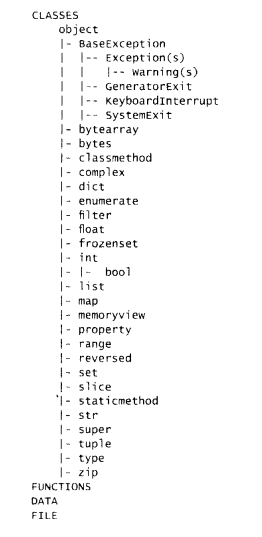
The following diagram rightly suggests that built-in classes (int, float, complex, bool, list, tuple, and diet) are inherited from the object class. Inheritance incidentally is one of the characteristic features of Object-Oriented Programming Methodology. The base attribute of each of these classes will confirm this.

Python’s built-in function library also has issubclass ( ) function to test if a certain class is inherited from another. We can use this function and confirm that all built-in classes are sub-classes of the object classes. Interestingly, class is also an object in Python. Another built-in function is±nstance() returns True if the first argument is an object of the second argument which has to be a class. By the way, type ( ) of any built-in class returns type which happens to be a metaclass of which all classes are objects, is itself a subclass of the object as its base class, (figure 4.4)

Python Data Presistence - OOP chapter 4 img 1

Following interpreter, activity shows that bool class is derived from int class, which is a subclass of object class and also an object of object class!

Example

>>> isinstance(int, object)
True
>>> issubclass(bool, int)
True
>>> int. bases
(<class 'object'>,)
>>> isinstance(int, object)
True

Each class also has access to another attribute__mro__(method resolution order) which can show the class hierarchy of inheritance. The bool class is inherited from int and int from the object.

Example

>>> bool.__mro__
(<class 'boo'>, <class 'int'>, <class 'object'>)

As mentioned above, type () on any built-in class returns type class which in turn is both a subclass and instance of the object class.

Example

>>> type(bool)
<class 'type'>
>>> type.__bases__
(<class 'object'>,)
>>> isinstance(type, object)
True
>>> issubclass(type, object)
True

Other important constituents of Python program such as functions or modules are also objects, as the following interpreter activity demonstrates:

Example

>>> #function from a module
. . .
>>> import math
>>> type(math.sqrt)
<class 'builtin_function_or_method'>
>>> #built-in function
. . .
>>> type(id)
cclass 'builtin_function_or_method'>
>>> #user defined function
. . .
>>> def hello( ):
... print ('Hello World')
. . .
>>> type(hello)
<class 'function'>
>>> #module is also an object
. . .
>>> type(math)
<class 'module'>

We have used the range ( ) function in connection with for loop. It actually returns a range object which belongs to the range class.

Example

>>> #range is also an object
. . .
>>> obj=range(10)
>>>type(obj)
<class 'range'>
>>> >>> range._bases__
(<class 'object'>,)

Python Data Persistence object-oriented programming Read More »