Author name: Prasanna

Python Programming – Random module

In this Page, We are Providing Python Programming – Random module. Students can visit for more Detail and Explanation of Python Handwritten Notes Pdf.

Python Programming – Random module

Random module

This module implements pseudo-random number generators for various distributions. Almost all module functions depend on the basic function random ( ), which generates a random float uniformly in the semi-open range [0 . 0 , 1 . 0 ). Python uses the “Mersenne Twister” as the core generator. However, Mersenne Twister being completely deterministic, it is not suitable for all purposes and is completely unsuitable for cryptographic purposes.

Functions for integers

random.randrange ( stop )

Return a randomly selected integer element from range ( 0 , stop ) .

>>> random . randrange ( 88 )
17
>>> random . randrange ( -88 )

Traceback ( most recent call last ) :
File "<pyshell#l>" , line 1 , in <module> 
random . randrange ( -88 )
File " C : \ Python27 \ lib \ random . py " , line 191 , in randrange 
raise ValueError , " empty range for randrange ( ) "
ValueError: empty range for randrange ( )

random . randrange ( start , stop [ , step ] )
Return a randomly selected integer element from range ( start , stop , step ) .

>>> random . randrange ( 3 , 100 , 5 )
83

random . randint ( a , b )
Return a random integer N such that a<=N<=b.

>>> random . randint ( 5 , 86 )
70

Functions for sequences

random . choice ( seq )
Return a random element from the non-empty sequence seq. If seq is empty, raises IndexError.

>>> random . choice ( ' abcdefghij ' )
' e ' 
>>> random . choice ( [ ' aa ' , ' bb ' , ' cc ' , 11 , 22 ] )
' cc '

random . shuffle ( x [ , random ] )
Shuffle the sequence x in place. The optional argument random is a O-argument function returning a random float in [ 0 . 0 , 1 . 0 ); by default, this is the function random ( ).

>>> items= [ 1 , 2 , 3 , 4 , 5 , 6 , 7 ]
>>> random . shuffle ( items )
>>> items
[ 4 , 7 , 2 , 6 , 3 , 5 , 1 ]

random . sample ( population , k )
Return a k length list of unique elements chosen from the population sequence; used for random sampling without replacement. Return a new list containing elements from the population, while leaving the original population unchanged. If the population contain repeating elements, then each occurrence is a possible selection in the sample.

>>> random . sample ( [ 1 , 2 , 3 , 4 , 5 ] , 3 )
[ 4 , 5 , 1 ]

To choose a sample from a range of integers, use an xrange ( ) object as an argument. This is especially fast and space efficient for sampling from a large population.

>>> random . sample ( xrange ( 10000000 ) , 5 )
[ 2445367 , 2052603 , 975267 , 3021085 , 6098369 ]

Functions for floating point values

random . random ( )
Return the next random floating point number in the range [ 0 . 0 , 1 . 0 ).

>>> random . random ( )
0.6229016948897019

random . uniform ( a , b )
Return a random floating point number N, such that a<=N<=b for a<=b and b<=N<=a for b<a.

>>> random . uniform ( 0 . 5 , 0 . 6 )
0.5795193565565696

random . triangular ( low , high , mode )
Return a random floating point number N such that low<=N<=high and with the specified mode between those bounds. The low and high bounds default to 0 and 1, respectively. The mode argument defaults to the midpoint between the bounds, giving a symmetric distribution.

>>> random . triangular ( 2 . 8 , 10 . 9 , 7 . 5 )
6.676127015045406

random . betavariate ( alpha , beta )
Beta distribution; conditions of the parameters are alpha>0 and beta>0. Returned values range between 0 and 1.

>>> random . betavariate ( 2 . 5 , 1 . 0 )
0.543590525336106

random . expovariate ( lambd )
Exponential distribution; lambd is 1.0 divided by the desired mean. It should be nonzero. Returned values range from 0 to positive infinity; if lambd is positive, and from negative infinity to 0, if lambd is negative.

>>> random . expovariate ( 0 . 5 )
1.5287594548764503

random . gammavariate ( alpha , beta )
Gamma distribution (not the gamma function). Conditions of the parameters are alpha>0 and beta>0.

>>> random . gammavariate ( 1 . 3 , 0 . 5 )
0.5893587279305473

random . gauss ( mu , sigma )
Gaussian distribution; mu is the mean, and sigma is the standard deviation. This is slightly faster than the normalvariate () function defined below.

>>> random . gauss ( 0 . 5 , 1 . 9 )
-1.8886943114939512

random . lognormvariate ( mu , sigma )
Log normal distribution; if natural logarithm of this distribution is taken, a normal distribution with mean mu, and standard deviation sigma is received, mu can have any value, and sigma must be greater than zero.

>>> random . lognormvariate ( 0 . 5 , 1 . 9 )
4.621063728160664

random . normalvariate ( mu , sigma )
Normal distribution; mu is the mean, and sigma is the standard deviation.

>>> random . normalvariate ( 0 . 5 , 1 . 9 )
1.6246107732503214

random . vonmisesvariate ( mu , kappa )
mu is the mean angle, expressed in radians between 0 and 271, and kappa is the concentration parameter, which must be greater than or equal to zero. If kappa is equal to zero, this distribution reduces to a uniform random angle over the range 0 to 2K .

>>> random . vonmisesvariate ( 0 . 5 , 1 . 9 )
-0.4664831190641767

random . paretovariate ( alpha )
Pareto distribution; alpha is the shape parameter.

>>> random . paretovariate ( 0 . 5 )
60.471412103322585

random . weibullvariate ( alpha , beta )
Weibull distribution; alpha is the scale parameter and beta is the shape parameter.

>>> random . weibullvariate ( 0 . 5 , 1 . 9 )
0.9229896561284915

Alternative generators

Apart from Mersenne Twister, there are more core random number generator, such as generator based on “Wichmann-Hill” algorithm.

>>> rnd=random . WichmannHill ( )
>>> rnd . random ( )
0.4065226158909223
>>>
>>> rnd=random . SystemRandom ( )
>>> rnd . random ( )
0.46579102190832355

Python Programming – Random module Read More »

Python Programming – Set

In this Page, We are Providing Python Programming – Set. Students can visit for more Detail and Explanation of Python Handwritten Notes Pdf.

Python Programming – Set

Set

A set is an unordered collection with no duplicate elements. Basic uses include membership testing, eliminating duplicate entries from sequence, mathematical operations like union, intersection, difference, symmetric difference etc. As mentioned in chapter 2, sets are of two types: set (mutable set) and frozenset (immutable set).

>>> a=set ( [ ’ spam ’ , ' eggs ' , 100 , 1234 ] ) 
>>> a
set ( [ ' eggs ' , 100 , 1234 , ' spam ' ] ) 
>>> a=set ( ' abracadabra ' )
>>> a
set ( [ ' a ' , ' r ' , ' b ' , ' c ' , ' d ' ] )
>>> a-frozenset ( [ ' spain ' , ' eggs ' , 100 , 1234 ] ) 
>>> a
frozenset ( [ ' eggs ' , 100 , 1234 , ' spam ' ] )

Being an unordered collection, sets do not record element position or order of insertion. Accordingly, sets do not support indexing, slicing, or other sequence-like behavior.

Set creation

A set can be created in many ways.

Using curly braces

Non-empty set (not frozenset) can be created by placing a comma-separated list of elements within braces. Curly braces cannot be used to create an empty set, because it will create an empty dictionary that will be discussed in the next section.

>>> { ' spam ' , ' eggs ' , 100 , 1234 } 
set ( [ 1234 , 100 , ' eggs ' , ' spam ' ] )

Set comprehension

Python also supports set comprehension:

>>> a= { x for x in ' abracadabra ' if x not in ' abc ' }
>>> a
set ( [ ' r ' , ' d ' ] )

Using built-in function

The built-in functions set ( ) and frozenset ( ) are used to create set and frozenset, respectively, whose elements are taken from iterable. If iterable is not specified, a new empty set is returned.

>>> a=set ( ( ' spam ' , ' eggs ' , 100 , 1234 ) )
>>> a
set ( [ ' eggs ' , 100 , 1234 , ' spam ' ] )
>>> set ( )
set ( [ ] ) 
>>> a=frozenset ( ( ' spam ' , ' eggs ' , 100 , 1234 ) )
>>> a
frozenset ( [ ' eggs ' , 100 , 1234 , ' spam ' ] )
>>> frozenset ( ) 
frozenset ( [ ] ) 
>>> set ( ' abc ' )==frozenset ( ' abc ' )
True

Deleting set

To explicitly remove an entire set, just use the del statement.

>>> ss=set ( ' abracadabra ' )
>>> ss
set ( [ ' a ' , ' r ' , ' b ' , ' c ' , ' d ' ] )
>>> del SS 
>>> SS
Traceback ( most recent call last ) :
File "<stdin>", line 1 , in <module>
NameError: name ' ss ' is not defined

Looping techniques

It is also possible to iterate over each element of a set. However, since set is unordered, it is not known which order the iteration will follow.

>>> ss=set ( ' abracadabra ' )
>>> ss
set ( [ ' a ' , ' r ' , ' b ' , ' c ' , ' d ' ] ) 
>>> for item in ss:
. . . print item
a
r
b
c
d

Membership operation

Set also support membership operation.

>>> a=set ( ' abracadabra ' )
>>> a
set ( [ ' a ' , " r ' r ' b ' , ' c ' , ' d ' ] )
>>> ' r ' in a 
True 
>>> ' rrr ' not in a 
True 
>>> a=frozenset ( ' abracadabra ' )
>>> a
frozenset ( [ ' a ' , ' r ' , ' b ' , ' c ' , ' d ' ] ) 
>>> ' r ' in a
True
>>> ' rrr ' not in a 
True

Python Programming – Set Read More »

Python Programming – Set Methods

In this Page, We are Providing Python Programming – Set Methods. Students can visit for more Detail and Explanation of Python Handwritten Notes Pdf.

Python Programming – Set Methods

Set methods

Below are the methods of both set and frozenset objects. Note that the non-operator versions of these methods accept any iterable as an argument, while their operator-based counterparts require their arguments to be set (set and frozenset).

isdisjoint ( other )
Return True, if the set has no elements in common with other. Sets are disjoint, if and only if their intersection is the empty set.

>>> s1=set ( [ 5 , 10 , 15 , 20] )
>>> s2=set ( [ 30 , 35 , 40 ] )
>>> s1 . isdisjoint ( s2 )
True 
>>> s1=frozenset ( [ 5 , 10 , 15 , 20 ] )
>>> s2=frozenset ( [ 30 , 35 , 40 ] )
>>> s1 . isdisjoint ( s2 )
True
>>> s1=set ( [ 5 , 10 , 15 , 20 ] )
>>> s2=frozenset ( [30 , 35 , 40 ] ) 
>>> s1 . isdisjoint ( s2 )
True

issubset ( other )
Test whether every element in the set is in other.

>>> s1=set ( [ 5 , 15 ] )
>>> s2=set ( [ 5 , 10 , 15 , 20 ] )
>>> s1 . issubset ( s2 )
True
>>> s1 . issubset ( ( 5 , 10 , 15 , 20 ) )
True
>>> s1=frozenset ( [ 5 , 15 ] )
>>> s2=frozenset ( [ 5 , 10 , 15 , 20 ] )
>>> s1 . issubset ( s2 )
True
>>> s1 . issubset ( ( 5 , 10 , 15 , 20 ) )
True

The operator based version of the the above method is set<=other.

>>> s1=set ( [ 5 , 15 ] )
>>> s2=frozenset ( [ 5 , 10 , 15 , 20 ] )
>>> s1<=s2
True

The operator based version setcother test whether the set is a proper subset of other, that is, set<=other and set!=other.

>>> s1=set ( [ 5 , 15 ] )
>>> s2=frozenset ( [ 5 , 10 , 15 , 20 ] )
>>> s1<s2 
True

issuperset (other).

Test whether every element in other is in the set.

>>> s1=set ( [ 5 , 15 ] )
>>> s2=set ( [ 5 , 10 , 15 , 20 ] ) 
>>> s2 . issuperset ( s1 )
True
>>> s2 . issuperset ( ( 5 , 15 ) )
True
>>> s1=frozenset ( [ 5 , 15 ] )
>>> s2=frozenset ( [ 5 , 10 , 15 , 20 ] )
>>> s2 . issuperset ( s1 )
True
>>> s2 . issuperset ( ( 5 , 15 ) )

The operator based version of the the above method is set >=other.

>>> s1=set ( [ 5 , 15 ] )
>>> s2=frozenset ( [ 5 , 10 , 15 , 20 ] )
>>> s1>=s2 
False

The operator-based version set> another test whether the set is a proper superset of other, that is, set>=other and set! =other.

>>> s1=set ( [ 5 , 15 ] )
>>> s2=frozenset ( [ 5 , 10 , 15 , 20 ] )
>>> s1<s2 
False

union ( other, . . . )

Return a new set with elements from the set and all others.

>>> s1=set ( [ 5 , 15 ] )
>>> s2= [ 15 , 20 , 25 ]
>>> s3=frozenset ( [ 30 , 35 , 40 ] )
>>> s1 . union ( s2 , s3 )
set ( [ 35 , 20 , 5 , 40 , 25 , 30 , 15 ] )

The operator based version of the above method is set | other. . .

>>> s1=set ( [ 5 , 15 ] )
>>> s2=set ( [ 15 , 20 , 25 ] ) 
>>> s3=frozenset ( [ 30 , 35 , 40 ] )
>>> s1 | s2 | s3
set ( [ 35 , 20 , 5 , 40 , 25 , 30 , 15 ] )

intersection ( other , . . .)

Return a new set with elements common to the set and all others .

>>> s1=set ( [ 5 , 10 , 15 ] ) 
>>> s2= [ 15 , 20 , 25 , 10 ]
>>> s3=frozenset ( [ 30 , 15 , 35 , 40 , 10 ] ) 
>>> s4= ( 40 , 50 , 10 , 15 , 20 )
>>> si . intersection ( s2 , s3 , s4 ) 
set ( [ 10 , 15 ] )

The operator based version of the above method is set&other . . .

>>> s1=set ( [ 5 , 10 , 15] )
>>> s2=set ( [ 15 , 20 , 25 , 10 ] )
>>> s3=frozenset ( [ 30 , 15 , 35 , 40 , 10 ] )
>>> s4=frozenset ( [ 40 , 50 , 10 , 15 , 20 ] )
>>> s1&s2&s3&s4 
set ( [ 10 , 15 ] )

difference ( other, . . . )

Return a new set with elements in the set that are not in the others.

>>> s1=set ( [ 5 , 10 , 15 ] )
>>> s2= [ 15 , 20 , 25 , 10 ]
>>> s3=frozenset ( [ 30 , 15 , 35 , 40 , 10 ] )
>>> s4= ( 40 , 50 , 10 , 15 , 20 )
>>> s3.difference ( s1 , s2 , s4 ) 
frozenset ( [ 35 , 30 ] )

The operator based version of the above method is set-other- . . .

>>> s1-set ( [ 5 , 10 , 15 ] )
>>> s2=set ( [ 15 , 20 , 25 , 10 ] )
>>> s3=frozenset ( [ 30 , 15 , 35 , 40 , 10 ] )
>>> s4=frozenset ( [ 40 , 50 , 10 , 15 , 20 ] )
>>> s1 - s2 - s3 - s4 
set ( [ 5 ] )
>>> s3 - s1 - s2 - s4 
frozenpet ( [ 35 , 30 ] )

symmetric_difference ( other )

Return a new set with elements in either the set or other but not both.

>>> s1=set ( [ 5 , 10 , 15 ] )
>>> s2= [ 15 , 20 , 25 , 10 ]
>>> s1 . symmetric_difference ( s2 ) 
set ( [ 25 , 20 , 5 ] )

The operator based version of the the above method is set Aother.

>>> s1=set ( [ 5 , 10 , 15 ] )
>>> s2=frozenset ( [ 15 , 20 , 25 , 10 ] )
>>> s1∧ s2
set ( [ 25 , 20 , 5 ] ) 
>>> s2∧s1
frozenset ( [ 25 , 20 , 5 ] )

copy ( )
Return a copy of the set.

>>> s=set ( [ 5 , 10 , 15 , 20 ] )
>>> a=s.copy ( )
>>> a
set ( [ 10 , 20 , 5 , 15 ] )
>>> s=frozenset ( [ 5 , 10 , 15 , 20] )
>>> a=s.copy ( )
>>> a
frozenset ( [ 10 , 20 , 5 , 15 ] )

The following methods are available for set and do not apply to immutable instances of frozenset.

update ( other , . . . )

Update the set, adding elements from all others.

>>> s1=set ( [ 5 , 15 ] )
>>> s2= ( 15 , 20 , 25 )
>>> s3=frozenset ( [ 30 , 35 , 40] )
>>> s1 . update ( s2 , s3 )
>>> s1
set ( [ 35 , 20 , 5 , 40 , 25 , 30 , 15 ] )

The operator based version of the above method is set | =other | . . .

>>> s1=set ( [ 5 , 15 ] )
>>> s2=set ( [ 15 , 20 , 25 ] )
>>> s3=frozenset ( [ 30 , 35 , 40 ] )
>>> s1|= s2 | s3 
>>> s1
set ( ' [ 35 , 5 , 40 , 15 , 20 , 25 , 30 ] )

intersection_update ( other , . . .)

Update the set, keeping only elements found in it and all others.

>>> s1=set ( [ 5 , 10 , 15 ] )
>>> s2= [ 15 , 20 , 25 , 10 ] 
>>> s3=set ( [ 30 , 15 , 35 , 40 , 10 ] ) 
>>> s4= ( 40 , 50 , 10 , 15 , 20 )
>>> s1 . intersection_update ( s2 , s3 , s4 )
>>> s1
set ( [ 10 , 15 ] )

The operator based version of the the above method is set&=other& . . .

>>> s1=set ( [ 5 , 10 , 15] )
>>> s2=set ( [ 15 , 20 , 25 , 10] )
>>> s3=frozenset ( [ 30 , 15 , 35 , 40 , 10 ] )
>>> s4=frozenset ( [ 40 , 50 , 10 , 15 , 20 ] )
>>> s1&=s2&s3&s4 
>>> s1
set ( [10 , 15 ] )

difference_update(other, . . .)

Update the set, removing elements found in others.

>>> s1=frozenset ( [ 5 , 10 , 15 ] )
>>> s2= [ 15 , 20 , 25 , 10 ]
>>> s3=set ( [ 30 , 15 , 35 , 40 , 10 ] )
>>> s4= ( 40 , 50 , 10 , 15 , 20 )
>>> s3 . difference_update ( s1 , s2 , s4 )
>>> s3
set ( [ 35 , 30 ] )

The operator based version of the above method is set-=other | . . .

>>> s1=frozenset ( [ 5 , 10 , 15 ] )
>>> s2=frozenset ( [ 15 , 20 , 25 , 10 ] )
>>> s3=set ( [ 30 , 15 , 35 , 40 , 10 ] )
>>> s4=frozenset ( [ 40 , 50 , 10 , 15 , 20 ] )
>>> s3-=s1 | s2 | s4 
>>> s3
set ( [ 35 , 30 ] )

symmetric_difference_update(other)
Update the set, keeping only elements found in either set, but not in both.

>>> s1=set ( [ 5 , 10 , 15 ] ) 
>>> s2= [ 15 , 20 , 25 , 10 ]
>>> s1 . symmetric_dif ference_update ( s2 )
>>> s1
set ( [ 25 , 20 , 5 ] )

The operator based version of the the above method is set/’=other.

>>> s1=set ( [ 5 , 10 , 15 ] ) 
>>> s2=frozenset ( [ 15 , 20 , 25 , 10 ] )
>>> s1 A=s2 
>>> s1
set ( [ 25 , 20 , 5 ] )

add ( elem )

The method adds element elem to the set.

>>> s=set ( [ 5 , 10 , 15 , 20 ] )
>>> s.add ( 25 )
>>> s
set ( [ 25 , 10 , 20 , 5 , 15 ] )

remove ( elem )

Remove element elem from the set. Raises KeyError, if elem is not contained in the set.

>>> s=set ( [ 5 , 10 , 15 , 20 ] )
>>> s.remove ( 15 )
>>> s
set ( [ 10 , 20 , 5 ] )
>>> s=set ( [ 5 , 10 , 15 , 20 ] )
>>> s . remove ( 100 )
Traceback ( most recent call last ) :
File " <stdin> " , line 1 , in <module>
KeyError: 100

discard ( elem )

Remove element elem from the set if it is present. It is difference from remove () in a way that it does not raise KeyError if elem is not present in the set.

>>> s=set ( [ 5 , 10 , 15 , 20 ] )
>>> s . discard ( 15 )
>>> s
set ( [ 10 , 20 , 5 ] )
>>> s . discard ( 100 )
>>> s
set ( [ 10 , 20 , 5 ] )

pop ( )

Remove and return an arbitrary element from the set. Raises KeyError, if the set is empty.

>>> s=set ( [ 5 , 10 , 15 , 20] ) 
>>> s . pop ( )
10
>>> s
set ( [ 20 , 5 , 15 ] )
>>> s . pop ( )
20
>>> s
set ( [ 5 , 15 ] )

clear ( )

Remove all elements from the set.

>>> s=set ( [ 5 , 10 , 15 , 20 ] )
>>> s . clear ( )
>>> s 
set ( [ ] )

Python Programming – Set Methods Read More »

Python Programming – Dictionary

In this Page, We are Providing Python Programming – Dictionary. Students can visit for more Detail and Explanation of Python Handwritten Notes Pdf.

Python Programming – Dictionary

Dictionary

Another useful mutable built-in type is “dictionary”. A dictionary is an unordered group of comma-separated “key: value” pairs enclosed within braces, with the requirement that the keys are unique within a dictionary. The main operation of a dictionary is storing a value corresponding to a given key and extracting the value for that given key. Unlike sequences, which are indexed by a range of numbers, the dictionary is indexed by key (key should be of an immutable type, strings and numbers can always be keys).

Tuples can be used as keys if they contain only strings, numbers, or tuples; if a tuple contains any mutable object either directly or indirectly, it cannot be used as a key. The list cannot be used as keys, since lists are of mutable type. Also, as mentioned previously, Python allows adding a trailing comma after the last item of the dictionary.

>>> a= { ' sape ' : 4139 , ' guido ' : 4127 , ' jack ' : 4098 }
>>> a
{ ' sape ' : 4139 , ' jack ' : 4098 , ' guido ' : 4127 }
>>> a [ ' jack ' ]
4098
>>> a= { ' sape ' : 4139, ' guido ' : 4127, ' jack ' : 4098 , }
>>> a
{ ' sape ' : 4139 , ' jack ' : 4098 , ' guido ' : 4127 }

Dictionary creation

Dictionary can be created in many ways.

Using curly braces

Placing a comma-separated record of key-value pairs within the braces adds initial key-value pairs to the dictionary; this is also the way dictionaries are written as output.

>>> a= { ' sape ' : 4139 , ' guido ' : 4127 , ' jack ' : 4098 }
>>> a 
{ ' sape ' , : 4139 , ' jack ' : 4098 , ' guido ' : 412 7 }

A pair of braces creates an empty dictionary.

>>> a= { }
>>> a 
{ }
>>> type ( a ) 
<type ' dict ' >

Dictionary comprehension

Dictionary comprehension provides a concise way to create a dictionary.

>>> { x : x**2 for x in ( 2 , 4 , 6 ) } 
{ 2 : 4 , 4 : 16 , 6 : 36 }

Using built-in function

Dictionary can also be created using a built-in function diet ( ). Consider the following example using diet (), which returns the same dictionary { ” one ” : 1 , ” two ” : 2 , ” three ” : 3 } :

>>> a=dict ( one=1 , two=2 , three=3 )
>>> b= { ' one ' : 1 , ' two ' : 2 , ' three ' : 3 }
>>> c=dict ( zip ( [ ' one ' , ' two ' , ' three ' ] , [ 1 , 2 , 3 ] ) ) 
>>> d=dict ( [ ( ' two', 2), ( ' one ', 1), ( ' three ', 3) J )
>>> e=dict ( { ' three ' : 3 , ' one ' : 1 , ' two ' : 2 } )
>>> a==b==c==d==e 
True

Accessing dictionary elements

To access a dictionary value, use the key enclosed within the square bracket. A KeyError exception is raised if the key is not present in the dictionary.

>>> a= { ' sape ' : 4139 , ' guido ' : 4127 , ' jack ' : 4098 }
>>> a [ ' guido ' ]
4127

Updating dictionary elements

It is possible to add a new item in a dictionary and can also change the value for a given key.

>>> a= { 'sape ' : 4139 , ' guido ' : 4127 , ' jack ' : 4098 }
>>> a [ ' mike ' ]=2299 # Add new item
>>> a [ ' guido ' ]=1000 # Update existing item
>>> a
{ ' sape ' : 4139 , ' mike ' : 2299 , ' jack ' : 4098 , ' guido ' : 1000 }

It is also possible to update a dictionary with another dictionary using the update ( ) method (discussed later).

Deleting dictionary elements

To remove a dictionary item (key-value pair) or the entire dictionary, one can use the del statement. To remove all items (resulting in an empty dictionary), the clear ( ) method (discussed later) can be used.

>>> a= { ' sape ' : 4139 , ' guido ' : 4127 , ' jack ' : 4098 } 
>>> del a [ ' guido ' ]
>>> a
{ ' sape ' : 4139 , ' jack ' : 4098 }
>>> del a
>>> a
Traceback ( most recent call last ) :
File " <stdin> ", line 1, in <module>
NameError: name ' a ' is not defined

Membership operation

Dictionary support membership operation i.e. checking the existence of a key in the dictionary.

>>> a= { 'sape ' : 4139 , ' guido ' : 4127 , ' jack ' : 4098 }
>>> ' jack ' in a 
True
>>> ' tom ' not in a 
True
>>> 4127 in a 
False

Looping techniques

When looping through the dictionary, the key and corresponding value can be retrieved at the same time using the iteritems ( ) method.

>>> a= { ' sape ' : 4139 , ' guido ' : 4127 , ' jack ' : 4098 }
>>> for k , v in a . iteritems ( ) :
. . . print k , v
sape 4139 
jack 4098 
guido 4127

Python Programming – Dictionary Read More »

Python Programming – Dictionary Methods

In this Page, We are Providing Python Programming – Dictionary Methods. Students can visit for more Detail and Explanation of Python Handwritten Notes Pdf.

Python Programming – Dictionary Methods

Dictionary methods

The following are some dictionary methods supported by Python.

diet . clear ( )
Removes all items from the dictionary.

>>> a= { ' Name ' : ' Zara ' , ' Age ' : 7 }
>>> len ( a )
2 
>>> a . clear ( )
>>> len ( a )
0

diet. copy ( )
Returns a copy of the dictionary.

>>> dict1 = { ' Name ' : ' Zara ' , ' Age ' : 7 ]
>>> dict2=dict1 . copy ( )
>>> dict2
{ ' Age ' : 7 , ' Name ' : ' Zara ' }

diet. fromkeys ( seq [ , value ] )
Create a new dictionary with keys from seq and values set to value (default as None).

>>> seq= ( ' name ' , ' age ' , ' gender ' )
>>> a=dict . fromkeys ( seq )
>>> a 
{ ' gender ' : None , ' age ' : None , ' name ' : None }
>>> a=a.fromkeys ( seq , 10 )
>>> a
{ ' gender ' : 10 , ' age ' : 10 , ' name ' : 10 }

diet . get ( key [ , default ] )
Return the value for the key, if the key is in the dictionary, else default. If the default is not given, the default is None.

>>> a= { ' Name ' : ' Zara ' , ' Age ' : 7 }
>>> a.get ( ' Age ' )
7
>>> a. get ( ' Gender ' , ' Never ' )
' Never '
>>> print a.get ( ' Gender ' )
None

diet.has_key ( key )
Test for the presence of a key in the dictionary. Returns True, if the key is present in the dictionary, otherwise False.

>>> a= { ' Name ' : ' Zara ' , ' Age ' : 7 }
>>> a.has_key ( ' Age ' )
True
>>> a.has_key ( ' Gender ' )
False

diet.items ( )
Returns a list of dictionary’s key-value tuple pairs.

>>> a= { ' Name ' : ' Zara ' , ' Age ' : 7 } 
>>> a . items ( )
[ ( ' age ' , 7 ) , ( ' Name ' , ' Zara ' ) ]

diet.iteritems ( )
Returns an iterator over the dictionary’s key-value pairs.

>>> a= { ' Gender ' : ' Female ' , ' Age 1 : 7 , ' Hair color ' : None , ' Name ' : ' Zara ' } 
>>> for b in a . iteritems ( ) :
. . . print ' { 0 } - - - -{ 1 } ' . format ( b [ 0 ] , b [ 1 ] )
. . .
Gender - - - -Female 
Age - - - - 7 
Hair color- - - - None1
Name- - - - Zara

diet.iterkeys ( )
Returns an iterator over the dictionary’s keys.

>>> a= { 1 Gender 1 : ’ Female ' , ' Age ' : 7 , ' Hair color ' : None , ' Name ' : ' Zara ' }
>>> for b in a.iterkeys ( ) :
. . . print b
. . . 
Gender
Age 
Hair color 
Name

diet.itervalues ( )
Returns an iterator over the dictionary’s values.

>>> a= { 1 Gender ' : ' Female ' , ' Age ' : 7 , ' Hair color ' : None , ' Name ' : ' Zara ' }
>>> for b in a.itervalues ( ) :
. . . print b
. . .
Female
7
None
Zara

diet.keys ( )
Returns list of dictionary keys.

>>> a= { ' Name ' : ' Zara ' , ' Age ' : 7 }
>>> a . keys ( )
[ ' Age ' , ' Name ' ]

diet.pop ( key [ , default ] )
If key is.in the dictionary, remove it and return its value, else return default. If default is not given and key is not in the dictionary, a KeyError is raised.

>>> a= { ' Gender ' : ' Female ' , ' Age ' : 7 , ' Hair color ' : None , ' Name ' : ' Zara ' }
>>> a . pop ( ' Age ' , 15 )
7
>>> a . pop ( ' Age ' , 15 )
15 
>>> a
{ ' Gender ' : ' Female ' , ' Hair color ' : None , ' Name ' : ' Zara ' }

diet. popitem ( )
Remove and return an arbitrary key-value pair from the dictionary. If the dictionary is empty, calling popitem () raises an KeyError exception.

>>> a= { ' Gender ' : ' Female ' , ' Age ' : 7 , ' Hair color ' : None , ' Name ' : ' Zara ' } 
>>> a . popitem ( )
( ' Gender ' , ' Female ' )
>>> a . popitem ( )
( ' Age ' , 7 )
>>> a
{ ' Hair color ' : None , ' Name ' : ' Zara ' }

diet . setdefault ( key [ , default ] )
If key is in the dictionary, return its value. If not, insert key with a value of default and return default. The default defaults to None.

>>> a= { ' Name ' : ' Zara ' , ' Age ' : 7 }
>>> a . setdefault ( ' Age ' , 15 )
7
>>> a . setdefault ( ' Gender ' , ' Female ' )
' Female '
>>> a . setdefault ( ' Hair color ' )
>>> a
{ ' Gender ' : ' Female ' , ' Age ' : 7 , ' Hair color ' : None , ' Name ' : ' Zara ' }

diet.update ( [ other ] )
Update the dictionary with the key-value pairs from other, overwriting existing keys, and returns None. The method accepts either another dictionary object or an iterable of key-value pairs (as tuples or other iterables of length two). If keyword arguments are specified, the dictionary is then updated with those key-value pairs.

>>> dict1= { ' Name ' : ' Zara ' , ' Age ' : 7 }
>>> dict2= { ' Gender ' : ' female ' }
>>> dict1 . update ( dict2 )
>>> dict1 . update ( hair_color= ' black ' , eye_color= ' blue ' )
>>> dict1
{ ' eye_color ' : ' blue ' , ' Gender ' : ' female ' , ' Age ' : 7 , ' Name ' : ' Zara ' , ' hair_color ' : ' black ' }

diet . values ( )
Return list of dictionary values.

>>> a= { ' Name ' : ' Zara ' , ' Age ' : 7 }
>>> a . values ( )
[ 7, ' Zara ' ]

Python Programming – Dictionary Methods Read More »

Python Programming – Simple and Compound Statements

In this Page, We are Providing Python Programming – Simple and Compound Statements. Students can visit for more Detail and Explanation of Python Handwritten Notes Pdf.

Python Programming – Simple and Compound Statements

A statement is a unit of code that the Python interpreter can execute. A script usually contains a sequence of statements.

A namespace is a logical grouping of the objects used within a program. Most namespaces are currently implemented as Python dictionaries. Examples of namespaces are the set of built-in names (containing functions such as abs ( ), and built-in exception names), the global names in a module, and the local names in a function definition.

The important thing to know about namespace is that there is absolutely no relation between names in different namespaces. For instance, the functions ____built-in______.open ( ) and os . open ( ) are distinguished by their namespaces. The following is an example of the local namespace.

>>> def example ( arg ) :
. . .       x=4
. . .       print locals ( )
. . . 
>>> example ( 10 )
{ ' x ' : 4 , ' arg ' : 10 }
>>> example ( ' hello ' )
{ ' x ' : 4 , ' arg ' : ' hello ' }

The function example ( ) has two variables in its local namespace: arg, whose value is passed into the function, and x, which is defined within the function. The locals ( ) built-in function return a dictionary of name-value pairs; the keys of this dictionary are the names of local variables as strings; the values of the dictionary are the actual values of the variables.

Python Programming – Simple and Compound Statements Read More »

Python Programming – Compound statement Built-in functions

In this Page, We are Providing Python Programming – Compound statement Built-in functions. Students can visit for more Detail and Explanation of Python Handwritten Notes Pdf.

Python Programming – Compound statement Built-in functions

Built-in functions

Till now, the discussed functions need to be defined before using it in a program; such functions are called user-defined functions. Python has a number of functions that are always available. These are called built-in functions. They are listed here in alphabetical order.

                   abs ( )                                  all ( )                                          any ( )
                   basestring ( )                       bin ( )                                        bool ( )
                   bytearray ( )                        callable ( )                                 chr ( )
                   classmethod ( )                   cmp ( )                                       compile ( )
                   complex ( )                          delattr ( )                                    diet ( )
                   dir ( )                                   divmod ( )                                  enumerate ( )
                  eval ( )                                  execfile ( )                                   file ( )
                  filter ( )                                float ( )                                      format ( )
                  frozenset ( )                        getattr ( )                                   globals ( )
                  hasattr ( )                            hash ( )                                         help ( )
                  hex ( )                                 id ( )                                            input ( )
                  int ( )                                  isinstance ( )                             issubclass ( )
                  iter ( )                                  len ( )                                         list ( )
                  locals ( )                             long ( )                                         map ( )
                  max ( )                               memoryview ( )                            min ( )
                  next ( )                              object ( )                                        oct ( )
                 open ( )                              ord ( )                                           pow ( )
                 print ( )                            property ( )                                      range ( )
                raw_input ( )                      reduce ( )                                     reload ( )
                repr ( )                              reversed ( )                                   round ( )
                set ( )                                setattr ( )                                        slice ( )
               sorted ( )                           staticmethod ( )                              str ( )
               sum ( )                               super ( )                                         tuple ( )
               type ( )                               unichr ( )                                       Unicode ( )
               vars ( )                              xrange ( )                                        zip ( )
             import ( )                           apply ( )                                         buffer ( )
              coerce ( )                          intern ( )

Some of the above built-in functions are discussed below:

abs ( x )
Return the absolute value of a number. The argument may be a plain or long integer or a floating-point number. If the argument is a complex number, its magnitude is returned.

>>> abs ( - 34 )
34 
>>> abs ( 34 . 5 )
34 . 5
>>> abs ( -3 -4 j )
5 . 0

all ( iterable )
Return True, if all elements of the iterable are true (or if the iterable is empty).

>>> all ( [ True , 10 ] )
True
>>> all ( [ True , 10 , 0 ] )
False
>>> all ( ( ) )
True

any ( iterable )
Return True, if any element of the iterable is true. If the iterable is empty, return False.

>>> any ( [ 0 , 5 , -3 ] )
True
>>> any (  [0 , False  , -3 ] )
True
>>> any ( ( ) )
False

bin ( x )
Convert an integer number to a binary string.

>>> bin ( 8 )
' 0b1000 '
>>> bin ( 27 )
' 0b11011 '
>>> (27) . hit_length ( )
5
>>> bin ( -1327 )
' -0b100101111 '
>>> ( -1327 ) . bit_length ( )
11

bool ( [ x ] )
Convert a value to a boolean. If x is false or omitted, this returns False; otherwise, it returns True. If no argument is given, this function returns False.

>>> bool ( 5 )
True 
>>> bool ( -5 )
True
>>> bool ( 0 )
False 
>>> bool ( ' hi ' )
True
>>> bool ( )
False 
>>> bool ( '' )
False 
>>> bool ( None )
False
>>> bool ( ' \ n ' ) 
True
>>> bool ( [ 0 ] )
True
>>> bool ( ( None , ) ) 
True

chr ( i )
Return a string of one character whose ASCII-8 code is the integer i. This is the inverse of ord ( ). The argument must be in the range [0,255]; ValueError will be raised if i is outside that range.

>>> for i in range ( 33 , 95 ) : print i , ' =  ' , chr ( i )
. . . 
33 = !
34 = "
35 = #
36 = $
3 7 = %
38 = &
39 = '
40 = (
41 = )
42 = *
43 = +
44 = ,
45 = -
46 = .
47 = /
48 = 0 
49 = 1
50 = 2
51 = 3
52 = 4
53 = 5 
55 = 7
56 = 8
57 = 9
58 = :
59 = ;
60 = < 
61 = = 
62 = >
63 = ?
64 = 0
65 = A
66 = B
67 = C
68 = D
69 = E
70 = F
71 = G
72 = H
73 = I
74 = J
75 = K
76 = L
77 = M
78 = N
79 = O
80 = P
81 = Q
82 = R
83 = S
84 = T
85 = U
86 = V
87 = W
88 = X
89 = Y
90 = Z
91 = [
92 = \
93 = ]
94 = A

cmp ( x , y )
Compare the two objects x and y, and return an integer according to the outcome. The returned value is negative, if xc’y, zero, if x==y, and strictly positive, if x>y.

>>> cmp ( 2 . 5 , 5 . 2 )
-1 
>>> cmp ( 5 . 2 , 5 . 2 )
0 
>>> cmp ( 5 . 2 , 2 . 5 ) 
1
>>> cmp ( ' hi ' , ' hello ’ )
1
>>> cmp ( 'hello ' , ' hi ' )
-1

complex ( [ real [ , imag ] ] )
Create a complex number with the value real+imag* j, or convert a string or number to a complex number. If the first parameter is a string, it will be interpreted as a complex number and the function must be called without a second parameter. The second parameter can never be a string. Each argument may be any numeric type (including complex).

If imag is omitted, it defaults to zero. If both arguments are omitted, the function returns 0 j. When converting from a string, the string must not contain whitespace around the central + or – operator. For example, complex ( ‘ 1 + 2 j ‘ ) is fine, but complex (‘1 + 2 j ‘ ) raises ValueError.

>>> complex ( )
Oj
>>> complex ( 2 . 51 )
( 2 . 51+0 j )
>>> complex ( 2 . 51 , 4 . 79 )
( 2 . 51+4 . 79 j )
>>> c1=4+5 j 
>>> c2=6+7 j
>>> complex(c1,c2)                                    # Equals ( 4+5 j ) + ( 6+7 j ) j = 4+5 j+6 j - 7 
( -3+11 j )
>>> c= ' 7 '
>>> complex (c)
( 7+0 j )
>>> c=' 7 + 4 j '
>>> complex (c)
( 7+4 j )
>>> x=2+3 j 
>>> x . real
2 . 0
>>> x . imag
3 . 0

delattr ( object , name )
This is a relative of setattr ( ). The arguments are an object and a string. The string must be the name of one of the object’s attributes. The function deletes the named attribute, provided the object allows it.

>>> class new__cls:
. . .                   def ______init_______ ( self , x ) :
. . .                   self. x=x
. . . 
>>> tt=new__cls ( 10 )
>>> tt . x
10 
>>> setattr ( tt ,' x ' , 20 )
>>> tt . x 
20
>>> setattr ( tt, ' y ' ' hello ' )
>>> tt.y 
' hello '
>>> delattr ( tt , ' x ' ) 
>>> tt . x 
Traceback ( most recent call last ) :
File "<stdin>", line 1 , in <module>
AttributeError: new__cls instance has no attribute ’ x ’

divmod ( a , b )
Take two (non-complex) numbers as arguments and return a pair of numbers consisting of their quotient and remainder.

>>> divmod ( 13 . 5 , 3 )
( 4 . 0 , 1 . 5 )
>>> divmod ( 13 , 3 )
( 4 , 1 )

enumerate ( sequence , start=0 )
Return an enumerate object. The sequence argument must be a sequence, an iterator, or some other object which supports iteration, while start is a count (default argument as 0).

>>> seasons=[ ' Spring ' , ' Summer ' , ' Fall ' , ' Winter ' ]
>>> list (enumerate ( seasons ) )
[ ( 0 ,' Spring ' ) , ( 1 , ' Summer ' ) , ( 2 , ' Fall ' ) , ( 3 , ' Winter ' ) ]
>>> list (enumerate ( seasons , start=2 ) )
[ ( 2 ,' Spring ' ) , ( 3 , ' Summer ' ) , ( 4 , ' Fall ' ) , ( 5 , ' Winter ' ) ] 
>>> for num , seasn in enumerate ( seasons , start=1 ) :
. . . print "[{0}] {1 } " . format ( num , seasn )
. . . 
[1] Spring
[2] Summer
[3] Fall
[4] Winter

filter ( function , iterable )
Create a list from those elements of iterable for which function returns True. The iterable may be either a sequence, a container that supports iteration, or an iterator. If iterable is a string or a tuple, the result also has that type, otherwise, it will be a list. If function is None, the identity function is assumed, that is, all elements of iterable that are false are removed.

>>> def isOdd ( x ) :
. . .               if ( x % 2 )==1: return True
. . .               else : return False
>>> filter ( isOdd, [88 , 43 , 65 ,-11 ,202 ] )
[ 43, 65, -11 ]
>>>
>>> def isLetter ( c ) : return c . isalpha ( )
. . . 
>>> filter ( isLetter,"01234abcdeFGHIJ* ( &!∧")
' abcdeFGHIJ '
>>> list= [ 0, 1, ( ) , (2, ) , 0 . 0, 0 . 25 ]
>>> filter ( None , list )
[1 , (2 ,), 0 . 25 ]
>>> filter ( boo1 , list )
[ 1 , ( 2 , ) , 0 . 25 ]

getattr ( object , name [ , default ] )
Return the value of the named attribute of the object; the name must be a string. If the string is the name of one of the object’s attributes, the result is the value of that attribute. If the named attribute does not exist, default is returned if provided, otherwise, AttributeError is raised. For example, a complex number object has real and imag attributes.

>>> a=3 . 5 + 4 . 9 J 
>>> type ( a ) 
<type ' complex '>
>>> getattr ( a , ' real ' )
3 . 5
>>> getattr (a , ' imag ' )
4 . 9
>>> getattr ( a ,' imagine ' , 2 . 2 )
2 . 2

globals ( )
Return a dictionary representing the current global symbol table. The following script “GlobalScope.py” gives some idea about the use of this function.

# Filemame: GlobalScope . py 
var1=10 
def func (  ): 
var2=20 
func ( )
if ' var1 ' in globals ( ) . keys ( ) :
            print "'var1' is a global variable of this module" 
if 'var2' in globals ( ) . keys ( ) :
            print "'var2' is a global variable of this module"

The output is:

’ var1 ' is a global variable of this module

hasattr ( object , name )
The arguments are an object and a string. The result is True, if the string is the name of one of the object’s attributes, otherwise False.

>>> a=3.5+4.9 J
>>> hasattr( a , ' imag ' ) 
True 
>>> hasattr ( a,' imagine ' ) 
False

hash ( )
In computing, a hash table (also “hash map”) is a data structure that can map keys to values. A hash table uses a hash function to compute an index (or hash value) into an array of buckets or slots, from which the correct value can be found. The built-in function hash ( ) return the hash value of the object (if it has one) which is basically an integer and it never changes during its lifetime.

Hashability makes an object usable as a dictionary key and a set member because these data structures use the hash value internally. All of Python’s immutable built-in objects are hashable, while no mutable containers (such as lists or dictionaries) are hashable.

>>> d= { ' Lisa ' : 88 . 5 , ' John ' : 69 . 73 , ' Mike ' : 88 . 5 }
>>> hash ( d [ ' Lisa 1 ' ] )
1485012992
>>> hash ( d [ ' John ' ] )
-1664573625
>>> hash ( d [ ' Mike ' ] )
1485012992
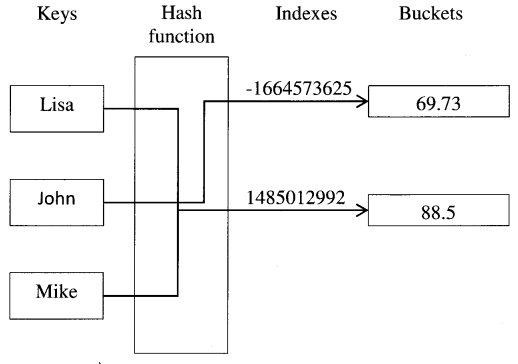
Python Handwritten Notes Chapter 3 img 1

Consider the following example :

>>> map ( hash , ( " namea " , " nameb " , " namec " , " named " ) )
[-1658398457 , -1658398460 , -1658398459 , -1658398462 ]
>>> map ( hash , ( 0 , 1 , 2 , 3 ) )
[ 0 , 1 , 2 , 3 ]

It can be observed that the strings are quite close in their letters, and their hashes are close in terms of numerical distance which is desirable behavior. If the keys are close in nature, one wants their hashes to be close as well so that lookups remain fast. Integers have the same hash value as themselves.

help ( [ object ] )
This function invokes the built-in help system (this function is intended for interactive use). If no argument is given, the interactive help system starts on the interpreter console. If the argument is a string, then the string is looked up as the name of a module, function, class, method, keyword, or documentation topic, and a help page is printed on the console. If the argument is any other kind of object, a help page on the object is generated.

>>> help (cmp)
Help on built-in function cmp in module ____builtin____ :
cmp ( . . . )
    cmp ( x , y ) -> integer

      Return negative if x<y , zero if x==y , positive if x>y .

hex ( x )
Convert an integer number (of any size) to a hexadecimal string. To obtain a hexadecimal string representation for a float, use the float. hex ( ) method.

>>> hex ( 25 )
' 0x19 '

id ( object )
Return the identity of the object. This is an integer (or long integer) which is guaranteed to be unique and constant for this object during its lifetime. Two objects with non-overlapping lifetimes may have the same id ( ) value.

>>> a=5 
>>> id ( a )
3885104 
>>> b= ' hello '
>>> id ( b )
44148000

input ( [ prompt ] )
This function is used to take input from user and evaluates the expression. There is also raw_input ( ) function which takes input from user, convert it to a string, and returns that.

>>> aa=4 
>>> bb=6
>>> resultl=input( ' ----> ' )
- - - >aa+bb 
>>> result2=raw__input ( ' ---> ' )
----->aa+bb
>>>
>>> result1
10
>>> result2
' aa+bb ' 

isinstance ( object , classinfo )
Return True, if the object argument is an instance of the classinfo argument, or of a subclass thereof.

>>> class new__cls :
. . .        def _____init______ ( self , x ) : 
. . .              self . x=x 
. . . 
>>> tt=new_cls ( 10 )
>>> isinstance ( tt , new_cls )
True

Also return True, if classinfo is a type object, and an object is an object of that type or of a subclass thereof. If the object is not a class instance or an object of the given type, the function always returns False.

>>> i=5 
>>> type ( i )
<type ' int '>
>>> type ( int ) 
<type ' type ' >
>>> isinstance ( i , int )
True
>>> isinstance ( i , str )
False

If classinfo is neither a class object nor a type object, it may be a tuple of class or type objects (other sequence types are not accepted). If classinfo is not a class, type, or tuple of classes, types, a TypeError exception is raised.

>>> isinstance( i ,( str , int , float , complex ) )
True

issubcTass ( class , classinfo )
Return True, if class is a subclass of classinfo.

>>> class A: 
. . .        pass
. . . 
class B(A):
. . .        pass
. . . 
>>> class C: 
. . .         pass
. . . 
>>> class D:
. . .        pass
. . . 
>>> issubclass ( B, A )
True

A class is considered a subclass of itself.

>>> issubclass ( D , D )
True

The classinfo may be a tuple of class objects, in which case every entry in classinfo will be checked. In any other case, a TypeError exception is raised.

>>> issubclass ( B , ( A , C , D ) )
True

len ( s )
Return the length (the number of items) of an object s. The argument may be a sequence (string, tuple or list) or a mapping (dictionary).

>>> len ( ' abed ' )
4
>>> seq=[ ' a ' , ' b ' , ' c ' , ' d ' ]
>>> len ( seq )
4
>>> seq= ( ' a ' , 'b \ 'c \ 'd')
>>> len ( seq )
4
>>> dict= { ' a ' : 8 , ' b ' :  9 , ' c ' : 10 , ' d ' : 11 }
>>> len ( diet )
4 '
>>> len ( ' ' )
0

locals ( )
The function returns a dictionary representing the current local symbol table.

# ! / usr / bin / env python 
# Filemame: LocalScope . py 
var1=10
var2=20 
    def func ( ) :
      var3=30 
       var4=40
print ' Local variables of func ( ) = ',locals ( ) 
func ( )
if 'var1' in locals ( ).keys ( ) and 'var2' in locals ( ) . keys( ) :
    print "'var1': and ' var2 ' are local variables of this module"

Output is:

Local variables of func( )= { ' var4 ' : 40 , ' var3 ' : 30 }
' var1 ' and ' var2 ' are local variables of this module

map ( function,iterable, . . . )
Apply function to every item of iterable and return a list of the results. If additional iterable arguments are passed, the function must take that many arguments and is applied to the items from all iterables in parallel. If one iterable is shorter than another, it is assumed to be extended with None items.

If the function is None, the identity function is assumed; if there are multiple arguments, map ( ) returns a list consisting of tuples containing the corresponding items from all iterables. The iterable arguments may be a sequence or any iterable object; the result is always a list.

>>> def add100 ( x ) :
. . .        return x+100
. . .
>>> map ( add100 , ( 44 , 22 , 66 ) )
[ 144 , 122 , 166 ]
>>>
>>> def abc ( a , b , c ) :
. . .        return a*10000+b*100+c
. . . 
>>> map ( abc , ( 1 , 2 , 3 ) , ( 4 , 5 , 6 ) , ( 7 , 8 , 9 ) )
[ 10407 , 20508 , 30609 ]
>>>
>>> map ( None , range ( 3 ) )
[ 0 , 1 , 2 ]
>>> map (None,range ( 3 ) , ' abc ' , [ 44 , 55 , 66 ] )
[ ( 0 , ' a ' , 44 ) , ( 1, -b ’ , 55 ) , ( 2 , *c ', 66 ) ]

max ( iterable [ , key ] )
Return the largest item in an iterable. The optional argument key specifies a function of one argument that is used to extract a comparison key from each list element. The default value is None (compare the elements directly),

>>> max ( ' hello ' )
' o '
>>> max ( [10, 80, 90, 20,-100] )
90 
>>> def LessThanFifty ( x ) :
. . .         if x<=50 :
. . .          return x
>>> max ( [ 10 , 80 , 90 , 20 , -100 ] , key=LessThanFifty )
20

The function has another form max (arg1, arg2, *args [, key] ), which returns the largest of two or more arguments.

>>> max ( ' hi ' ,  ' hello ' ,  ' bye ' ) 
' hi '
>>> max ( ' Gumby ' , ' Lambert ' , ' Sartre ' , ' Cheddar ' )
' Cheddar '
>>> max ( ' Gumby ' , ' Lambert ' , ' Sartre ' , ' Cheddar ' , key=str.upper )
' Sartre '

min ( iterable [ , key ] )
Return the smallest item in an iterable. The key has same meaning as that in max ( ) function.

>>> min ( ' hello' )
' e '
>>> min ( ( 10 , 80 , 90 , 20 , -100 } )
-100

The function has another form min (arg1, arg2, *args [ , key] ), which returns the smallest of two or more arguments.

>>> min ( 10 , 80 , 90 , 20 , -100 )
-100
>>> def rev ( x ) : return -x
. . . 
>>> min ( 10 , 80 , 90 , 20 , -100 , key=rev )
90

next ( iterator [ , defauIt ] )
Retrieve the next item from the iterator. If the default is given, it is returned if the iterator is exhausted, otherwise, Stoplteration is raised.

>>> it=iter ( xrange ( 0 , 3 ) )
>>> next ( it , ' Done ' )
0
>>> next ( it , ' Done ' )
1
>>> next ( it ,  'Done ' ) 
2 
>>> next ( it , ' Done ' ) 
' Done '
>>> next ( it , ' Done ' )
' Done ' 
>>> it=iter ( xrange ( 0 , 3 ) )
>>> next ( it )
0
>>> next ( it )
1 
>>> next ( it )
2
>>> next ( it ) 
Traceback ( most recent call last ) :
File "<stdin>", line 1, in <module>
Stoplteration

oct ( x )
Convert an integer number (of any size) to an octal string.

>>> oct ( 135 )
' 0207 '

pow ( x , y [ , z ] )
Return x to the power y; if z is present, return x to the power y, and modulo z (computed more efficiently than pow (x, y) %z). The two-argument form pow (x, y) is equivalent to using the power operator x* *y. The arguments must be of numeric types. If the second argument is negative, the third argument must be omitted. If z is present, x and y must be of integer types, and y must be non-negative.

>>> 2 * * 4 
16
>>> pow ( 2 , 4 )
16
>>> ( 2 * * 4 ) % 3 
1
>>> pow ( 2 , 4 ,3 )
1

print ( * objects , sep=’ ‘ , end=’ \ n ‘ , file=sys . stdout )
Print objects to the stream file, separated by sep and followed by end. If sep, end and file, are present, they must be given as keyword arguments. All non-keyword arguments are converted to strings and written to the stream, separated by sep and followed by end. Both sep and end must be strings, they can also be None, which means to use the default values. If no objects are given, print ( ) will just write end. The file argument must be an object with a write ( ) method, if it is not present or None, sys. stdout (file objects corresponding to the interpreter’s standard output stream) will be used.

This function is not normally available as a built-in function, since the name print is recognized as the print statement. To disable the statement and use the print ( ) function, use the following future statement before using the function.

>>> from _____future______ import print_function
>>> x , y=3 , 5
>>> print ( ' The sum of ' , x , ' plus ' , y , ' is ' , x+y )
The sum of 3 plus 5 is 8
>>> print ( ' The sum of ' , x , ' plus ' , y , ' is ' , x+y , sep =' ' )
The sum of 3 plus 5 is 8
>>> print ( ' The sum of ' , x , ' plus ' , y , ' is ' , x+y , sep='  ' , end=' \ n The \ n End \ n ' )
The sum of 3 plus 5 is 8
The 
End

range( start,stop[,step] )
This function creates list whose elements are in arithmetic progression. The arguments must be plain integers. If the step argument is omitted, it defaults to 1. If the start argument is omitted, it defaults to 0. step must not be zero (or else ValueError is raised).

>>> range ( 10 )
[ 0 , 1 , 2 , 3 , 4 , 5 , 6 , 7 , 8 , 9 ]
>>> range ( 1 , 11 ) 
[ 1 , 2 , 3 , 4 , 5 , 6 , 7 , 8 , 9 , 10 ]
>>> range ( 0 , 30 , 5 ) 
[ 0 , 5 , 10 , 15 , 20 , 25 ]
>>> range ( 0 , 10 , 3 ) 
[ 0 , 3 , 6 , 9 ] 
>>> range ( 0 , -10 , -1 ) 
[ 0 , -1 , -2 , -3 , -4 , -5 , -6 , -7 , -8 , -9 , ]
>>> range ( 0 )
[ ]
>>> range ( 10 , 5 )
[ ]
>>> range ( 10 , 5 , -1 )
[ 10 , 9 , 8 , 7 , 6 ]

reload ( module )
Reload a previously imported module. The argument must be a module object, so it must have been successfully imported before. This is useful if the programmer has edited the module’s source file using an external editor and wants to try out the new version without leaving the Python interpreter. The return value is the module object.

reversed ( seq )
The function returns an iterator object that can iterate over all the objects in the container in reverse order.

>>> Seq= [ 10, 20, 30 ]
>>> revSeq=reversed ( Seq ) 
>>> for item in revSeq: print item
. . . 
30 
20
10

round ( number [ , ndigits ] )
Return the floating-point value number rounded to digits after the decimal point. If digits are omitted, it defaults to zero.

>>> round ( 2 .769753 )
3 . 0
>>> round ( -2 . 769753 )
-3 . 0 
>>> round ( 2 . 769753 , 4 )
2 . 7698
>>> round ( -2 . 769753 , 4 )
-2 . 7698

setattr ( object, name, value )
This is the counterpart of getattr ( ). The arguments are an object, a string, and an arbitrary value. The string may name an existing attribute or a new attribute. The function assigns the value to the attribute, provided the object allows it. The following example will become clearer after going through chapter 6.

>>> class new_cls:
. . .             def init ( self , x ) :
. . .           self . x=x
>>> tt=new_cls ( 10 )
>>> tt.x 
10
>>> setattr ( tt , ' x ' , 20 )
>>> tt.x 
20
>>> setattr ( tt , ' yhello ' )
>>> tt.y 
' hello '

slice ( start , stop [ , step ] )
Return a slice object representing the set of indices specified by range (start, stop, step). The function can also be of form slice (stop), where the start and step arguments default to None. Slice objects have read-only data attributes start, stop, and step, which merely returns the argument values (or their default).

>>> slice ( 20 ) 
slice ( None , 20 , None )
>>> s1=slice ( 2 , 20 , 3 ) 
>>> type ( s1 ) 
<type ' slice ' >
>>> s1 . start 
2 
>>> s1 . stop 
20
>>> s1 . step 
3

The slice object can be passed to the ________getitem__________ ( ) method of the built-in sequences.

>>> range ( 50 ). getitem ( s1 )
[ 2 , 5 , 8 , 11 , 14 , 17 ]

Or use slice objects directly in subscripts:

>>> range ( 50 ) [ s1 ]
[ 2 , 5 , 8 , 11 , 14 , 17 ]

sorted ( iterable [ , cmp [ , key [ , reverse] ] ] )
Return a new sorted list from the items in iterable. The arguments cmp, key, and reverse are optional.

>>> a= [ 66 . 25 , 333 , ' abc ' , 333 , 1 , ’ ab ' , 1234 . 5 ]
>>> sorted ( a )
[ 1 , 66 . 25 , 333 , 333 , 1234 . 5 , ' ab ' , ' abc ' ]
>>> sorted ( { 10 : ' D ' , 5 : ' B ' , 8 : ' B ' , 6 : ' E ' , 2 : ' A ' } )
[ 2 , 5 , 6 , 8 , 10 ]

cmp specifies a custom comparison function of two arguments (iterable elements) which should return a negative, zero or positive number depending on whether the first argument is considered smaller than, equal to, or larger than the second argument. The default value is None.

key specifies a function of one argument that is used to extract a comparison key from each list element. The default value is None (compare the elements directly).

>>> strs= [ ' ccc ' , ' aaaa ' , ' d ' , ' bb ' ]
>>> sorted ( strs , key=len)                               # Sorted by string length
[ ' d ' , ' bb ' , ' ccc ' , 'aaaa ' ]
>>> student_tuples=[
. . . ( ' john ' , ' A ' , 15 ) ,
. . . ( ' jane ' , ' B ' , 12 ) ,
. . . ( ' dave ' , ' B ' , 10 ) , ]
>>> sorted ( student_tuples , key=lambda student : student [ 2 ] )                        # By age 
[ ( ' dave ' , ' B ' , 10 ) , ( ' jane ' , ' B ' , 12 ) , ( ' john ' , ' A ' , 15 ) ]

the reverse is a boolean value. If set to True, then the list elements are sorted as if each comparison were reversed.

>>> a= [ 66 . 25 , 333 , ' abc ' , 333 , 1 , ' ab ' , 1234 . 5 ]
>>> sorted ( a , reverse = True )
[ ' abc ' , ' ab ' , 1234 . 5 , 333 , 333 , 66 . 25 , 1 ]

In general, the key and reverse conversion processes are much faster than specifying an equivalent cmp function. This is because cmp is called multiple times for each list element, while key and reverse touch each element only once.

>>> L= [ ' geas ' , ' clue ' , ' Zoe ' , ' Ann ' ]
>>> sorted ( L )
[ ' Ann ' , ' Zoe ' , ' clue ' , ' geas ' ]
>>> def ignoreCase(x,y) :
. . . return cmp ( x . upper ( ) , y . upper ( ) ) 
. . . 
>>> sorted ( L , ignoreCase )
[ ' Ann ' , ' clue ' , ' geas ' , ' Zoe ' ]
>>> sorted ( L , None , str . upper )
[ ' Ann ' , ’ clue ' , ' geas ' , ’ Zoe ' ]
>>> L
[ ' geas ' , ' clue ' , ' Zoe ' , ' Ann ' ] 

sum ( iterable [ , start ] )
The function returns the sum total of start ( defaults to 0 ) and the items of an iterable.

>>> seq= [ 5 , 7 . 4 , 2 , 11 ]
>>> sum ( seq )
25 . 4
>>> sum ( seq , 10 . 2 )
35 . 6
>>> aa=4
>>> bb=2 . 5
>>> cc=9 . 1
>>> seq= [ aa , bb , cc ]
>>> sum ( seq )
15 . 6

type ( object )
The function returns the type of an object.

>>> i=50 . 7 
>>> type ( i )
<type ' float '>
>>> type ( i ) is float 
True

xrange ( start , stop [ , step ] )
This function is very similar to range ( ), but returns an xrange object instead of a list. This yields the same values as the corresponding list, without actually storing them all simultaneously. The advantage of xrange ( ) over range ( ) is minimal, except when a very large range is used on a memory-starved machine or when all of the range ( ) elements are never used (such as when the loop is usually terminated with break). The function can also be used as xrange (stop).

The xrange type is an immutable sequence that is commonly used for looping. The advantage of the xrange type is that an xrange object will always take the same amount of memory, no matter the size of the range it represents. There are no consistent performance advantages. The xrange objects support indexing, iteration, and the len ( ) function.

>>> for i in xrange ( 2000000000 ) :
. . . print i
. . . if i > 5 :
. . . break 
. . . 
0
1
2
3
4
5
6
>>> for i in range ( 2000000000 ) :
. . . print i
. . . if i>5 :
. . . break
. . .
Traceback ( most recent call last ) :
File "<stdin>", line 1, in <module>
MemoryError

zip ( [ iterable , . . . ] )
This function returns a list of tuples, where the /th tuple contains the /th element from each of the argument sequences or iterables. The returned list is truncated in length to the length of the shortest argument sequence. When there are multiple arguments that are all of the same lengths, zip ( ) is similar to map ( ) with an initial argument of None. With no arguments, it returns an empty list, zip ( ) in conjunction with the * operator can be used to unzip a list:

>>> x= [ 1 , 2 , 3 ]
>>> y=[ 4 , 5 , 6 , 7 , 8 ]
>>> zipped=zip ( x , y )
>>> zipped
[ ( 1 , -4 ) , ( 2 , 5 ) , ( 3 , 6 ) ]
>>> zip ( x )
[ ( 1 , ) , ( 2 , ) , ( 3 , ) ]
>>> x2 , y2=zip ( *zipped )
>>> x2 
( 1 , 2 , 3 )
>>> y2 
( 4 , 5 , 6 )
>>> zip ( ) 
[ ]

Python Programming – Compound statement Built-in functions Read More »

Basics of Python – String Operations

In this Page, We are Providing Basics of Python – String Operations. Students can visit for more Detail and Explanation of Python Handwritten Notes Pdf.

Basics of Python – String Operations

String operations

Some of the string operations supported by Python are discussed below.

Concatenation

Strings can be concatenated using + operator.

>>> word=' Python '+' Program '
>>> word
' Python Program '

Two string literals next to each other are automatically concatenated; this only works with two literals, not with arbitrary string expressions.

>>> ' Python ' ' Program '
' Python Program ' 
>>> word1=' Python '
>>> word2=' Program '
>>> word1 word2
File "<stdin>", line 1
word1 word2
                   ∧
SyntaxError: invalid syntax

Repetition

Strings can be repeated with the * operator.

>>> word=' Help '
>>> word * 3
' Help Help Help '
>>> 3 * word
' Help Help Help '

Membership operation

As discussed previously, membership operators in and not in are used to test for membership in a sequence.

>>> word=' Python '
>>> 'th' in word
True
>>> ' T ' not in word
True

Slicing operation

The string can be indexed, the first character of a string has sub-script (index) as 0. There is no separate character type; a character is simply a string of size one. A sub-string can be specified with the slice notation.

>>> word=' Python'
>>> word [2]
' t '
>>> word [0:2]
' Py '

String slicing can be in form of steps, the operation s [ i : j : k ] slices the string s from i to j with step k.

>>> word [1 :6 : 2]
' yhn '

Slice indices have useful defaults, an omitted first index defaults to zero, an omitted second index defaults to the size of the string being sliced.

>>> word [ : 2]
' Py '
>>> word [2 : ]
' thon '

As mentioned earlier, the string is immutable, however, creating a new string with the combined content is easy and efficient.

>>> word [0] = ' J '
Traceback (most recent call last) :
File "<stdin>", line 1, in <module>
TypeError : 'str' object does not support item assignment
>>> 'J ' + word[ 1 : ]
' Jython '

If the upper bound is greater than the length of the string, then it is replaced by the string size; an upper bound smaller than the lower bound returns an empty string.

>>> word [ 2 : 50 ]
'thon '
>>> word [ 4 : 1 ]
' '

Indices can be negative numbers, which indicates counting from the right-hand side.

>>> word [ -1 ]
' n '
>>> word [ -2 ]
' o '
>>> word [ -3 : ] 
' hon '
>>> word [ : -3 ]
' Pyt ' 
>>> word[-0]     # -0 is same as 0
' P '

Out-of-range negative slice indices are truncated, but a single element (non-slice) index raises the IndexError exception.

>>> word [ -100 : ]
' Python '
>>> word [ -100 ]
Traceback (most recent call last) :
File "<stdin>", line 1, in <module>
IndexError : string index out of range

String formatting

String objects have an interesting built-in operator called modulo operator (%). This is also known as the “string formatting” or “interpolation operator”. Given format%values (where a format is a string object), the % conversion specifications in format are replaced with zero or more elements of values. The % character marks the start of the conversion specifier.

If the format requires a single argument, values may be a single non-tuple object. Otherwise, values must be a tuple with exactly the number of items specified by the format string, or a single mapping object (a dictionary). If the dictionary is provided, then the mapping key is provided in parenthesis.

>>> ' %s Python is a programming language. ' % ' Python '
' Python Python is a programming language. '
>>> ' %s Python is a programming language. ' % ( ' Python ' )
' Python Python is a programming language.'
>>>
>>> ' %s has %d quote types. ' % ( ' Python ' , 2 )
' Python has 2 quote types. '
>>> ' %s has %03d quote types. ' % ( ' Python ' , 2 )
' Python has 002 quote types. '  
>>> ' %( language )s has % ( number ) 03d quote types.' % \
. . . { " language " : " Python " , " number " : 2 }
' Python has 002 quote types. '

In the above example, 03 consists of two components:

  • 0 is a conversion flag i.e. the conversion will be zero-padded for numeric values.
  • 3 is minimum field width (optional).
ConversionMeaning
DSigned integer decimal.
1Signed integer decimal.
EFloating-point exponential format (lowercase).
EFloating-point exponential format (uppercase).
FFloating-point decimal format.
gFloating point format. Uses lowercase exponential format if the exponent is less than -4 or not less than precision, decimal format otherwise.
GFloating point format. Uses uppercase exponential format if the exponent is less than -4 or not less than precision, decimal format otherwise.
sString.

Precision (optional) is given as a dot (.) followed by the precision number. While using conversion type f, F, e, or E, the precision determines the number of digits after the decimal point, and it defaults to 6.

>>> " Today's stock price : %f " % 50
"Today's stock price: 50 000000"
>>> "Today's stock price : %F " % 50
"Today's stock price: 50 000000"
>>>
>>> "Today's stock price : %f " % 50.4625
"Today's stock price : 50 462500"
>>> "Today's stock price : %F " % 50.4625
"Today's stock price : 50 462500"
>>>
>>> "Today's stock price : %f " % 50.46251987624312359
"Today's stock price : 50. 462520"
>>> "Today's stock price : %F " % 50.46251987624312359
"Today's stock price : 50. 462520"
>>>
>>> "Today's stock price : %. 2f " % 50 . 4625
"Today's stock price : 50.46"
>>> "Today's stock price : %. 2F " % 50 . 4625
"Today's stock price : 50.46"
>>>
>>> "Today's stock price : %e " % 50 . 46251987624312359
"Today's stock price : 5 . 046252e+01 "
>>> "Today's stock price : %E " % 50 . 46251987624312359
"Today's stock price : 5 . 046252e+01 "
>>> "Today's stock price : % 3e " % 50 . 46251987624312359
"Today's stock price : 5 . 046e + 01 "
>>> "Today's stock price : % 3E " % 50 . 46251987624312359
"Today's stock price : 5 . 046E + 01 "

While using conversion type g or G, the precision determines the number of significant digits before and after the decimal point, and it defaults to 6.

>>> " Today's stock price : %g" % 50.46251987624312359
"Today's stock price: 50.4625"
>>> "Today's stock price: %G" % 50.46251987624312359
"Today's stock price: 50.4625"
>>>
>>> "Today's stock price: %g" % 0.0000005046251987624312359
"Today's stock price: 5.04625e-07"
»> "Today's stock price: %G" % 0.0000005046251987624312359
"Today's stock price: 5.04625E-07"

Python String Programs

Basics of Python – String Operations Read More »

Basics of Python – Regular Expression Module

In this Page, We are Providing Basics of Python – Regular Expression Module. Students can visit for more Detail and Explanation of Python Handwritten Notes Pdf.

Basics of Python – Regular Expression Module

Regular expression module

A regular expression (also called RE, or regex, or regex pattern) is a specialized approach in Python, using which programmers can specify rules for the set of possible strings that need to be matched; this set might contain English sentences, e-mail addresses, or anything. REs can also be used to modify a string or to split it apart in various ways.

Meta characters

Most letters and characters will simply match themselves. For example, the regular expression test will match the string test exactly. There are exceptions to this rule; some characters are special “meta characters”, and do not match themselves. Instead, they signal that some out-of-the-ordinary thing should be matched, or they affect other portions of the RE by repeating them or changing their meaning. Some of the meta characters are discussed below:

Meta character

Description

Example

[ ]

Used to match a set of characters.

[time]

The regular expression would match any of the characters t, i, m, or e.

[a-z]

The regular expression would match only lowercase characters.

Used to complement a set of characters.[time]

The regular expression would match any other characters than t, i, m or e.

$

Used to match the end of string only.time$

The regular expression would match time in ontime, but will not match time in timetable.

*

Used to specify that the previous character can be matched zero or more times.tim*e

The regular expression would match strings like timme, tie and so on.

+

Used to specify that the previous character can be matched one or more times.tim+e

The regular expression would match strings like timme, timmme, time and so on.

?

Used to specify that the previous character can be matched either once or zero times.tim ?e

The regular expression would only match strings like time or tie.

{ }

The curly brackets accept two integer values. The first value specifies the minimum number of occurrences and the second value specifies the maximum of occurrences.tim{1,4}e

The regular expression would match only strings time, timme, timmme or timmmme.

Regular expression module functions

Some of the methods of re module as discussed below:

re. compile ( pattern )
The function compile a regular expression pattern into a regular expression object, which can be used for matching using its match ( ) and search ( ) methods, discussed below.

>>> import re
>>> p=re.compile ( ' tim*e ' )

re. match ( pattern, string )
If zero or more characters at the beginning of the string match the regular expression pattern, match-( ) return a corresponding match object instance. The function returns None if the string does not match the pattern.

re. group ( )
The function return the string matched by the RE.

>>> m=re .match ( ' tim*e' , ' timme pass time ' )
>>> m. group ( )
' timme '

The above patch of code can also be written as:

>>> p=re. compile ( ' tim*e ' )
>>> m=p.match ( ' timme pass timme ' )
>>> m.group ( )
'timme'

re. search ( pattern, string )
The function scans through string looking for a location where the regular expression pattern produces a match, and returns a corresponding match object instance. The function returns None if no position in the string matches the pattern.

>>> m=re.search( ' tim*e ' ' no passtimmmeee ' )
>>> m.group ( )
' timmme '

The above patch of code can also be written as:

>>> p=re.compile ( ' tim*e ' )
>>> m=p.search ( ' no passtimmmeee ' )
>>> m.group ( )
' timmme '

re.start ( )
The function returns the starting position of the match.

re.end ( )
The function returns the end position of the match.

re.span ( )
The function returns a tuple containing the ( start, end ) indexes of the match.

>>> m=re.search ( ' tim*eno passtimmmeee ' )
>>> m.start ( )
7
>>> m.end ( )
13
>>> m.span ( )
( 7 , 13 )

The above patch of code can also be written as:

>>> p=re.compile ( ' tim*e ' )
>>> m=p.search ( ' no passtimmmeee ' )
>>> m.start ( )
7 
>>> m.end ( )
13
>>> m.span ( )
( 7 , 13 )

re. findall ( pattern, string )
The function returns all non-overlapping matches of pattern in string, as a list of strings. The string is scanned left-to-right, and matches are returned in the order found.

>>> m=re.findall ( ' tim*e ' , ' timeee break no pass timmmeee ' )
>>> m 
[ ' time ' , ' timmme ' ]

The above patch of code can also be written as:

>>> p=re . compile ( ' tim*e ' )
>>> m=p.findall ( ' timeee break no pass timmmeee ' )
>>> m
[ ' time ', ' timmme ' ]

re. finditer ( pattern, string )
The function returns an iterator yielding MatchObject instances over all non-overlapping matches for the RE pattern in a string. The string is scanned left-to-right, and matches are returned in the order found.

>>> m=re.finditer ( ' tim*e ', ' timeee break no pass timmmeee ' )
>>> for match in m :
. . .           print match.group ( )
. . .           print match.span ( )
time 
( 0 , 4 ) 
timmme 
( 21 , 27 )

The above patch of code can also be written as:

>>> p=re.compile( ' tim*e ' )
>>> m=p.finditer ( ' timeee break no pass timmmeee ' )
>>> for match in m :
. . .         print match.group ( )
. . .         print match.span ( )
time 
( 0 , 4 ) 
timmme
( 21 , 27 )

Basics of Python – Regular Expression Module Read More »

Basics of Python – String Methods

In this Page, We are Providing Basics of Python – String Methods. Students can visit for more Detail and Explanation of Python Handwritten Notes Pdf.

Basics of Python – String Methods

String methods

Below are listed some of the string methods which support both strings and Unicode objects. Alternatively, some of these string operations can also be accomplished using functions of the string module.

str.isalnum( )
Return True, if all characters in the string are alphanumeric, otherwise False is returned.

>>> str=" this2009 ”
>>> str.isalnum ( )
True
>>> str=" this is string example. . . .wow ! ! ! "
>>> str.isalnum( )
False

str. isalpha ( )
Return True, if all characters in the string are alphabetic, otherwise False is returned.

>>> str=" this "
>>> str.isalpha ( )
True
>>> str=" this is string example. . . .wow ! ! ! "
>>> str.isalpha ( )
False

str.isdigit( )
Return True, if all characters in the string are digits, otherwise False is returned.

>>> str="this2009" 
>>> str.isdigit ( )
False
>>> str=" 2009 "
>>> str.isdigit ( )
True

str . isspace ( )
Return True, if there are only whitespace characters in the string, otherwise False is returned.

>>> str= "    "
>>> str.isspace ( )
True
>>> str=" This is string example. . . .wow ! ! ! "
>>> str.isspace ( )
False

str.islower ( )
Return True, if all cased characters in the string are in lowercase and there is at least one cased character, false otherwise.

>>> str=" THIS is string example. . . .wow! ! ! "
>>> str.islower( )
False
>>> str=" this is string example. . . .wow ! ! ! "
>>> str.islower ( )
True
>>> str=" this2009 "
>>> str.islower ( )
True
>>> str=" 2009 "
>>> str.islower ( )
False

str.lower ( )
Return a string with all the cased characters converted to lowercase.

>>> str="THIS IS STRING EXAMPLE. . . .WOW ! ! ! "
>>> str.lower ( )
' this is string example. . . .wow ! ! ! '

The above can be imitated using the string module’s function string. lower (s), where s is a string.

>>> import string 
>>> str="THIS IS STRING EXAMPLE. . . .WOW ! ! ! " 
>>> string:lower(str)
' this is String example. . . .wow ! ! ! '

str.isupper ( )
Return True, if all cased characters in the string are uppercase and there is at least one cased character, otherwise False is returned.

>>> str="THIS IS STRING EXAMPLE. . . .WOW ! ! ! "
>>> str.isupper ( )
True
>>> str=" THIS is string example. . . .wow ! ! ! "
>>> str.isupper ( )
False

str.upper ( )
Return a string with all the cased characters converted to uppercase. Note that str . upper () . isupper () might be False, if string contains uncased characters.

>>> str=" this is string example. . . .wow ! ! ! "
>>> str.upper ( )
' THIS IS STRING EXAMPLE. . . . WOW ! ! ! '
>>> str.upper ( ) .isupper ( )
True
>>> str="@1234@"
>>> str.upper ( )
' @1234@ '
>>> str.upper ( ).isupper ( )
False

The above can be imitated using the string module’s function string. upper (s), where s is a string.

>>> str=" this is string example. . . .wow ! ! ! "
>>> string.upper (str)
' THIS IS STRING EXAMPLE. . . .WOW ! ! ! ’
>>> string.upper (str).isupper ( )
True 
>>> str="@1234@"
>>> string.upper(str)
'@1234@' 
>>> string.upper (str).isupper ( )
False

str.capitalize ( )
Return a string with its first character capitalized and the rest lowercase.

>>> str=" this Is stRing example. . . . wow ! ! ! "
>>> str.capitalize ( )
' This is string example. . . .wow ! ! ! '

The above can be imitated using the string module’s function string, capitalize (word), where the word is a string.

>>> str=" this Is stRing example. . . .wow ! ! ! "
>>> string.capitalize ( str )
' This is string example. . . .wow ! ! ! '

str.istitle ( )
Return True, if the string is title cased, otherwise False is returned.

>>> str=" This Is String Example. . .Wow ! ! ! "
>>> str . istitle ( )
True
>>> str=" This is string example. . . .wow ! ! ! "
>>> str.istitle ( )
False

str.title ( )
Return a title cased version of the string, where words start with an uppercase character and the remaining characters are lowercase. It will return unexpected results in cases where words have apostrophes etc.

>>> str=" this is string example. . . .wow ! ! ! "
>>> str.title ( )
' This Is String Example. . . .wow ! ! ! '
>>> str=" this isn't a float example. . . .wow ! ! ! "
>>> str.title ( )
" This Isn'T A Float Example. . . .Wow ! ! ! "

str.swapcase ( )
Return a copy of the string with reversed character case.

>>> str='' This is string example. . . .WOW ! ! ! "
>>> str . swapcase ( ) 
' tHIS IS STRING EXAMPLE. . . .wow ! ! ! '

The above can be imitated using the string module’s function string. swap case (s), where s is a string.

>>> str=" This is string example. . . .WOW ! ! ! "
>>> string, swapcase (str) 
' tHIS IS STRING EXAMPLE. . . .wow ! ! ! '

str.count(sub[,start[, end]])
Return the number of non-overlapping occurrences of sub-string sub in the range [start, end]. Optional arguments start and end are interpreted as in slice notation.

>>> str=" this is string example. . . .wow ! ! ! "
>>> sub=" i "
>>> str.count (sub , 4 , 40)
2
>>> sub=" wow "
>>> str.count(sub)
1

The above can be imitated using string module’s function string. count (s, sub [, start [, end] ] ), where s is a string.

>>> str=" this is string example. . . .wow ! ! ! "
>>> sub=" i "
>>> string.count( str , sub , 4 ,40 )
2
>>> sub=" wow "
>>> string.count( str,sub )
1

str.find(sub[,start[,end]])
Return the lowest index in the string where the sub-string sub is found, such that sub is contained in the slice s [ start: end]. Optional arguments start and end are interpreted as in slice notation. Return -1, if the sub is not found.

>>> str1=" this is string example. . . .wow ! ! ! "
>>> str2=" exam "
>>> str1.find ( str2 )
15
>>> str1.find ( str2 , 10 )
15 
>>> str1.find ( str2 , 40 )
-1

The above can be imitated using the string module’s function string. find (s, sub [, start [, end] ]), where s is a string.

>>> str1=" this is string example. . . .wow ! ! ! "
>>> str2=" exam " 
>>> string.find ( str1 , str2 )
15 
>>> string.find(str1 , str2 , 10 )
15
>>> string.find( str1 , str2 , 40)
-1

The find ( ) method should be used only if there is a requirement to know the position of the sub. To check if the sub is a sub-string or not, use the in operator:

>>> ' Py ' in ' Python '
True

str.rfind(sub[,start[, end]] )
Return the highest index in the string where the sub-string sub is found, such that sub is contained within s [start: end]. Optional arguments start and end are interpreted as in slice notation. Return -1 on failure.

>>> str1=" this is really a string example. . . .wow ! ! ! "
>>> str2=" is "
>>> strl.rfind ( str2 )
5
>>> str1.rfind ( str2 , 0 , 10 )
5
>>> strl.rfind ( str2 , 10 , 20 )
-1

The above can be imitated using the string module’s function string.rfind(s, sub [, start [, end] ] ), where s is a string.

>>> str1=" this is really a string example. . . .wow ! ! ! " 
>>> str2=" is "
>>> string.rfind ( str1 , str2 )
5
>>> string.rfind ( str1 , str2 , 0 , 10 )
5
>>> string.rfind ( str1 , str2 , 10 , 0 )
-1

str.index ( sub [ , start [ , end ] ] )
Like find ( ), but raise ValueError when the sub-string is not found.

>>> str1=" this is string example. . . .wow ! ! ! "
>>> str2=" exam "
>.> str1. index ( str2 ) 
15 
>>> str1.index ( str2 , 10 )
15 
>>> str1.index ( str2 , 40 )
Traceback ( most recent call last ) :
File "<pyshell#38>", line 1, in <module>
str1 . index ( str2 , 40 ) 
ValueError: substring not found

The above can’ be imitated using string module’s function string, index (s, sub [, start [, end] ] ), where s is a string.

>>> str1 = " this is string example. . . .wow ! ! ! " 
>>> str2=" exam "
>>> string.index ( str1 , str2 )
15
>>> string. index ( str1 , str2 ,10 )
15
>>> string, index ( str1 , str2 , 40 )
Traceback ( most recent call last ) :
File " <stdin> ", line 1, in <module>
File " C : \ Python27 \ lib \ string.py ", line 328, in index 
return s . index ( *args )
ValueError: substring not found

str.rindex ( sub [ , start [ , end ] ] )
Like rfind ( ), but raises ValueError when the sub-string sub is not found.

>>> str1="this is string example. . . .wow ! ! ! "
>>> str2=" is "
>>> strl.rindex ( str1 , str2 )
5
>>> str1.rindex ( str2 , 10 , 20 )
Traceback (most recent call last) : 
File " <stdin> ", line 1, in <module>
ValueError: substring not found

The above can be imitated using the string module’s function string. rfind ( s, sub [, start [, end] ] ), where s is a string.

>>> str1= " this is string example. . . .wow ! ! ! "
>>> str2=" is "
>>> string.rindex ( str1 , str2 )
5
>>> string.rindex ( str1 , str2 , 10 , 20)
Traceback (most recent call last) :
File "<stdin>", line 1, in <module>
File." C : \ Python27 \ lib \ string.py" , line 337, in rindex 
return s.rindex ( *args )
ValueError: substring not found

str.startswith (prefix [ , start [ , end ] ] )
Return True, if string starts with the prefix, otherwise return False. The prefix can also be a tuple of prefixes to look for. With optional start, test string beginning at that position. With an optional end, stop comparing string at that position.

>>> str=" this is string example. . . .wow ! ! ! "
>>> str.startswith( ' this ' )
True
>>> str.startswith( ' is ' , 2)
True
>>> str.startswith( ' this ' , 10 , 17 )
False
>>> pfx=( ' the ' , ' where ' , ' thi ' )
>>> str. startswith ( pfx )
True

str.endswith ( suffix [ , start [ , end ] ] )
Return True, if the string ends with the specified suffix, otherwise return False. The suffix can also be a tuple of suffixes to look for. The “est starts from the index mentioned by optional argument start. The comparison is stopped indicated by optional argument end.

>>> str=" this is string example. . . .wow ! ! ! "
>>> suffix=" wow ! ! ! "
>>> str.endswith ( suffix )
True
>>> suffix= ( " tot ! ! ! ", " wow ! ! ! " )
>>> str.endswith ( suffix )
True
>>> str.endswith ( suffix,20 )
True
>>> suffix= " is "
>>> str.endswith( suffix , 2 , 4 )
True
>>> str.endswith( suffix , 2 , 6 )
False
>>> str.endswith ( (' hey ’,' bye ',' w ! ! ! ' ) )
True

str. join ( iterable )
Return a string which is the concatenation of the strings in the iterable. The separator between elements is the string str providing this method.

>>> str="-" 
>>> seq= ( " a " , " b " , " c " )
>>> str. join ( seq )
' a-b-c '
>>> seq=[ " a " , " b " , " c " ]
>>> str.join (seq) 
' a-b-c '

The above can be imitated using the string module’s function string, join (words [, sep] ), where words is a list or tuple of strings, while the default value for sep is a single space character.

>>> str="-"
>>> seq= ( "a", "b", "c")
>>> string. join (seq, str)
'a-b-c'
>>> seq= [ ”a”, "b”, "c" ]
>>> string.join(seq,str) 
' a-b-c ’

str.replace ( old , new [ , count ] )
Return a string with all occurrences of substring old replaced by new. If the optional argument count is given, only the first count occurrences are replaced.

>>> str=" this is string example. . . . wow ! ! ! this is really string"
>>> str.replace (" is "," was ")
'thwas was string example. . . .wow ! ! ! thwas was really string’
>>> str=" this is string example. . . .wow ! ! ! this is really string "
>>> str.replace (" is "," was ", 3)
'thwas was string example. . . .wow ! ! ! thwas is really string '

The above can be imitated using the string module’s function string. replace (s, old, new [, max replace ] ), where s is a string and may replace is the same as count (discussed above).

>>> str=" this is string example. . . .wow ! ! ! this is really string"
>>> string.replace (str, " is "," was " )
'thwas was string example. . . .wow ! ! ! thwas was really string'
>>> str=" this is string example. . . .wow ! ! ! this is really string"
>>> string.replace (str," is "," was ", 3)
'thwas was string example. . . .wow ! ! ! thwas is really string'

str.center ( width [ , fillchar ] )
Return centered string of length width. Padding is done using optional argument fillchar (default is a space).

>>> str=" this is string example. . . .wow ! ! ! "
>>> str.center ( 40 ,' a ' )
' aaaathis is string example. . . .wow ! ! ! aaaa'
>>> str="this is string example. . . .wow ! ! ! "
>>> str.center (40)
' this is string example. . . .wow ! ! ! '

The above can be imitated using the string module’s function string, center (s, width [, fillchar ] ), where s is a string.

>>> str=" this is string example. . . .wow ! ! ! "
>>> string.center(str, 40 ,’ a ' )
'aaaathis is string example. . . .wow ! ! ! aaaa'
>>> str="this is string example .... wow!!!"
>>> string.center(str,40)
' this is string example. . . .wow ! ! ! '

str.1just ( width [ , fillchar ] )
Return the string left-justified in a string of length width. Padding is done using the optional argument fillchar (default is a space). The original string is returned if the width is less than or equal to len(str).

>>> str="this is string example. . . .wow! ! ! " 
>>> str . 1 just (50, ' 0 ' )
'this is string example. . . .wow ! ! !000000000000000000 '
>>> str=" this is string example. . . .wow ! ! ! "
>>> str.1just (50)
' this is string example. . . .wow ! ! ! '
>>> str="this is string example. . . .wow ! ! ! "
>>> str.1just (10)
' this is string example. . . .wow ! ! ! '

The above can be imitated using string module’s function string. 1 just (s, width [,fill char] ), where s is a string.

>>> str="this is string example. . . .wow ! ! ! "
>>> string.1just ( str , 50, ' 0 ' )
' this is string example. . . .wow ! ! ! 000000000000000000 '
>>> str=" this is string example. . . .wow ! ! ! "
>>> string.1just ( str , 50 )
'this is string example. . . .wow ! ! ! '

str.rjust ( width [ ,fillchar ] )
Return the right-justified string of length width. Padding is done using the optional argument fillchar (default is a space). The original string is returned if the width is less than or equal to len(str).

>>> str="this is string example. . . .wow ! ! ! "
>>> str.rjust ( 50 , ' 0 ' )
'000000000000000000this is string example. . . .wow ! ! ! '
>>> str=" this is string example. . . .wow ! ! ! "
>>> str.rjust ( 10 , ' 0 ' )
' this is string example. . . .wow ! ! ! '

The above can be imitated using the string module’s function string. rjust (s, width [, fillchar] ), where s is a string.

>>> str="this is string example. . . .wow ! ! ! "
>>> string .r just (str, 50, ’ 0 ’ )
' 000000000000000000this is string example. . . .wow ! ! ! '
>>> str="this is string example. . . .wow ! ! ! "
>>> string.rjust (str , 10 , ' 0 ' ) .
' this is string example. . . .wow ! ! ! '

str.zfill ( width )
Return a string of length width, having leading zeros. The original string is returned, if the width is less than or equal to len(str).

>>> str=” this is string example. . . .wow ! ! ! "
>>> str.zfill (40)
'00000000this is string example. . . .wow ! ! ! ' 
>>> str . zf ill ( 45)
' 0000000000000this is string example. . . .wow ! ! ! '

The above can be imitated using the string module’s function string, zfill (s, width), where s is a string.

>>> str=" this is string example. . . .wow ! ! ! "
>>> string . zfill ( str , 40 ) 
'00000000this is string example. . . .wow ! ! ! ’
>>> string . zfill ( str , 45 ) 
' 0000000000000this is string example. . . .wow ! ! ! '

str.strip ( [ chars ] )
Return a string with the leading and trailing characters removed. The chars argument is a string specifying the set of characters to be removed. If omitted or None, the chars argument defaults to removing whitespace.

>>> str=" 0000000this is string example. . . . wow ! ! ! 0000000 "
>>> str.strip ( ' 0 ' )
'this is string example. . . .wow ! ! ! '

The above can be imitated using the string module’s function string. strip (s [, chars ] ), where s is a string.

>>> str=" 0000000this is string example. . . .wow ! ! ! 0000000"
>>> string, strip (str, ’ 0 ’ )
'this is string example. . . .wow ! ! ! '

str.1strip ( [ chars ] )
Return a string with leading characters removed. The chars argument is a string specifying the set of characters to be removed. If omitted or None, the chars argument defaults to removing whitespace.

>>> str=" this is string example. . . .wow ! ! ! "
>>> str.1strip ( ) 
'this is string example. . . .wow ! ! ! '
>>> str="88888888this is string example. . . .wow ! ! ! 8888888 "
>>> str.1strip ( ' 8 ' ) 
'this is string example. . . .wow ! ! ! 8888888 '

The above can be imitated using string module’s function string. lstrip (s [, chars] ), where s is a string.

>>> str="     this is string example. . . .wow ! ! !       "
>>> string.1strip (str)
' this is string example. . . .wow ! ! ! '
>>> str=" 888S8888this is string example. . . .wow ! ! ! 8888888 "
>>> string.1strip ( str , ' 8 ' )
' this is string example. . . .wow ! ! ! 8888888 '

str.rstrip ( [ chars ] )
Return a string with trailing characters removed. The chars argument is a string specifying the set of characters to be removed. If omitted or None, the chars argument defaults to removing whitespace.

>>> str=" this is string example. . . .wow ! ! ! "
>>> str.rstrip ( )
' this is string example. . . .wow ! ! ! '
>>> str="88888888this is string example. . . .wow ! ! ! 8888888 "
>>> str.rstrip (' 8 ')
' 88888888this is string example. . . .wow ! ! ! '

The above can be imitated using string module’s function string.rstrip (s [, chars] ), where s is a string.

>>> str="   this is string example. . . .wow ! ! ! "
>>> string.rstrip ( str )
' this is string example. . . .wow ! ! ! '
>>> str=  "88888888this is string example. . . .wow ! ! ! 8888888 "
>>> string.rstrip ( str,' 8 ' )
' 88888888this is string example. . . .wow ! ! ! '

str.partition(sep)
Split the string at the first occurrence of sep, and return a tuple containing the part before the separator, the separator itself, and the part after the separator.

>>> str="       this is string example. . . .wow ! ! !        "
>>> str.partition (' s ')
('        thi ' ,  ' s ' , ' is string example. . . .wow ! ! !       ' )

str.rpartition (sep)
Split the string at the last occurrence of sep, and return a tuple containing the part before the separator, the separator itself, and the part after the separator.

>>> str="         this is string example. . . .wow! ! !       "
>>> str.rpartition (' s ' )
(' this is ', ' s ', ' tring example. . . .wow ! ! ! ' )

str.split ( [ sep [ , maxsplit ] ] )
Return a list of the words from the string using sep as the delimiter string. If maxsplit is given, at most maxsplit splits are done (thus, the list will have at most maxsplit + 1 elements). If maxsplit is not specified or -1, then all possible splits are made. If sep is not specified or None, any whitespace string is a separator.

>>> str="Line1-abcdef \nLine2-abc \nLine4-abcd"
>>> str . split ( )
['Line1-abcdef', ' Line2-abc ', ' Line4-abcd ' ]
>>> str.split(' ',1)
[' Line1-abcdef ', '\nLine2-abc \nLine4-abcd ' ]

The above can be imitated using string module’s function string, split (s [, sep [, maxsplit ] ] ), where s is a string.

>>> str="Line1-abcdef \nLine2-abc \nLine4-abcd"
>>> string.split (str)
[ ' Line1-abcdef ', ' Line2-abc ', ' Line4-abcd ' ]
>>> string. split ( str,'   ',1 )
[ ' Line1-abcdef ', ' \nLine2-abc \nLine4-abcd ' ]

str.rsplit ( [ sep [ , maxsplit ] ] )
Return a list of the words from the string using sep as the delimiter string. If maxsplit is given, at most maxsplit splits are done, the rightmost ones. If sep is not specified or None, any whitespace string is a separator. Except for splitting from the right, rsplit () behaves like split () which is described in detail below.

>>> str="       this is string example. . . .wow ! ! !       "
>>> str.rsplit ( )
['this', 'is', 'string', 'example. . . .wow ! ! ! ' ]
>>> str.rsplit ( ' s ' )
['       thi ', ' i ', '   ', ' tring example. . . .wow ! ! ! ' ]

The above can be imitated using string module’s function string. rsplit (s [, sep [, maxsplit ] ] ), where s is a string.

>>> str="          this is string example. . . . wow ! ! !        "
>>> string. rsplit ( str )
[ ' this ' ,  ' is ' , ' string ' , ' example. . . .wow ! ! ! ' ]
>>> string. rsplit ( str , ' s ' )
['          thi' ; ' i ', ' ', 'tring example. . . .wow ! ! !                 ' ]

str. splitlines ( [ keepends ] )
Return a list of the lines in the string, breaking at line boundaries. Line breaks are not included in the resulting list unless keeping is given.

>>> str="1ine1-a b c d e f\n1ine2- a b c\ n\n1ine4- a b c d "
>>> str.splitlines ( )
[ ' Line1-a b c d e f',   ' Line2- a b c ' , '   ' , ' Line4- a b c d ' ]
>>> str. splitlines (0)
[ ' Line1-a b c d e f ', ' Line2- a b c ', '    ', ' Line4- a b c d ' ]
>>> str.splitLines ( Fa1se )
[ ' Line1-a b c d e f ' , ' Line2- a b c ', '    ', ' Line4- a b c d ' ]
>>> str.sp1itLines (1)
[ ' Line1-a b c d e f\n ' , ' Line2- a b c\n', '\n', ' Line4- a b c d ' ]
>>> str.splitLines ( True )
[ ' Line1-a b c d e’ f\n', ' Line2- a b c\n', ' Line4- a b c d ' ]

str.translate ( table [ , deletechars ] )
Return a string having all characters occurring in the optional argument delete chars are removed, and the remaining characters have been mapped through the given translation table, which must be a string of length 256.

The maketrans ( ) function (discussed later in this section) from the string module is used to create a translation table. For string objects, set the table argument to None for translations that only delete characters.

>>> str=' this is string example. . . .wow ! ! ! '
>>> tab=string.maketrans ( ' e ' , ' E ' )
>>> str.translate ( tab )
' this is string ExamplE. . . .wow ! ! ! '
>>> str.translate ( tab , ' ir ' )
' ths s stng ExamplE. . . .wow ! ! ! '
>>> str.translate ( None , ' ir ' )
' ths s stng example. . . .wow ! ! ! '

The above can be imitated using string module’s function string. translate (s, table [, deletechars ] ), where s is a string.

>>> str=’ this is string example. . . .wow ! ! ! '
>>> tab=string.maketrans (' e ',' E ')
>>> string.translate ( str , tab )
' this is string ExamplE. . . .wow ! ! ! '
>>> string.translate ( str , tab ,' ir ' )
' ths s stng ExamplE. . . .wow ! ! ! '
>>> string.translate ( str , None ,' ir ' )
' ths s stng example. . . .wow ! ! ! '

The following functions are there in the string module but are not available as string methods.

string.capwords(s[,sep])
Split the argument s into words using str. split (), then capitalize each word using str. capitalize ( ), and join the capitalized words using str. join ( ). If the optional second argument sep is absent or None, runs of whitespace characters are replaced by a single space, and leading and trailing whitespace is removed, otherwise, sep is used to split and join the words.

>>> str=" this is string example. . . .wow ! ! ! ''
>>> string.capwords (str)
' This Is String Example. . . .Wow ! ! ! '
>>> string.capwords (str, '    ' )
' This Is String Example. . . .Wow ! ! !    '
>>> string, capwords ( str,' s ' )
' this is sTring example. . . . wow ! ! ! ' 

string.maketrans ( from , to )
Return a translation table suitable for passing to translate (), that will map each character in from into the character at the same position in to, from and to must have the same length.

>>> str=' this is string example. . . .wow ! ! ! '
>>> tab=string.maketrans ( ' t! ' , ' T. ' )
>>> string.translate ( str , tab )
'This is sTring example. . . .wow. . . '
>>> string.translate ( str , tab ,' ir ' )
' Ths s sTng example. . . .wow. . . '
>>> string.translate ( str , None , ' ir ' )
' ths s stng example. . . .wow ! ! ! '

Python String Programs

Basics of Python – String Methods Read More »