Author name: Prasanna

Basics of Python – String Constants

In this Page, We are Providing Basics of Python – String Constants. Students can visit for more Detail and Explanation of Python Handwritten Notes Pdf.

Basics of Python – String Constants

String constants

Some constants defined in the string module are as follows:

string. ascii_lowercase
It returns a string containing the lowercase letters ‘ abcdefghijklmnopqrstuvwxyz ‘.

>>> import string
>>> string . ascii_lowercase
' abcdefghijklmnopqrstuvwxyz '

string. ascii_uppercase
It returns a string containing uppercase letters ‘ ABCDEFGHIJKLMNOPQRSTUVWXYZ ‘.

>>> string . ascii_uppercase 
' ABCDEFGHIJKLMNOPQRSTUVWXYZ '

string. ascii_letters
It returns a string containing the concatenation of the ascii_lowercase and ascii_uppercase constants.

>>> string . ascii_letters
' abcdefghijklmnopqrstuvwxyzABCDEFGHIJKLMNOPQRSTUVWXYZ '

string. digits
It returns the string containing the digits ‘ 0123456789 ‘.

>>> string.digits 
' 0123456789 '

String.hex digits
It returns the string containing hexadecimal characters ‘ 0123456789abcdef ABCDEF ‘.

>>> string.hexdigits 
' 0123456789abcdef ABCDEF ’

string.octdigits
It returns the string containing octal characters ‘ 01234567 ‘.

>>> string.octdigits 
' 01234567 '

string. punctuation
It returns the string of ASCII characters which are considered punctuation characters.

>>> string.punctuation
‘ ! ” # $ % & \ ‘ ( ) * + , – . / : ; <=> ? @ [ \\ ] ∧ _ ‘ { | } ∼ ‘

string. whitespace
It returns the string containing all characters that are considered whitespace like space, tab, vertical tab, etc.

>>> string.whitespace
‘ \ t \ n \ x0b \ x0c \ r ‘

string. printable
It returns the string of characters that are considered printable. This is a combination of digits, letters, punctuation, and whitespace.

>>> string . printable
' 0123456789abcdefghijklmnopqrstuvwxyzABCDEFGHIJKLMNOPQRSTUVWXYZ ! " # $ % & \ ' ( ) * + , - . / : ; <=> ? 0 [ \\ ]∧ _ ' { I \ t \ n \ r \ x0b \ x0c  '

Python String Programs

Basics of Python – String Constants Read More »

Introduction to Python – Python Download and Installation

In this Page, We are Providing Introduction to Python – Python Download and Installation. Students can visit for more Detail and Explanation of Python Handwritten Notes Pdf.

Introduction to Python – Python Download and Installation

Python download and installation

There are many different ways to install Python, the best approach depends upon the operating system one is using, what is already installed, and how the person intends to use it. To avoid wading through all the details, the easiest approach is to use one of the pre-packaged Python distributions that provide built-in required libraries. An excellent choice for Windows operating system users is to install using a binary file which can be downloaded from the official Python’s website (http://www.python.org/download/).

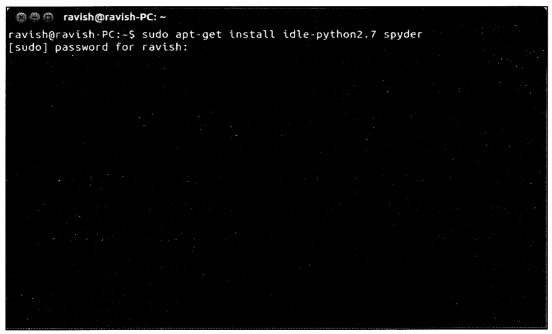
One can install IDLE and Spyder in Ubuntu (Linux) operating system by executing the following commands in the terminal (as shown in Figures 1-4).

sudo apt-get install idle-python2.7 spyder

These can be independently installed using separate commands.

sudo apt-get install idle-python2.7 
sudo apt-get install spyder

Python Handwritten Notes Chapter 1 img 4

Introduction to Python – Python Download and Installation Read More »

Introduction to Python – Integrated Development Environment

In this Page, We are Providing Introduction to Python – Integrated Development Environment. Students can visit for more Detail and Explanation of Python Handwritten Notes Pdf.

Introduction to Python – Integrated Development Environment

Introduction to Python – Integrated development environment

An Integrated Development Environment (IDE) is an application that provides comprehensive facilities for software development. An IDE normally consists of a source code editor, compiler and/or interpreter, and a debugger.

Introduction to Python – IDLE

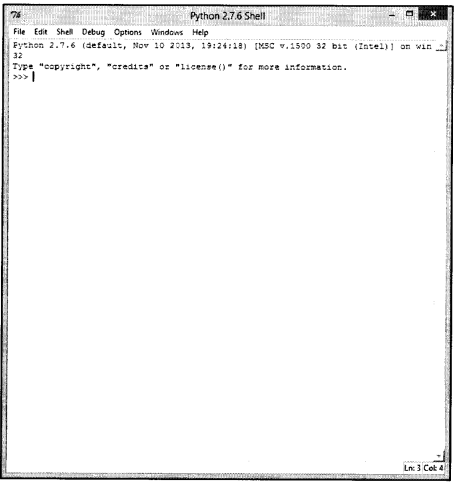
IDLE is an IDE, and it is the basic editor and interpreter environment which ships with the standard distribution of Python. IDLE is the built using “Tkinter” GUI toolkit, and has the following features:

  • Coded in Python, using the Tkinter GUI toolkit.
  • Cross-platform i.e. works on Windows and Unix.
  • Has source code editor with multiple undo, text highlighting, smart indent, call tips, and many other features (shown in figure 1-2).
  • Has Python shell window, also known as “interactive interpreter” (shown in figure 1-1).

Python Handwritten Notes Chapter 1 img 1
Python Handwritten Notes Chapter 1 img 2

Introduction to Python – Spyder

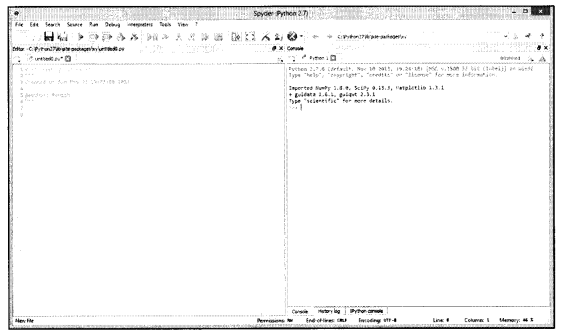
“Spyder” (previously known as “Pydee”) stands for “Scientific PYthon Development EnviRonment” (shown in figure 1-3), and it is a powerful IDE for the Python language with advanced editing, interactive testing, debugging, and introspection features. This IDE also has the support of “IPython” (enhanced interactive Python interpreter) and popular Python libraries such as NumPy, Matplotlib (interactive 2D/-3D plotting), etc. Some of the key features are:

  • Syntax coloring (or highlighting).
  • Typing helpers like automatically inserting closing parentheses etc.
  • Support IPython interpreter.
  • Contains a basic terminal command window.

Spyder runs on all major platforms (Windows, Mac OSX, Linux), and the easiest way to install Spyder in Windows is through Python(x,y) package (visit http://www.pythonxy.com).

Python Handwritten Notes Chapter 1 img 3
The expressions/codes discussed in this book are written and tested in Spyder IDE.

Introduction to Python – Integrated Development Environment Read More »

Introduction to Python – Python, Pythonic, History, Documentation

In this Page, We are Providing Introduction to Python – Python, Pythonic, History, Documentation. Students can visit for more Detail and Explanation of Python Handwritten Notes Pdf.

Introduction to Python – Python, Pythonic, History, Documentation

Python

Python is a high-level general-purpose programming language that is used in a wide variety of application domains. Python has the right combination of performance and features that demystify program writing. Some of the features of Python are listed below:

  • It is simple and easy to learn.
  • Python implementation is under an open-source license that makes it freely usable and distributable, even for commercial use.
  • It works on many platforms such as Windows, Linux, etc.
  • It is an interpreted language.
  • It is an object-oriented language.
  • Embeddable within applications as a scripting interface.
  • Python has a comprehensive set of packages to accomplish various tasks.

Python is an interpreted language, as opposed to a compiled one, though the distinction is blurry because of the presence of the bytecode compiler (beyond the scope of this book). Python source code is compiled into bytecode so that executing the same file is faster the second time (recompilation from source to bytecode can be avoided). Interpreted languages typically have a shorter development/debug cycle than compiled ones, and also their programs generally also run slowly. Please note that Python uses a 7-bit ASCII character set for program text.

The latest stable releases can always be found on Python’s website (http://www.python.org/). There are two recommended production-ready Python versions at this point in time because at the moment there are two branches of stable releases: 2.x and 3.x. Python 3.x may be less useful than 2.x since currently there is more third-party software available for Python 2 than for Python 3. Python 2 code will generally not run unchanged in Python 3. This book focuses on Python version 2.7.6.

Python follows a modular programming approach, which is a software design technique that emphasizes separating the functionality of a program into independent, interchangeable modules, such that each contains everything necessary to execute only one aspect of the desired functionality. Conceptually, modules represent a separation of concerns and improve maintainability by enforcing logical boundaries between components.

More information on the module is provided in chapter 5. Python versions are numbered in the format A.B.C or A.B, where A is the major version number, and it is only incremented for major changes in the language; B is the minor version number, and incremented for relatively lesser changes; C is the micro-level, and it is incremented for bug-fixed release.

Pythonic

“Pythonic” is a bit different idea/approach of the writing program, which is usually not followed in other programming languages. For example, to loop all elements of an iterable using for statement, usually, the following approach is followed:

food= [ 'pizza', 'burger',1 noodles']
for i in range(len(food)):
print(food[i])

A cleaner Pythonic approach is:

food=['pizza','burger','noodles']
for piece in food:
print(piece)

History

Python was created in the early 1990s by Guido van Rossum at Centrum Wiskunde & Informatica (CWI, refer http://www.cwi.nl/) in the Netherlands as a successor of a language called “ABC”. Guido remains Python’s principal author, although it includes many contributions from others. When he began implementing Python, Guido van Rossum was also reading the published scripts from “Monty Python’s Flying Circus”,.a BBC comedy series from the 1970s. Van Rossum thought he needed a name that was short, unique, and slightly mysterious, so he decided to call the language “Python”. In 1995, Guido continued his work on Python at the Corporation for National Research Initiatives (CNRI, visit http://www.cnri.reston.va.us/) in Reston, Virginia, where he released several versions of the software.

In May 2000, Guido and the Python core development team moved to “BeOpen.com” to form the BeOpen PythonLabs team. In October of the same year, the PythonLabs team moved to Digital Creations (now Zope Corporation, visit http://www.zope.com/). In 2001, the Python Software Foundation (PSF, refer http://www.python.org/psf/) was formed, a non-profit organization created specifically to own Python-related intellectual property. Zope Corporation is a sponsoring member of the PSF.

Documentation

Official Python 2.7.6 documentation can be accessed from the website link: http://docs.python.Org/2/. To download an archive containing all the documents for version 2.7.6 of Python in one of the various formats (plain text, PDF, HTML), follow the link: http://docs.python.Org/2/download.html.

Introduction to Python – Python, Pythonic, History, Documentation Read More »

Basics of Python – String

In this Page, We are Providing Basics of Python – String. Students can visit for more Detail and Explanation of Python Handwritten Notes Pdf.

Basics of Python – String

String

Python can manipulate string, which can be expressed in several ways. String literals can be enclosed in matching single quotes (‘) or double quotes (“); e.g. ‘hello’, “hello” etc. They can also be enclosed in matching groups of three single or double quotes (these are generally referred to as triple- quoted strings), e.g. ‘ hello ‘, “hello”. A string is enclosed in double-quotes if the string contains a single quote (and no double quotes), else it is enclosed in single quotes.

>>> "doesnt"
'doesnt'
>>> "doesn't"
"doesn't"
>>> '"Yes," he said.'
' "Yes., " he said. '

The above statements can also be written in some other interesting way using escape sequences.

>>> "doesn\' t" ;
"doesn ' t”
‘>>> '\"Yes,\" he said.' 
' "Yes," he said.'

Escape sequences are character combinations that comprise a backslash (\) followed by some character, that has special meaning, such as newline, backslash itself, or the quote character. They are called escape sequences because the backslash causes an escape from the normal way characters are interpreted by the compiler/interpreter. The print statement produces a more readable output for such input strings. Table 2-12 mentions some of the escape sequences.

Escape sequence

Meaning

\n

Newline.
\t

Horizontal tab.

\v

Vertical tab.


Escape sequence

Meaning
W

A backslash (\).

Y

Single quote (‘).
\”

Double quote (“).

String literals may optionally be prefixed with a letter r or R, such string is called raw string, and there is no escaping of character by a backslash.

>>> str=' This is \n a string '
>>> print str 
This is 
a string
>>> str=r' This is \n a string '
>>> print str 
This is \n a string

Specifically, a raw string cannot end in a single backslash.

>>> str=r ' \ '
File "<stdin>", line 1 
str=r ' \ '
            ∧
SyntaxError: EOL while scanning string literal

Triple quotes are used to specify multi-line strings. One can use single quotes and double quotes freely within the triple quotes.

>>> line=" " "This is
. . . a triple
. . . quotes example" " "
>>> line
' This, is\na triple\nquotes example'
>>> print line
This is
a triple 
quotes example

Unicode strings are not discussed in this book, but just for the information that a prefix of ‘ u ‘ or ‘ U’ makes the string a Unicode string.

The string module contains a number of useful constants and functions for string-based operations. Also, for string functions based on regular expressions, refer to re module. Both string and re modules are discussed later in this chapter.

Python String Programs

Basics of Python – String Read More »

Introduction to Python – Executing Python Script

In this Page, We are Providing Introduction to Python – Executing Python Script. Students can visit for more Detail and Explanation of Python Handwritten Notes Pdf.

Introduction to Python – Executing Python Script

Executing Python script

As discussed in the previous section, the Python script can be executed using the F5 functional key, from Python’s IDE. It can also be executed using a command prompt by typing the following command:

$ python <filename>

On different platforms, the execution of Python scripts (apart from running from inside Python’s IDE) can be carried out as follows:

Linux

On Unix/Linux system, Python script can be made directly executable, like shell scripts, by including the following expression as the first line of the script (assuming that the interpreter is on the user’s PATH) and giving the file an executable mode.

#! /usr/bin/env python

The ‘# !’ must be the first two characters of the file. Note that the hash or pound character ‘#’ is used to start a comment in Python. The script can be given an executable mode/permission, using the chmod command:

$ chmod + x HelloWorld.py

Windows

On the Windows system, the Python installer automatically associates .py files with python.exe, so that double-click on a Python file will run it as a script. The extension can also be .pyw, in that case, the console window that normally appears is suppressed. At MS-DOS prompt, the Python script can be executed by going to the directory containing the script and just entering the script name (with extension).

Introduction to Python – Executing Python Script Read More »

Introduction to Python – Script Mode

In this Page, We are Providing Introduction to Python – Script Mode. Students can visit for more Detail and Explanation of Python Handwritten Notes Pdf.

Introduction to Python – Script Mode

Script mode

If the Python interpreter is closed and then invoked again, the definitions that were made (functions, variables, etc.) are lost. Therefore, to write a long program, the programmer should use a text editor to prepare the input for the interpreter and run it with that file as input instead. This is known as creating a “script”. Most of the examples in this book are discussed using interactive mode, but few scripts are also incorporated.

First program

This section will demonstrate to write a simple Python program, which prints “Hello World”. Type the following lines in an IDLE text editor and save it as “HelloWorld.py”.

#! /usr/bin/env python 
print('Hello world')

The first line is called “shebang line” or “hashbang line” (more information in the next section). The second line gives the output: “Hello World”. There are numerous ways to run a Python program. The simplest approach is to press the F5 functional key after saving the program in an IDLE text editor. The output is shown below:

>>>
Hello world

Introduction to Python – Script Mode Read More »

Introduction to Python – Interactive Mode

In this Page, We are Providing Introduction to Python – Interactive Mode. Students can visit for more Detail and Explanation of Python Handwritten Notes Pdf.

Introduction to Python – Interactive Mode

Interactive mode

One of Python’s most useful features is its interactive interpreter. It allows very fast testing of ideas without the overhead of creating test files, as is typical in most programming languages. However, the interpreter supplied with the standard Python distribution is somewhat limited for extended interactive use. IPython is a good choice for the comprehensive environment for interactive and exploratory computing.

To start interactive mode, launch Python with no arguments (possibly by selecting it from your computer’s main menu). It is a very powerful way to test out new ideas or inspect modules and packages.

Interactive mode prompts for the next command with the “primary prompt”, usually three greater-than signs (>>>); a continuation line is prompted with the “secondary prompt”, which is by default represented by three dots (…). The interpreter prints a welcome message stating its version number and some additional information before printing the first prompt:

$ python
Python 2.7 (#1, Feb 28 2010, 00:02:06)
Type "help", "copyright", "credits" or "license" for more information.
>>>

Continuation lines are needed when entering a multi-line statement. As an example, take a look at this if statement:

>>> the_world_is_flat = 1 
>>> if the_world_is_flat:
... print("Be careful not to fall off!")
...
Be careful not to fall off!

Invoking Python interpreter

In Unix/Linux platforms, the Python interpreter is usually installed at /usr/local/bin/python. It is possible to start interpreter by typing the following command (same command for MS Windows)

$ python

in the shell. Since the choice of the directory where the interpreter lives is an installation option, other places are possible (e.g/usr/local/python is a popular alternative location).

On Windows machines, the Python installation is available at path C:\Python27, though, this can be changed when running the installer. To add this directory to Path environmental variable, type the following command into the MS-DOS command prompt:

set path=%path%;C:\python27

Inputting the end-of-file character (Control-D on Unix, Control-Z on Windows) at the primary prompt causes the interpreter to exit. If that does not work, you can exit the interpreter by typing the following command:

>>> quit()

Introduction to Python – Interactive Mode Read More »

Introduction to Python – Object

In this Page, We are Providing Introduction to Python – Object. Students can visit for more Detail and Explanation of Python Handwritten Notes Pdf.

Introduction to Python – Object

Introduction to Python Object

“Object” (also called “name”) is Python’s abstraction for data. All data in a Python program is represented by objects or by relations between objects. Every object has an identity, a type, and a value. An object’s identity never changes once it has been created; it can be thought of it as the object’s address in memory. The id () function returns an integer representing its identity (currently implemented as its address). An object’s type determines the operations that the object supports and also defines the possible values for objects of that type.

An object’s type is also unchangeable and the type () function returns an object’s type. The value of some objects can change. Objects whose value can change are said to be “mutable”; objects whose value is unchangeable once they are created are called “immutable”. In the example below, object a has identity 31082544, type int, and value 5.

>>> a=5
>>> id (a)
31082544 
>>> type (a) 
<type 'int'>

Some objects contain references to other objects; these are called “containers”. Examples of containers are tuples, lists, and dictionaries. The value of an immutable container object that contains a reference to a mutable object can change when the latter’s value is changed; however, the container is still considered immutable because the collection of objects it contains cannot be changed. So, immutability is not strictly the same as having an unchangeable value.

An object has an attribute(s), which are referenced using dotted expressions. For example, if an object ABC has an attribute PQ, then it would be referenced as ABC. PQ. In the following example, upper () is an attribute of var object.

>>> var= 'hello'
>>> var.upper()
'HELLO'

In the above example, upper () is a function on some object var, and this function is called “method”. More information on “method” is given in chapter 6.

Introduction to Python – Object Read More »

Python Interview Questions on Array Sequence

We have compiled most frequently asked Python Interview Questions which will help you with different expertise levels.

Python Interview Questions on Array Sequence

Low Level Arrays

Let’s try to understand how information is stored in low-level computer architecture in order to understand how array sequences work. Here is a small brush-up on computer science basics on memory units.

We know that the smallest unit of data in a computer is a bit (0 or 1). 8 bits together make a byte. A byte has 8 binary digits. Characters such as alphabets, numbers, or symbols are stored in bytes. A computer system memory has a huge number of bytes and tracking of how information is stored in these bytes is done with the help of a memory address. Every byte has a unique memory address which makes tracking information easier.

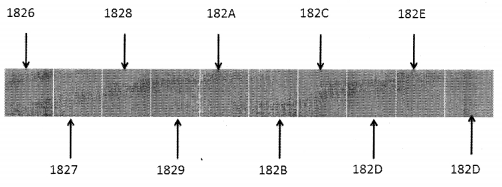
The following diagram depicts a lower-level computer memory. It shows a small section of memory of individual bytes with consecutive addresses.
Python Interview Questions on Array Sequence chapter 9 img 1

Computer system hardware is designed in such a manner that the main memory can easily access any byte in the system. The primary memory is located in the CPU itself and is known as RAM. Any byte irrespective of the address can be accessed easily. Every byte in memory can be stored or retrieved in constant time, hence its Big-O notation for the time complexity would be O(1).

There is a link between an identifier of a value and the memory address where it is stored, the programming language keeps a track of this association. So, a variable student_name may store name details for a student and class_ teacher would store the name of a class teacher. While programming, it is often required to keep a track of all related objects.

So, if you want to keep a track of scores in various subjects for a student, then it is a wise idea to group these values under one single name, assign each value an index and use the index to retrieve the desired value. This can be done with the help of Arrays. An array is nothing but a contiguous block of memory.

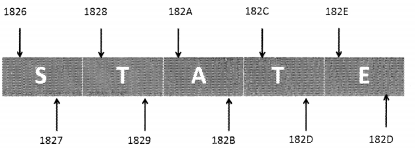
Python internally stores every Unicode character in 2 bytes. So, if you want to store a 5-letter word (let’s say ‘state’) in python, this is how it would get stored in memory:
Python Interview Questions on Array Sequence chapter 9 img 2

Since each Unicode character occupies 2 bytes, the word STATE is stored in 10 consecutive bytes in the memory. So, this is a case of an array of 5 characters. Every location of an array is referred to as a cell. Every array element is numbered and its position is called index. In other words, the index describes the location of an element.

Table

Every cell of an array must utilize the same number of bytes.

The actual address of the 1st element of the array is called the Base Address. Let’s say the name of the array mentioned above is my_array[ ]. The Base address of my_array[ ] is 1826. If we have this information it is easy to calculate the address of any element in the array.

Address of my array [index] = Base Address +( Storage size in bytes of one element in the array) * index.

Therefore, Address of my array[3] = 1826 + 2*3
= 1826 + 6
= 182C
After that, slight information on how things work at a lower level lets’s get back to the higher level of programming where the programmer is only concerned with the elements and index of the array.

Referential Array

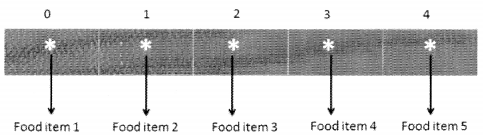
We know that in an array, every cell must occupy the same number of bytes. Suppose we have to save string values for the food menu. The names can be of different lengths. In this case, we can try to save enough space considering the longest possible name that we can think of but that does not seem to be a wise thing to do like a lot of space is wasted in the process and you never know there may be a name longer than the value that we have catered for. A smarter solution, in this case, would be to use an array of object references.
Python Interview Questions on Array Sequence chapter 9 img 3

In this case, every element of the array is actually a reference to an object. The benefit of this is that every object which is of string value can be of different length but the addresses will occupy the same number of cells. This helps in maintaining the constant time factor of order O(1).

In Python, lists are referential in nature. They store pointers to addresses in the memory. Every memory address requires a space of 64-bits which is fixed.

Question 1.
You have a list integer list having integer values. What happens when you give the following command?
integer_list[1] + = 7
Answer:
In this case, the value of the integer at index 1 does not change rather we end up referring to space in the memory that stores the new value i.e. the sum of integer_list[1]+7.

Question 2.
State whether True or False:
A single list instance may include multiple references to the same object as elements of the list.
Answer:
True

Question 3.
Can a single object be an element of two or more lists?
Answer:
Yes

Question 4.
What happens when you compute a slice of the list?
Answer:
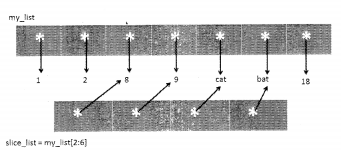
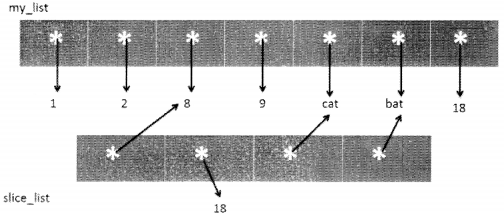
When you compute a slice of the list, a new list instance is created. This new list actually contains references to the same elements that were in the parent list.
For example:

>>> my_list = [1, 2,8,9, "cat", "bat", 18]
>>> slice_list = my_list[2:6]
>>> slice_list
[8, 9, 'cat' , 'bat' ]
>>>

This is shown in the following diagram:
Python Interview Questions on Array Sequence chapter 9 img 4

Question 5.
Suppose we change the value of the element at index 1 of the slice just to 18 (preceding diagram). How will you represent this in a diagram?
Answer:
When we say sliceJist[1]=18, we actually are changing the reference that earlier pointed to 9 to another reference that points to value 18. The actual integer object is not changed, only the reference is shifted from one location to the other.
Python Interview Questions on Array Sequence chapter 9 img 5

Deep Copy and Shallow Copy in Python

Python has a module named “copy” that allows deep copy or shallow copy mutable objects.

Assignment statements can be used to create a binding between a target and an object, however, they cannot be used for copying purposes.

Deep Copy

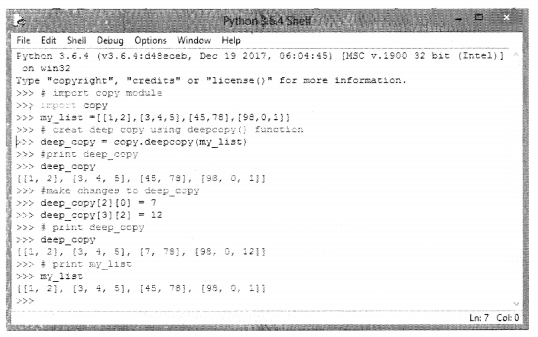
The copy module of python defines a deepcopy( ) function which allows the object to be copied into another object. Any changes made to the new object will not be reflected in the original object.

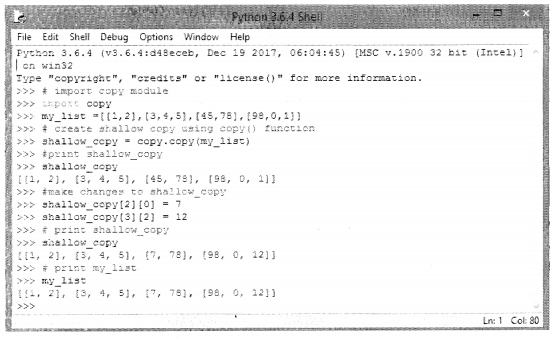
In the case of shallow copy, a reference of the object is copied into another object as a result of which changes made in the copy will be reflected in the parent copy. This is shown in the following code:
Python Interview Questions on Array Sequence chapter 9 img 6

Python Interview Questions on Array Sequence chapter 9 img 7

It is important to note here that shallow and deep copying functions should be used when dealing with objects that contain other objects (lists or class instances), A shallow copy will create a compound object and insert into it, the references the way they exist in the original object. A deep copy on the other hand creates a new compound and recursively inserts copies of the objects the way they exist in the original list.

Question 6.
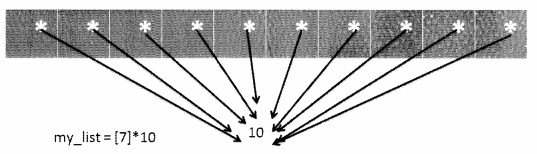
What would be the result of the following statement? my list = [7]* 10?
Answer:
It would create a list named my list as follows:
[7, 7, 7, 7, 7, 7, 7, 7, 7, 7]
Python Interview Questions on Array Sequence chapter 9 img 8

All the 10 cells of the list my_list, refers to the same element which in this case is 10.

Question 7.
Have a look at the following piece of code:

>>> a = [1,2,3,4,5,6,7]
>>> b = a
>>>b [ 0 ] = 8
>>> b
[8, 2, 3, 4, 5, 6, 7]
>>> a
[8, 2, 3, 4, 5, 6, 7]
>>>

Here, we have used the assignment operator still on making changes to ‘b’ changes are reflected in ‘a’. Why?
Answer:
When you use an assignment operator you are just establishing a relationship between an object and the target. You are merely setting a reference to the variable. There are two solutions to this:

(I)

>>> a
[8,2,3, 4, 5, 6, 7]
>>>a = [ 1,2 3, 4,5 ,6, 7]
>>> b = a [:]
>>>b[0] = 9
>>> b
[9, 2, 3, 4, 5, 6, 7]
>>> a
[1, 2, 3, 4, 5, 6, 7]
>>>

(II)

>>> a = [ 1,2 3, 4,5 6, 7]
>>> b = list (a)
>>>b
[1,2, 3, 4, 5, 6, 7]
>>>b [0] = 9
>>> b
[9, 2, 3, 4, 5, 6, 7]
>>> a
[1, 2, 3, 4, 5, 6, 7]
>>>

Question 8.
Take a look at the following piece of code:

>>> import copy
>>> a = [1 9 9 4 5, 5]
>>> b = copy.copy(a)
>>> b
[l, 2, 3, 4, 5, 6]
>>>b [2] = 9
>>> b
[1.2, 9, 4, 5, 6]
>>> a
[1.2, 3, 4, 5, 6]
>>>

‘b’ is a shallow copy of ‘a’ however when we make changes to ‘b’ it is not reflected in ‘a’, why? How can this be resolved?
Answer:
List ‘a’ is a mutable object (list) that consists of immutable objects (integer).
A shallow copy would work with the list containing mutable objects.
You can use b=a to get the desired result.

Question 9.
Look at the following code:

>>> my_list = [["apples", "banana"], ["Rose", "Lotus"], ["Rice", "Wheat"]]
>>> copy_list = list (my_list)
>>> copy_list[2][0]="cereals"

What would happen to the content of my_list? Does it change or remains the same?
Answer:
Content of my_list will change:

>>> my list [['apples', 'banana'] , [ 'Rose', 'Lotus'],
['cereals', 'Wheat']]
>>>

Question 10.
Look at the following code:

>>> my_list = [ ["apples", "banana"], ["Rose", "Lotus"], ["Rice", "Wheat"]]
>>> copy_list = my_list.copy( )
>>> copy_list[2][0]="cereals"

What would happen to the content of my_list? Does it change or remains the same?
Answer:
Content of my_list would change:

>>> my_list
[ [ 'apples' , 'banana1' ] , [ 'Rose' , 'Lotus' ] ,
[ 'cereals', 'Wheat']]
>>>

Question 11.
When the base address of immutable objects is copied it is called_________________.
Answer:
Shallow copy

Question 12.
What happens when a nested list undergoes deep copy?
Answer:
When we create a deep copy of an object, copies of nested objects in the original object are recursively added to the new object. Thus, a deep copy will create a completely independent copy of not only of the object but also of its nested objects.

Question 13.
What happens when a nested list undergoes shallow copy?
Answer:
A shallow copy just copies references of nested objects therefore the copies of objects are not created.

Dynamic Arrays

As the name suggests dynamic array is a contiguous block of memory that grows dynamically when new data is inserted. It has the ability to adjust its size automatically as and when there is a requirement, as a result of which, we need not specify the size of the array at the time of allocation and later we can use it to store as many elements as we want.

When a new element is inserted in the array, if there is space then the element is added at the end else a new array is created that is double in size of the current array, so elements are moved from the old array to the new array and the old array is deleted in order to create some free memory space. The new element is then added at the end of the expanded array.

Let’s try to execute a small piece of code. This example is executed on 32-bit machine architecture. The result can be different from that of 64-bit but the logic remains the same.
For a 32-bit system 32-bits (i.e 4 bytes) are used to hold a memory address. So, now let’s try and understand how this works:
When we created a blank list structure, it occupies 36 bytes in size. Look at the code given as follows:

import sys
my_dynamic_list =[ ]
print("length = ",len(my_dynamic_list) , ".", "size in bytes = ", sys.getsizeof(my_dynamic_list),".")

Here we have imported the sys module so that we can make use of getsizeof( ) function to find the size, the list occupies in the memory.
The output is as follows:
Length = 0.
Size in bytes = 36 .
Now, suppose we have a list of only one element, let’s see how much size it occupies in the memory.

import sys
my_dynamic_list =[1]
print("length = ",len(my_dynamic_list),".", "size in bytes = ", sys.getsizeof(my_dynamic_list),".")
length = 1 . size in bytes = 40 .

This 36 byte is just the requirement of the list data structure on 32- bit architecture.
If the list has one element that means it contains one reference to memory and in a 32-bit system architecture memory, the address occupies 4 bytes. Therefore, the size of the list with one element is 36+4 = 40 bytes.
Now, let’s see what happens when we append to an empty list.

import sys
my_dynamic_list =[ ]
value = 0
for i in range(20):
print("i = ",i,".", "                                  Length of my_
dynamic_list = ",len(my_dynamic_list),".", " size in bytes = ", sys.getsizeof(my_dynamic_ list),".")
my_dynamic_list.append(value)
value +=1

Output
i = 0 .    Length of mydynamic list = 0 .      size in bytes =36
i = 1 .    Length of my_dynamic_list = 1 .    size in bytes = 52
i = 2 .    Length of my_dynamic list = 2 .    size in bytes = 52
i = 3 .    Length of my dynamic list = 3 .    size in bytes = 52
i = 4.     Length of my dynamic list = 4 .    size in bytes = 52
i= 5.      Length of my dynamic list = 5 .    size in bytes = 68
i = 6.     Length of my_dynamic_list = 6 .   size in bytes = 68
i = 7.     Length of my_dynamic_list = 7 .   size in bytes = 68
i = 8 .    Length of my_dynamic_list = 8 .   size in bytes = 68

i = 9.     Length of my_dynamic_list = 9 .   size in bytes = 100
i = 10.   Length of my dynamic list =10.    size in bytes = 100
i = 11 .  Length of my dynamic list =11.    size in bytes = 100
i = 12 .  Length of my_dynamic_list = 12 . size in bytes = 100
i = 13 .  Length of my dynamic list =13.    size in bytes = 100
i = 14.   Length of my_dynamic_list = 14 . size in bytes = 100
i = 15 .  Length of my dynamic list =15.    size in bytes = 100
i = 16.   Length of my dynamic list = 16.   size in bytes = 100
i = 17.   Length of my_dynamic_list =17.   size in bytes = 136
i = 18 .  Length of my dynamic list =18.    size in bytes = 136
i = 19.  Length of my_dynamic_list = 19.   size in bytes = 136

Now, lets have a look at how things worked here:

When you call an append( ) function for list, resizing takes place as per list_resize( ) function defined in Objects/listobject.c file in Python. The job of this function is to allocate cells proportional to the list size thereby making space for additional growth.
The growth pattern is : 0,4,8,16,25,35,46,58,72,88,

Amortization

Let’s suppose that there is a man called Andrew, who wants to start his own car repair shop and has a small garage. His business starts and he gets his first customer however, the garage has space only to keep one car. So, he can only have one car in his garage.
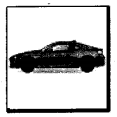
Python Interview Questions on Array Sequence chapter 9 img 9

Seeing a car in his garage, another person wants to give his car to him. Andrew, for the ease of his business, wants to keep all cars in one place. So, in order to keep two cars, he must look for space to keep two cars, move the old car to the new space and also move the new car to the new space and see how it works.

So, basically, he has to:

  1. Buy new space
  2. Sell the old space

Let’s say, this process takes one unit of time. Now, he also has to:

  1. Move the old car to a new location
  2. Move the new car to a new location Moving each car takes one unit of time.
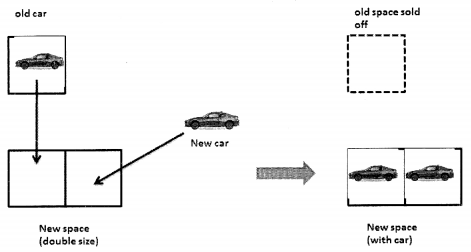
Python Interview Questions on Array Sequence chapter 9 img 10

Andrew is new in the business. He does not know how his business would expand, also what is the right size for the garage. So, he comes up with the idea that if there is space in his garage then he would simply add the new car to space, and when the space is full he will get a new space twice as big as the present one and then move all cars there and get rid of old space. So, the moment he gets his new car, it’s time to buy a new space twice the old space and get rid of the old space.
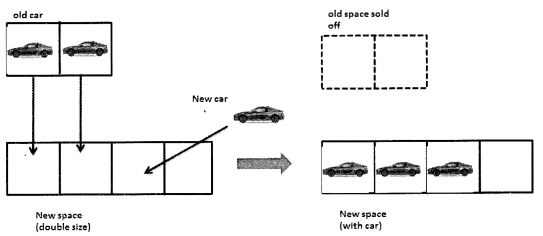
Python Interview Questions on Array Sequence chapter 9 img 11

Now, when the fourth car arrives Andrew need not worry. He has space for the car.
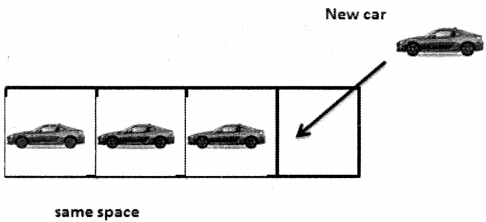
Python Interview Questions on Array Sequence chapter 9 img 12
And now again when he gets the fifth car he will have to buy a space that is double the size of the space that he currently has and sell the old space.

So, let’s now take a look at the time complexity: Let’s analyze how much does it take to add a car to Andrew’s garage where there is n number of cars in the garage.

Here is what we have to see:

1. If there is space available, Andrew just has to move one car into a new space and that takes only one unit of time. This action is independent of the n (number of cars in the garage). Moving a car in a garage that has space is constant time i.e. O(1).

2. When there in spot and a new car arrives, Andrew has to do the following:

  • Buy a new space that takes 1 unit of time.
  • Move all cars into new space one by one and then move the new car into free space. Moving every car takes one unit of time.

So, if there were n cars already in the old garage, plus one car then that would take n+1 time units to move the car.
So, the total time taken in step two is 1+n+l and in Big O notation this would mean O(n) as the constant does not matter.

On the look of it, one may think this is too much of a task but every business plan should be correctly analyzed. Andrew will buy a new garage only if the space that he has, gets all filled up. On spreading out the cost over a period of time, one will realize that it takes a good amount of time only when the space is full but in a scenario where there is space, the addition of cars does not take much time.

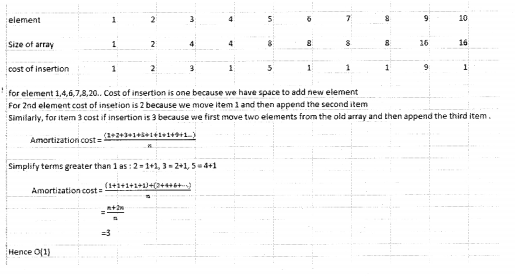
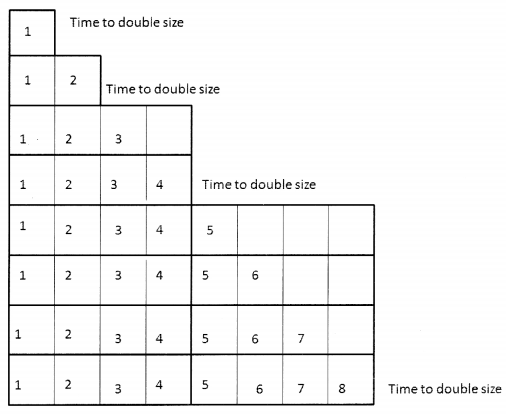
Now keeping this example in mind we try to understand the amortization of dynamic arrays. We have already learned that in a dynamic array when the array is full and a new value has to be added, the contents of the array are moved on to the new array that is double in size, and then the space occupied by the old array is released.
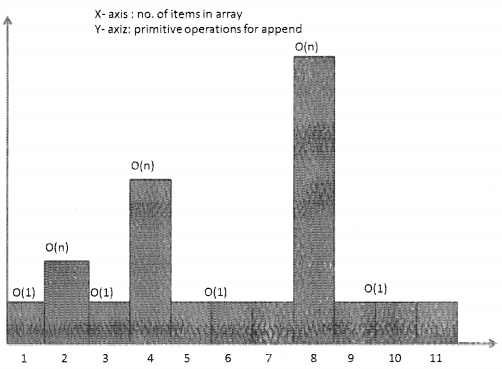
 

Python Interview Questions on Array Sequence chapter 9 img 13

It may seem like the task of replacing the old array with a new one is likely to slow down the system. When the array is full, appending a new element may require O(n) time. However, once the new array has been created we can add new elements to the array in constant time O(1) till it has to be replaced again. We will now see that with the help of amortization analysis how this strategy is actually quite efficient.

As per the graph above, when there are two elements then on calling append, the array will have to double in size, same after 4th and 8th element. So, at 2, 4, 8, 16… append will be O(n) and for the rest of the cases, it will be 0(1).
The steps involved are as follows:

  1. When the array is full, allocate memory for the new array and the size of the new array should typically be twice the size of the old array.
  2. All contents from the old array should be copied to the new array.
  3. The space occupied by the old array should be released.
 

Python Interview Questions on Array Sequence chapter 9 img 14

The analysis would be as follows:
Python Interview Questions on Array Sequence chapter 9 img 15

Python Interview Questions on Array Sequence Read More »