Python

Program to Check if a Number is Peterson Number

Python Program to Check if a Number is Peterson Number

Are you wondering how to seek help from subject matter experts and learn the Java language? Go with these Basic Java Programming Examples and try to code all of them on your own then check with the exact code provided by expert programmers.

Given a number, the task is to check whether the given number is a Peterson number or not.

Peterson Number:

The Peterson number is the number whose sum of factorials of each digit equals the number itself. Let me give you an example to help you understand:

Examples:

Example1:

Input:

Given number =1

Output:

The given number [ 1 ] is a Peterson number

Example2:

Input:

Given number =145

Output:

The given number [ 145 ] is a Peterson number

Program to Check if a Number is Peterson Number in Python

Below are the ways to check whether the given number is a Peterson number or not.

Method #1: Using For Loop (Static Input)

Approach:

  • Import the math module using the import keyword.
  • Give the number as static input and store it in a variable.
  • Take a variable psum and initialize its value to 0.
  • Convert the given number to a string using the str() function.
  • Convert the given number into a list of digits using list(),map(),int,split() functions.
  • Traverse in this list of digits using For loop.
  • Calculate the factorial of the list value using math.factorial() function.
  • Add this factorial value to psum.
  • Check if psum is equal to the given number using the If statement.
  • If it is true then it is a Peterson number.
  • Else it is not Peterson’s number.
  • The Exit of the Program.

Below is the implementation:

# Import the math module using the import keyword.
import math
# Give the number as static input and store it in a variable.4
gvnnumb = 145
# Take a variable psum and initialize its value to 0.
psum = 0
# Convert the given number to a string using the str() function.
strnumbe = str(gvnnumb)
# Convert the given number into a list of
# digits using list(),map(),int,split() functions.
lstdigts = list(map(int, strnumbe))
# Traverse in this list of digits using For loop.
for dgtnumbr in lstdigts:
    # Calculate the factorial of the list value using math.factorial() function.
    numbfact = math.factorial(dgtnumbr)
    # Add this factorial value to psum.
    psum = psum+numbfact
# Check if psum is equal to the given number using the If statement.
if(psum == gvnnumb):
        # If it is true then it is a Peterson number.
    print('The given number [', gvnnumb, '] is a Peterson number')
# Else it is not Peterson's number.
else:
    print('The given number [', gvnnumb, '] is not a Peterson number')

Output:

The given number [ 145 ] is a Peterson number

Method #2: Using For Loop (User Input)

Approach:

  • Import the math module using the import keyword.
  • Give the number as user input using int(input()) and store it in a variable.
  • Take a variable psum and initialize its value to 0.
  • Convert the given number to a string using the str() function.
  • Convert the given number into a list of digits using list(),map(),int,split() functions.
  • Traverse in this list of digits using For loop.
  • Calculate the factorial of the list value using math.factorial() function.
  • Add this factorial value to psum.
  • Check if psum is equal to the given number using the If statement.
  • If it is true then it is a Peterson number.
  • Else it is not Peterson’s number.
  • The Exit of the Program.

Below is the implementation:

# Import the math module using the import keyword.
import math
# Give the number as user input using int(input()) and store it in a variable.
gvnnumb = int(input(
    'Enter some random number to check whether the given number is a Peterson or not = '))
# Take a variable psum and initialize its value to 0.
psum = 0
# Convert the given number to a string using the str() function.
strnumbe = str(gvnnumb)
# Convert the given number into a list of
# digits using list(),map(),int,split() functions.
lstdigts = list(map(int, strnumbe))
# Traverse in this list of digits using For loop.
for dgtnumbr in lstdigts:
    # Calculate the factorial of the list value using math.factorial() function.
    numbfact = math.factorial(dgtnumbr)
    # Add this factorial value to psum.
    psum = psum+numbfact
# Check if psum is equal to the given number using the If statement.
if(psum == gvnnumb):
        # If it is true then it is a Peterson number.
    print('The given number [', gvnnumb, '] is a Peterson number')
# Else it is not Peterson's number.
else:
    print('The given number [', gvnnumb, '] is not a Peterson number')

Output:

Enter some random number to check whether the given number is a Peterson or not = 1
The given number [ 1 ] is a Peterson number

Related Programs:

Python Program to Check if a Number is Peterson Number Read More »

Program for Neon Number

Python Program for Neon Number

Are you new to the java programming language? We recommend you to ace up your practice session with these Basic Java Programs Examples

Given a number, the task is to check whether the given number is a Neon Number or not in Python.

Neon Number:

A Neon Number is a number whose square sum of digits equals the original number.

Ex: 9

Square of 9 =81

Sum of digits of square = 8 +1 =9 ,So it is Neon Number

Examples:

Example1:

Input:

Given Number = 9

Output:

The Given Number [ 9 ] is a neon Number

Example2:

Input:

Given Number =123

Output:

The Given Number [ 123 ] is not a neon Number

Program for Neon Number in Python

Below are the ways to check whether the given number is a Neon Number or Not.

Method #1: Using list() and sum() functions (Static Input)

Approach:

  • Give the number as static input and store it in a variable.
  • Calculate the square of the given number using the ** operator or multiply the given number by itself and store it in a variable.
  • Convert this squared number into a list of digits using list(),int(),map(),str() functions.
  • Store this list in a variable.
  • Calculate the sum of digits of this list using the sum() function.
  • Check if this sum is equal to the given number or not using the If conditional statement.
  • If it is true then the given number is a Neon Number.
  • Else the given number is not a Neon Number.
  • The Exit of the Program.

Below is the implementation:

#Give the number as static input and store it in a variable.
givnumb=9
#Calculate the square of the given number using the ** operator 
#or multiply the given number by itself and store it in a variable.
squarnumb=givnumb**2
#Convert this squared number into a list of digits
#using list(),int(),map(),str() functions.
#Store this list in a variable.
numbedigit=list(map(int,str(givnumb)))
#Calculate the sum of digits of this list using the sum() function.
sumdigi=sum(numbedigit)
#Check if this sum is equal to the given number 
#or not using the If conditional statement.
#If it is true then the given number is a Neon Number.
if(sumdigi==givnumb):
  print('The Given Number [',givnumb,'] is a neon Number')
#Else the given number is not a Neon Number.
else:
    print('The Given Number [',givnumb,'] is not a neon Number')

Output:

The Given Number [ 9 ] is a neon Number

Method #2: Using list() and sum() functions (User Input)

Approach:

  • Give the number as user input using the int(input()) function and store it in a variable.
  • Calculate the square of the given number using the ** operator or multiply the given number by itself and store it in a variable.
  • Convert this squared number into a list of digits using list(),int(),map(),str() functions.
  • Store this list in a variable.
  • Calculate the sum of digits of this list using the sum() function.
  • Check if this sum is equal to the given number or not using the If conditional statement.
  • If it is true then the given number is a Neon Number.
  • Else the given number is not a Neon Number.
  • The Exit of the Program.

Below is the implementation:

# Give the number as user input using int(input()) function and store it in a variable
givnumb = int(input('Enter some random number ='))
# Calculate the square of the given number using the ** operator
# or multiply the given number by itself and store it in a variable.
squarnumb = givnumb**2
# Convert this squared number into a list of digits
# using list(),int(),map(),str() functions.
# Store this list in a variable.
numbedigit = list(map(int, str(givnumb)))
# Calculate the sum of digits of this list using the sum() function.
sumdigi = sum(numbedigit)
# Check if this sum is equal to the given number
# or not using the If conditional statement.
# If it is true then the given number is a Neon Number.
if(sumdigi == givnumb):
    print('The Given Number [', givnumb, '] is a neon Number')
# Else the given number is not a Neon Number.
else:
    print('The Given Number [', givnumb, '] is not a neon Number')

Output:

Enter some random number =123
The Given Number [ 123 ] is not a neon Number

Related Programs:

Python Program for Neon Number Read More »

Program to Compute the Value of Euler’s Number ,Using the Formula e = 1 + 11! + 12! + …… 1n!

Python Program to Compute the Value of Euler’s Number ,Using the Formula: e = 1 + 1/1! + 1/2! + …… 1/n!

Our website provided core java programs examples with output aid beginners and expert coders to test their knowledge gap and learn accordingly.

Given a number numb, the task is to compute the value of the Euler’s number expansion in Python.

Examples:

Example1:

Input:

given number =3

Output:

Enter some random number = 3
The total sum of euler's value of the series 2.67

Example2:

Input:

given number =5

Output:

The total sum of euler's value of the series  2.72

Program to Compute the Value of Euler’s Number ,Using the Formula: e = 1 + 1/1! + 1/2! + …… 1/n! in Python

There are several ways to calculate the value of the euler’s number some of them are:

Method #1:Using factorial function and for loop(Static Input)

Approach:

  • Give the number as static input.
  • Set the value of the totalsum variable to 1.
  • Find the total of the series using a for loop ranging from 1 to the number.
  • Compute the factorial using math. factorial() function.
  • After rounding to two decimal places, print the totalsum of the series.
  • Exit of program.

Below is the implementation:

import math
# Give the number of terms as static input.
numb = 5
# Set a totalsum variable which calculates the total sum and initialize it to 1.
totalsum = 1
# Find the total of the series using a for loop ranging from 1 to the number.
for val in range(1, numb+1):
  # Compute the factorial using math. factorial() function.
    totalsum = totalsum+(1/math.factorial(val))
# Print the totalsum value of the euler's series, rounded to two decimal places.
print("The total sum of euler's value of the series ", round(totalsum, 2))

Output:

The total sum of euler's value of the series  2.72

Method #2:Using factorial function and for loop(User Input)

Approach:

  • Scan the given number as user input by using int(input()) function.
  • Set the value of the totalsum variable to 1.
  • Find the total of the series using a for loop ranging from 1 to the number.
  • Compute the factorial using math. factorial() function.
  • After rounding to two decimal places, print the totalsum of the series.
  • Exit of program.

Below is the implementation:

import math
#  Scan the number as user input by using int(input()) function
numb = int(input('Enter some random number = '))
# Set a totalsum variable which calculates the total sum and initialize it to 1.
totalsum = 1
# Find the total of the series using a for loop ranging from 1 to the number.
for val in range(1, numb+1):
  # Compute the factorial using math. factorial() function.
    totalsum = totalsum+(1/math.factorial(val))
# Print the totalsum value of the euler's series, rounded to two decimal places.
print("The total sum of euler's value of the series ", round(totalsum, 2))

Output:

Enter some random number = 13
The total sum of euler's value of the series 2.72

Method #3:Using factorial function and while loop(Static Input)

Approach:

  • Give the number as static input.
  • Set a totalsum variable which calculates the total sum and initialize it to 0.
  • Take a variable say value and initialize it to 1.
  • Using while loop calculate the total sum till value greater than given number
  • Compute the factorial using math. factorial() function.
  • Calculate the totalsum by incrementing it value with 1/factorial value.
  • Increment the value by 1.
  • Print the totalsum of the series, rounded to two decimal places.
  • Exit of program.

Below is the implementation:

import math
# Give the number of terms as static input.
numb = 3
# Take a variable say value and initialize it to 1.
value = 1
# Set a totalsum variable which calculates the total sum and initialize it to 1.
totalsum = 1
# Using while loop calculate the total sum till value greater than given number
while(value <= numb):
   # Compute the factorial using math. factorial() function.
    totalsum = totalsum+(1/math.factorial(value))
    # Increment the value by 1.
    value = value+1
# Print the totalsum value of the euler's series, rounded to two decimal places.
print("The total sum of euler's value of the series ", round(totalsum, 2))

Output:

The total sum of euler's value of the series 2.67

Method #4:Using factorial function and while loop(User Input)

Approach:

  • Scan the given number as user input by using int(input()) function.
  • Set a totalsum variable which calculates the total sum and initialize it to 0.
  • Take a variable say value and initialize it to 1.
  • Using while loop calculate the total sum till value greater than given number
  • Compute the factorial using math. factorial() function.
  • Calculate the totalsum by incrementing it value with 1/factorial value.
  • Increment the value by 1.
  • Print the totalsum of the series, rounded to two decimal places.
  • Exit of program.

Below is the implementation:

import math
# Scan the number as user input by using int(input()) function
numb = int(input('Enter some random number = '))
# Take a variable say value and initialize it to 1.
value = 1
# Set a totalsum variable which calculates the total sum and initialize it to 1.
totalsum = 1
# Using while loop calculate the total sum till value greater than given number
while(value <= numb):
   # Compute the factorial using math. factorial() function.
    totalsum = totalsum+(1/math.factorial(value))
    # Increment the value by 1.
    value = value+1
# Print the totalsum value of the euler's series, rounded to two decimal places.
print("The total sum of euler's value of the series ", round(totalsum, 2))

Output:

Enter some random number = 3
The total sum of euler's value of the series 2.67

Related Programs:

Python Program to Compute the Value of Euler’s Number ,Using the Formula: e = 1 + 1/1! + 1/2! + …… 1/n! Read More »

Python Program to Check a Number is Spy number

Python Program to Check a Number is Spy number

If you are new to Java and want to learn the java coding skills too fast. Try practicing the core java programs with the help of the Java basic programs list available.

Given a number, the task is to check whether the given number is a spy number or not using Python.

Spy number:

If the sum of a number’s digits equals the product of its digits, it’s called a Spy number. 1124,123,1412,132……

Examples:

Example1:

Input:

Given number=1124

Output:

The given number 1124 is spy number

Example2:

Input:

Given number=123

Output:

The given number 123 is spy number

Program to Check a Number is Spy number in Python

Below are the ways to check the given number is a spy number or not in Python.

Method #1: Using For Loop (Static Input)

Approach:

  • Give the number as static input and store it in a variable.
  • Convert this given number to a string using the function str().
  • Take two variables one to store the sum of digits and another to store the product of digits and initialize the sum of digits to 0 and the product of digits with 1.
  • Convert this given number into a list of digits using list(),map(),int functions.
  • Traverse through the digits of the number(Iterate through the list) using For loop.
  • For each element add the element to the sum of digits.
  • Multiply the element with the product of digits.
  • Check if the sum of digits is equal to the product of digits using the If statement.
  • If it is true then it is a spy number
  • Else it is not a spy number.
  • The Exit of the Program.

Below is the implementation:

# Give the number as static input and store it in a variable.
numbe = 1124
# Convert this given number to a string using the function str().
strnumbe = str(numbe)
# Take two variables one to store the sum of digits and
# another to store the product of digits and
# initialize the sum of digits to 0 and the product of digits with 1.
sumOfDigit = 0
productOfDigit = 1
# Convert this given number into a list of digits using list(),map(),int functions.
listdigits = list(map(int, strnumbe))
# Traverse through the digits of the number(Iterate through the list) using For loop.
for elemen in listdigits:
    # For each element add the element to the sum of digits.
    # Multiply the element with the product of digits.
    sumOfDigit = sumOfDigit+elemen
    productOfDigit = productOfDigit*elemen
# Check if the sum of digits is equal to the product of digits using the If statement.
# If it is true then it is a spy number
if(sumOfDigit == productOfDigit):
    print('The given number', strnumbe, 'is spy number')
# Else it is not a spy number.
else:
    print('The given number', strnumbe, 'is not spy number')

Output:

The given number 1124 is spy number

Method #2: Using For Loop (User Input)

Approach:

  • Give the number as user input using int(input()) and store it in a variable.
  • Convert this given number to a string using the function str().
  • Take two variables one to store the sum of digits and another to store the product of digits and initialize the sum of digits to 0 and the product of digits with 1.
  • Convert this given number into a list of digits using list(),map(),int functions.
  • Traverse through the digits of the number(Iterate through the list) using For loop.
  • For each element add the element to the sum of digits.
  • Multiply the element with the product of digits.
  • Check if the sum of digits is equal to the product of digits using the If statement.
  • If it is true then it is a spy number
  • Else it is not a spy number.
  • The Exit of the Program.

Below is the implementation:

# Give the number as user input using int(input()) and store it in a variable.
numbe = int(input('Enter some random number = '))
# Convert this given number to a string using the function str().
strnumbe = str(numbe)
# Take two variables one to store the sum of digits and
# another to store the product of digits and
# initialize the sum of digits to 0 and the product of digits with 1.
sumOfDigit = 0
productOfDigit = 1
# Convert this given number into a list of digits using list(),map(),int functions.
listdigits = list(map(int, strnumbe))
# Traverse through the digits of the number(Iterate through the list) using For loop.
for elemen in listdigits:
    # For each element add the element to the sum of digits.
    # Multiply the element with the product of digits.
    sumOfDigit = sumOfDigit+elemen
    productOfDigit = productOfDigit*elemen
# Check if the sum of digits is equal to the product of digits using the If statement.
# If it is true then it is a spy number
if(sumOfDigit == productOfDigit):
    print('The given number', strnumbe, 'is spy number')
# Else it is not a spy number.
else:
    print('The given number', strnumbe, 'is not spy number')

Output:

Enter some random number = 123
The given number 123 is spy number

Related Programs:

Python Program to Check a Number is Spy number Read More »

Program to Check If A Number Is A Happy Number

Python Program to Check If A Number Is A Happy Number

The best and excellent way to learn a java programming language is by practicing Simple Java Program Examples as it includes basic to advanced levels of concepts.

Given a number, the task is to check whether the given number is a happy number or not.

Happy Number :

If the repeating sum of the digits squared equals one, the number is said to be a Happy Number. If we continue this method and get outcome 1, we have a happy number. If the outcome is 4, it enters an infinite loop and is not a happy number. Let’s look at an example to help you grasp it better.

Given Number = 320
Square of the digits  = 32 + 22 + 02 = 13
Square of the digits  = 12 + 32 = 10
Square of the digits  = 12 + 02 = 1

Other Examples of happy numbers  =7, 28, 100 etc.

Examples:

Example1:

Input:

Given number =100

Output:

The given number [ 100 ] is a happy number

Example2:

Input:

Given number = 28

Output:

The given number [ 28 ] is a happy number

Program to Check If A Number Is A Happy Number in Python

Below are the ways to check whether the given number is a happy number or not.

Method #1: Using For Loop (Static Input)

Approach:

  • Give the number as static input and store it in a variable.
  • Create a function digitSquareSum() that accepts the given number as an argument and returns the sum of squares of digits.
  • Inside the digitSquareSum() function.
  • Convert the given argument to string using the str() function.
  • Convert the given argument into list of digits using list(),map(),int() functions.
  • Store it in a variable.
  • Take a variable sumsquaredigits and initialize its value to 0.
  • Loop in this digits list using For loop.
  • Increment the value of sumsquaredigits by the square of the digit(iterator value).
  • Return the sumsquaredigits value.
  • Take a variable reslt and initialize its value to the given number.
  • Loop till the reslt is not equal to 1 or 4 using while loop.
  • Inside the loop pass the reslt value to digitSquareSum() and store it in the same variable reslt.
  • After the end of the while loop, Check whether reslt value is 1 or not using the If statement.
  • If it is true then the given number is a happy number.
  • Else it is not a happy number.
  • The Exit of the Program.

Below is the implementation:

# Create a function digitSquareSum() that accepts the given number
# as an argument and returns the sum of squares of digits.


def digitSquareSum(resltnumber):
    # Inside the digitSquareSum() function.
    # Convert the given argument to string using the str() function.
    strnumbe = str(resltnumber)
    # Convert the given argument into list of digits using list(),map(),int() functions.
    # Store it in a variable.
    numbrlistdigits = list(map(int, strnumbe))
    # Take a variable sumsquaredigits and initialize its value to 0.
    sumsquaredigits = 0
    # Loop in this digits list using For loop.
    for digitvalu in numbrlistdigits:
        # Increment the value of sumsquaredigits by the square
        # of the digit(iterator value).
        sumsquaredigits = sumsquaredigits+(digitvalu**2)
    # Return the sumsquaredigits value
    return sumsquaredigits


# Give the number as static input and store it in a variable.
numbr = 100
# Take a variable reslt and initialize its value to the given number.
reslt = numbr
# Loop till the reslt is not equal to 1 or 4 using while loop.
while(reslt != 1 and reslt != 4):
    # Inside the loop pass the reslt value to digitSquareSum()
    # and store it in the same variable reslt.
    reslt = digitSquareSum(reslt)
# After the end of the while loop,
# Check whether reslt value is 1 or not using the If statement.
if(reslt == 1):
    # If it is true then the given number is a happy number.
    print('The given number [', numbr, '] is a happy number')
else:
    # Else it is not a happy number.
    print('The given number [', numbr, '] is not a happy number')

Output:

The given number [ 100 ] is a happy number

Method #2: Using For Loop (User Input)

Approach:

  • Give the number as user input using int(input()) and store it in a variable.
  • Create a function digitSquareSum() that accepts the given number as an argument and returns the sum of squares of digits.
  • Inside the digitSquareSum() function.
  • Convert the given argument to string using the str() function.
  • Convert the given argument into list of digits using list(),map(),int() functions.
  • Store it in a variable.
  • Take a variable sumsquaredigits and initialize its value to 0.
  • Loop in this digits list using For loop.
  • Increment the value of sumsquaredigits by the square of the digit(iterator value).
  • Return the sumsquaredigits value.
  • Take a variable reslt and initialize its value to the given number.
  • Loop till the reslt is not equal to 1 or 4 using while loop.
  • Inside the loop pass the reslt value to digitSquareSum() and store it in the same variable reslt.
  • After the end of the while loop, Check whether reslt value is 1 or not using the If statement.
  • If it is true then the given number is a happy number.
  • Else it is not a happy number.
  • The Exit of the Program.

Below is the implementation:

# Create a function digitSquareSum() that accepts the given number
# as an argument and returns the sum of squares of digits.


def digitSquareSum(resltnumber):
    # Inside the digitSquareSum() function.
    # Convert the given argument to string using the str() function.
    strnumbe = str(resltnumber)
    # Convert the given argument into list of digits using list(),map(),int() functions.
    # Store it in a variable.
    numbrlistdigits = list(map(int, strnumbe))
    # Take a variable sumsquaredigits and initialize its value to 0.
    sumsquaredigits = 0
    # Loop in this digits list using For loop.
    for digitvalu in numbrlistdigits:
        # Increment the value of sumsquaredigits by the square
        # of the digit(iterator value).
        sumsquaredigits = sumsquaredigits+(digitvalu**2)
    # Return the sumsquaredigits value
    return sumsquaredigits


# Give the number as user input using int(input()) and store it in a variable.
numbr = int(input(
    'Enter some random number to check whether the number is happy number or not = '))
# Take a variable reslt and initialize its value to the given number.
reslt = numbr
# Loop till the reslt is not equal to 1 or 4 using while loop.
while(reslt != 1 and reslt != 4):
    # Inside the loop pass the reslt value to digitSquareSum()
    # and store it in the same variable reslt.
    reslt = digitSquareSum(reslt)
# After the end of the while loop,
# Check whether reslt value is 1 or not using the If statement.
if(reslt == 1):
    # If it is true then the given number is a happy number.
    print('The given number [', numbr, '] is a happy number')
else:
    # Else it is not a happy number.
    print('The given number [', numbr, '] is not a happy number')

Output:

The given number [ 100 ] is a happy number

Related Programs:

Python Program to Check If A Number Is A Happy Number Read More »

Program to Minimum Operations to make all Elements of the List Equal

Python Program to Minimum Operations to make all Elements of the List Equal

Have you mastered basic programming topics of java and looking forward to mastering advanced topics in a java programming language? Go with these ultimate Advanced java programs examples with output & achieve your goal in improving java coding skills.

Given a list, the task is to find the minimum operations needed to make all the elements of the given list equal in Python

Examples:

Example1:

Input:

Given list = [11, 3, 7, 1, 2, 7, 3, 6, 7, 9, 3, 9, 1, 19]

Output:

The minimum operations to make all the elements of the given list [11, 3, 7, 1, 2, 7, 3, 6, 7, 9, 3, 9, 1, 19] equal is:
[ 11 ]

Example2:

Input:

Given list = [9, 9, 8, 9, 5, 8, 3, 1, 4, 7]

Output:

The minimum operations to make all the elements of the given list [9, 9, 8, 9, 5, 8, 3, 1, 4, 7] equal is:
[ 7 ]

Program to Minimum Operation to make all Elements of the List Equal in Python

Below are the ways to find the minimum operations needed to make all the elements of the given list equal in Python

Method #1: Using Counter() (Hashing , Static Input)

Approach:

  • Import the Counter() function from collections using the import keyword.
  • Give the list as static input and store it in a variable.
  • Calculate the frequency of all the given list elements using the Counter() function which returns the element and its frequency as key-value pair and store this dictionary in a variable(say freqyValues)
  • Calculate the max value of the freqyValues using values() and max() function and store it in a variable(say mxfrqncyval)
  • Calculate the length of the given list using the len() function and store it in a variable.
  • Subtract the mxfrqncyval from the length of the given list.
  • Print the result.
  • The Exit of the Program.

Below is the implementation:

# Import the Counter() function from collections using the import keyword.
from collections import Counter
# Give the list as static input and store it in a variable.
givnlst = [11, 3, 7, 1, 2, 7, 3, 6, 7, 9, 3, 9, 1, 19]
# Calculate the frequency of all the given list
# elements using the Counter() function which returns
# the element and its frequency as key-value pair and
# store this dictionary in a variable(say freqyValues)
freqncyValues = Counter(givnlst)
# Calculate the max value of the freqyValues using values()
# and max() function and store it in a variable(say mxfrqncyval)
mxfrqncyval = max(freqncyValues.values())
# Calculate the length of the given list using the len() function
# and store it in a variable.
lstlengt = len(givnlst)
# Subtract the mxfrqncyval from the length of the given list.
minresul = lstlengt-mxfrqncyval
print('The minimum operations to make all the elements of the given list',
      givnlst, 'equal is:')
print('[', minresul, ']')

Output:

The minimum operations to make all the elements of the given list [11, 3, 7, 1, 2, 7, 3, 6, 7, 9, 3, 9, 1, 19] equal is:
[ 11 ]

Method #2: Using Counter() (Hashing , User Input)

Approach:

  • Import the Counter() function from collections using the import keyword.
  • Give the list as user input using list(),map(),input(),and split() functions.
  • Store it in a variable.
  • Calculate the frequency of all the given list elements using the Counter() function which returns the element and its frequency as key-value pair and store this dictionary in a variable(say freqyValues)
  • Calculate the max value of the freqyValues using values() and max() function and store it in a variable(say mxfrqncyval)
  • Calculate the length of the given list using the len() function and store it in a variable.
  • Subtract the mxfrqncyval from the length of the given list.
  • Print the result.
  • The Exit of the Program.

Below is the implementation:

# Import the Counter() function from collections using the import keyword.
from collections import Counter
# Give the list as user input using list(),map(),input(),and split() functions.
# Store it in a variable.
givnlst = list(map(int, input(
    'Enter some random List Elements separated by spaces = ').split()))
# Calculate the frequency of all the given list
# elements using the Counter() function which returns
# the element and its frequency as key-value pair and
# store this dictionary in a variable(say freqyValues)
freqncyValues = Counter(givnlst)
# Calculate the max value of the freqyValues using values()
# and max() function and store it in a variable(say mxfrqncyval)
mxfrqncyval = max(freqncyValues.values())
# Calculate the length of the given list using the len() function
# and store it in a variable.
lstlengt = len(givnlst)
# Subtract the mxfrqncyval from the length of the given list.
minresul = lstlengt-mxfrqncyval
print('The minimum operations to make all the elements of the given list',
      givnlst, 'equal is:')
print('[', minresul, ']')

Output:

Enter some random List Elements separated by spaces = 9 9 8 9 5 8 3 1 4 7
The minimum operations to make all the elements of the given list [9, 9, 8, 9, 5, 8, 3, 1, 4, 7] equal is:
[ 7 ]

Related Programs:

Python Program to Minimum Operations to make all Elements of the List Equal Read More »

Program to Swap the First and Last Value of a List

Python Program to Swap the First and Last Value of a List

Lists in Python:

A list is exactly what it sounds like: a container for various Python objects such as integers, words, values, and so on. In other programming languages, it is equal to an array. It is denoted with square brackets (and this is one of the attributes that differentiates it from tuples, which are separated by parentheses). It is also mutable, which means it can be changed or altered, as opposed to tuples, which are immutable.

Given a list , the task is to swap the first and last value of the given list.

Examples:

String List:

Example1:

Input:

given list = ['hello', 'this', 'is', 'BTechGeeks', 'online', 'platform', 'for', 'btech', 'students']

Output:

printing the given list before swapping the values = 
['hello', 'this', 'is', 'BTechGeeks', 'online', 'platform', 'for', 'btech', 'students']
printing the given list after swapping the values = 
['students', 'this', 'is', 'BTechGeeks', 'online', 'platform', 'for', 'btech', 'hello']

Integer List:

Example2:

Input:

given list = [33, 92, 12, 74, 22, 79, 122, 17, 63, 99, 129]

Output:

printing the given list before swapping the values = 
[33, 92, 12, 74, 22, 79, 122, 17, 63, 99, 129]
printing the given list after swapping the values = 
[129, 92, 12, 74, 22, 79, 122, 17, 63, 99, 33]

Program to Swap the First and Last Value of the Given List in Python

There are several ways to sort the first and last value of the given list in python some of them are:

Beginners and experienced programmers can rely on these Best Java Programs Examples and code various basic and complex logics in the Java programming language with ease.

Method #1:Using temporary variable

Approach:

  • Give the live input as static.
  • Swap the first and last elements in the given list using a temporary variable.
  • Print the new list after swapping that.
  • The Exit of the Program

i)String list

Below is the implementation:

# given list
given_list = ['hello', 'this', 'is', 'BTechGeeks',
              'online', 'platform', 'for', 'btech', 'students']
# printing the given list before swapping the values
print('printing the given list before swapping the values = ')
print(given_list)
# Swap the first and last elements in the given list using a temporary variable.
tempo = given_list[0]
given_list[0] = given_list[-1]
given_list[-1] = tempo
# printing the given list after swapping the values
print('printing the given list after swapping the values = ')
print(given_list)

Output:

printing the given list before swapping the values = 
['hello', 'this', 'is', 'BTechGeeks', 'online', 'platform', 'for', 'btech', 'students']
printing the given list after swapping the values = 
['students', 'this', 'is', 'BTechGeeks', 'online', 'platform', 'for', 'btech', 'hello']

ii)Integer list

Below is the implementation:

# given list
given_list = [33, 92, 12, 74, 22, 79, 122, 17, 63, 99, 129]
# printing the given list before swapping the values
print('printing the given list before swapping the values = ')
print(given_list)
# Swap the first and last elements in the given list using a temporary variable.
tempo = given_list[0]
given_list[0] = given_list[-1]
given_list[-1] = tempo
# printing the given list after swapping the values
print('printing the given list after swapping the values = ')
print(given_list)

Output:

printing the given list before swapping the values = 
[33, 92, 12, 74, 22, 79, 122, 17, 63, 99, 129]
printing the given list after swapping the values = 
[129, 92, 12, 74, 22, 79, 122, 17, 63, 99, 33]

Method #2: Using comma operator in Python

Approach:

  • Give the live input as static.
  • Swap the first and last elements in the given list using a ‘,’ operator.
  • Print the new list after swapping that.
  • The Exit of the Program

i)String list

Below is the implementation:

# given list
given_list = ['hello', 'this', 'is', 'BTechGeeks',
              'online', 'platform', 'for', 'btech', 'students']
# printing the given list before swapping the values
print('printing the given list before swapping the values = ')
print(given_list)
# Swap the first and last elements in the given list using a , operator
given_list[0], given_list[-1] = given_list[-1], given_list[0]
# printing the given list after swapping the values
print('printing the given list after swapping the values = ')
print(given_list)

Output:

printing the given list before swapping the values = 
['hello', 'this', 'is', 'BTechGeeks', 'online', 'platform', 'for', 'btech', 'students']
printing the given list after swapping the values = 
['students', 'this', 'is', 'BTechGeeks', 'online', 'platform', 'for', 'btech', 'hello']

ii)Integer list

Below is the implementation:

# given list
given_list = [33, 92, 12, 74, 22, 79, 122, 17, 63, 99, 129]
# printing the given list before swapping the values
print('printing the given list before swapping the values = ')
print(given_list)
# Swap the first and last elements in the given list using a , operator
given_list[0], given_list[-1] = given_list[-1], given_list[0]
# printing the given list after swapping the values
print('printing the given list after swapping the values = ')
print(given_list)

Output:

printing the given list before swapping the values = 
[33, 92, 12, 74, 22, 79, 122, 17, 63, 99, 129]
printing the given list after swapping the values = 
[129, 92, 12, 74, 22, 79, 122, 17, 63, 99, 33]

Related Programs:

Python Program to Swap the First and Last Value of a List Read More »

Program to Count Pair in an Array or List whose Product is Divisible by K

Python Program to Count Pair in an Array or List whose Product is Divisible by K

Given a list, the task is to count the number of pairs in the given list whose product is divisible by k in Python.

Examples:

Example1:

Input:

Given list = [1, 15, 19, 2, 9, 6, 10, 12]
Given k=3

Output:

The total number of pairs are =  9

Example2:

Input:

Given list = 1 9 21 7 34 29 91 3 8 5
Given k=5

Output:

The total number of pairs are = 11

Python Program to Count Pair in an Array or List whose Product is Divisible by K

Below are the ways to count the number of pairs in the given list whose product is divisible by k in Python.

Have you mastered basic programming topics of java and looking forward to mastering advanced topics in a java programming language? Go with these ultimate Advanced java programs examples with output & achieve your goal in improving java coding skills.

Method #1: Using Nested For Loops (Static Input)

Approach:

  • Give the list as static input and store it in a variable.
  • Give the value of k as static input and store it in another variable.
  • We will tackle this problem using two nested loops.
  • Take a variable count which stores the count and initialize its value to 0.
  • Calculate the length of the given list using the len() function.
  • Iterate from 0 to the number of elements of the given list using For loop.
  • Loop from m+1 to the number of elements of the given list using another For loop(Inner For loop) where m is the iterator value of the parent For loop.
  • Check If (givenlist[m]*givenlist[m] %k == 0) using If conditional Statement where m is the iterator value of the parent For loop and n is the inner loop iterator value.
  • If it is true then increment the count by 1.
  • Print the count.
  • The Exit of the Program.

Below is the implementation:

# Give the list as static input and store it in a variable.
givenlst = [1, 15, 19, 2, 9, 6, 10, 12]
# Give the value of k as static input and store it in another variable.
k = 3
# Take a variable count which stores the count and initialize its value to 0.
paircont = 0
# Calculate the length of the given list using the len() function.
listleng = len(givenlst)
# We will use two nested loops.
# Iterate from 0 to the number of elements of the given list using For loop.
for m in range(0, listleng):
    # Loop from m+1 to the number of elements of the given list
    # using another For loop(Inner For loop)
    # where m is the iterator value of the parent For loop.
    for n in range(m+1, listleng):
        # Check If (givenlist[m]*givenlist[m] %k == 0) using If conditional Statement
        # where m is the iterator value of the parent For loop
        # and n is the inner loop iterator value.
        if((givenlst[m]+givenlst[n]) % k == 0):
            # If it is true then increment the count by 1.
            paircont = paircont+1
# Print the count.
print('The total number of pairs are = ', paircont)

Output:

The total number of pairs are =  9

Method #2: Using Nested For Loops (User Input)

Approach:

  • Give the list as user input using list(),map(),input(),and split() functions.
  • Store it in a variable.
  • Give the value of k as user input using int(input()) and store it in another variable.
  • We will tackle this problem using two nested loops.
  • Take a variable count which stores the count and initialize its value to 0.
  • Calculate the length of the given list using the len() function.
  • Iterate from 0 to the number of elements of the given list using For loop.
  • Loop from m+1 to the number of elements of the given list using another For loop(Inner For loop) where m is the iterator value of the parent For loop.
  • Check If (givenlist[m]*givenlist[m] %k == 0) using If conditional Statement where m is the iterator value of the parent For loop and n is the inner loop iterator value.
  • If it is true then increment the count by 1.
  • Print the count.
  • The Exit of the Program.

Below is the implementation:

# Give the list as user input using list(),map(),input(),and split() functions.
# Store it in a variable.
givenlst = list(
    map(int, input('Enter some random List Elements separated by spaces = ').split()))
# Give the value of k as user input using int(input()) and store it in another variable.
k = int(input('Enter some random value of k = '))
# Take a variable count which stores the count and initialize its value to 0.
paircont = 0
# Calculate the length of the given list using the len() function.
listleng = len(givenlst)
# We will use two nested loops.
# Iterate from 0 to the number of elements of the given list using For loop.
for m in range(0, listleng):
    # Loop from m+1 to the number of elements of the given list
    # using another For loop(Inner For loop)
    # where m is the iterator value of the parent For loop.
    for n in range(m+1, listleng):
        # Check If (givenlist[m]*givenlist[m] %k == 0) using If conditional Statement
        # where m is the iterator value of the parent For loop
        # and n is the inner loop iterator value.
        if((givenlst[m]+givenlst[n]) % k == 0):
            # If it is true then increment the count by 1.
            paircont = paircont+1
# Print the count.
print('The total number of pairs are = ', paircont)

Output:

Enter some random List Elements separated by spaces = 1 9 21 7 34 29 91 3 8 5
Enter some random value of k = 5
The total number of pairs are = 11

Related Programs:

Python Program to Count Pair in an Array or List whose Product is Divisible by K Read More »

Python Program to Find a Fixed Point in a given Array or List

Python Program to Find a Fixed Point in a given Array or List

An array is a type of variable that can hold several values at once.

One element in a fixed point array is given as if its value is the same as its index. If a value is present, the code will return it; otherwise, it will return -1. We have an array of x unique numbers sorted in ascending order in this. In the following code, we create a function that returns a fixed point integer and returns -1 if there is no fixed point integer. The fixed point index is defined as an index I such that array[i] equals i.

Given a list, the task is to find a fixed point in the given list in Python if the fixed point is present in the given list then print -1.

Examples:

Example1:

Input:

Given List = [19, 24, 25, 3, 81, 144, 600, 900, 225, 4, 9, 1, 16, 49, 23, 49, 25, 10, 25]

Output:

The Fixed point present in the given list is [ 3 ]

Example2:

Input:

Given list = [7 , 8, 45, 19, 21, 23, 6 ,7, 5,]

Output:

The Fixed point present in the given list is [ 6 ]

Program to Find a Fixed Point in a given Array or List Python

Below are the ways to find a Fixed Point in the given list in Python.

Grab the opportunity to learn all effective java programming language concepts from basic to advance levels by practicing these Java Program Examples with Output

Method #1: Using For Loop (Static Input)

Approach:

  • Give the list as static input and store it in a variable.
  • Create a function findFixed() which accepts the given list as an argument and returns -1 if the list does not contain a fixed point else print the fixed point.
  • Pass the given list as an argument to the findFixed() function.
  • Inside the findFixed() function calculate the length of the given list.
  • Loop till length of the given list using For loop.
  • Check if the element is equal to the index(iterator value of the For loop).
  • If it is true then return index.
  • Return -1 after the end of the For loop.
  • Print the Fixed-point Index
  • The Exit of the Program.

Below is the implementation:

# Create a function findFixed() which accepts the given list
# as an argument and returns -1
# if the list does not contain a fixed point else print the fixed point.


def findFixed(gvnlst):
    # Inside the findFixed() function calculate the length of the given list.
    lstleng = len(gvnlst)
    # Loop till length of the given list using For loop.
    for m in range(lstleng):
      # Check if the element is equal to the index(iterator value of the For loop).
        if gvnlst[m] is m:
            # If it is true then return index.
            return m
    # Return -1 after the end of the For loop.
    return -1


# Give the list as static input and store it in a variable.
gvnlst = [19, 24, 25, 3, 81, 144, 600, 900,
          225, 4, 9, 1, 16, 49, 23, 49, 25, 10, 25]
# Pass the given list as an argument to the findFixed() function.
fxdpoint = findFixed(gvnlst)
print('The Fixed point present in the given list is [', fxdpoint, ']')

Output:

The Fixed point present in the given list is [ 3 ]

Method #2: Using For Loop (User Input)

Approach:

  • Give the list as user input using list(),map(),input(),and split() functions.
  • Store it in a variable.
  • Create a function findFixed() which accepts the given list as an argument and returns -1 if the list does not contain a fixed point else print the fixed point.
  • Pass the given list as an argument to the findFixed() function.
  • Inside the findFixed() function calculate the length of the given list.
  • Loop till the length of the given list using For loop.
  • Check if the element is equal to the index(iterator value of the For loop).
  • If it is true then return index.
  • Return -1 after the end of the For loop.
  • Print the Fixed-point Index
  • The Exit of the Program.

Below is the implementation:

# Create a function findFixed() which accepts the given list
# as an argument and returns -1
# if the list does not contain a fixed point else print the fixed point.


def findFixed(gvnlst):
    # Inside the findFixed() function calculate the length of the given list.
    lstleng = len(gvnlst)
    # Loop till length of the given list using For loop.
    for m in range(lstleng):
      # Check if the element is equal to the index(iterator value of the For loop).
        if gvnlst[m] is m:
            # If it is true then return index.
            return m
    # Return -1 after the end of the For loop.
    return -1


# Give the list as user input using list(),map(),input(),and split() functions.
# Store it in a variable.
gvnlst = list(map(int, input(
    'Enter some random List Elements separated by spaces = ').split()))
# Pass the given list as an argument to the findFixed() function.
fxdpoint = findFixed(gvnlst)
print('The Fixed point present in the given list is [', fxdpoint, ']')

Output:

Enter some random List Elements separated by spaces = 7 8 45 19 21 23 6 7 5
The Fixed point present in the given list is [ 6 ]

Related Programs:

Python Program to Find a Fixed Point in a given Array or List Read More »

Program for Multiplication of Two Matrices in Python and C++ Programming

Python Program for Multiplication of Two Matrices | How do you do Matrix Multiplication in Python?

Are you a job seeker and trying to find simple java programs for Interview? This would be the right choice for you, just tap on the link and start preparing the java programs covered to crack the interview.

Looking across the web for guidance on Multiplication of Two Matrices in Python? Before you begin your learning on Matrix Multiplication of Two Matrices know what is meant by a Matrix and what does Matrix Multiplication in actual means. This tutorial is going to be extremely helpful for you as it assists you completely on How to Multiply Two Matrices in Python using different methods like nested loops, nested list comprehension, etc. Furthermore, we have written simple python programs for multiplying two matrices clearly.

What is a Matrix?

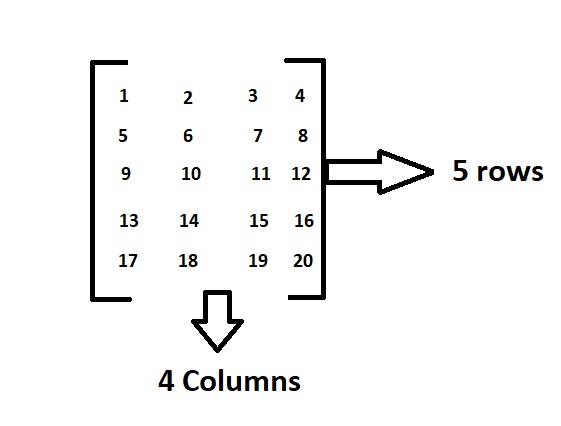
A matrix is a rectangular sequence of numbers divided into columns and rows. A matrix element or entry is a number that appears in a matrix.

Example:

Above is the matrix which contains 5 rows and 4 columns and having elements from 1 to 20.

In this order, the dimensions of a matrix indicate the number of rows and columns.

Here as there are 5 rows and 4 columns it is called a 5*4 matrix.

What is Matrix Multiplication?

Matrix multiplication is only possible if the second matrix’s column equals the first matrix’s rows. A matrix can be represented in Python as a nested list ( a list inside a list ).

Examples for Matrix Multiplication:

Example 1:

Input:

Matrix 1  =  [  1  -8    7  ]
                    [  0   2    5  ]
                    [  1   6    2 ]
                      
Matrix 2 =   [   5    2   -6  ]
                    [   1    8    9 ]
                    [   3    5    7 ]

Output:

printing the matrix A :
1 -8 7
0 2 5
1 6 2
printing the matrix B :
5 2 -6
1 8 9
3 5 7
Printing the product of matrices : 
18 -27 -29
17 41 53
17 60 62

Example 2:

Input:

Matrix 1  =  1 2 3 
                  -5 8 7 
                   6 4 5 
                      
Matrix 2 =  2 7 9 
                  0 -8 5 
                  6 -5 2

Output:

Enter the number of rows and columns of the first matrix3
3
Enter the number of rows and columns of the second matrix3
3
Enter element A11 = 1
Enter element A12 = 2
Enter element A13 = 3
Enter element A21 = -5
Enter element A22 = 8
Enter element A23 = 7
Enter element A31 = 6
Enter element A32 = 4
Enter element A33 = 5

Enter elements of 2nd matrix: 
Enter element B11 = 2
Enter element B12 = 7
Enter element B13 = 9
Enter element B21 = 0
Enter element B22 = -8
Enter element B23 = 5
Enter element B31 = 6
Enter element B32 = -5
Enter element B33 = 2

printing the matrix A
1 2 3 
-5 8 7 
6 4 5

printing the matrix B
2 7 9 
0 -8 5 
6 -5 2 
Print the product of two matrices A and B
20 -24 25 
32 -134 9 
42 -15 84

Given two matrices, the task is to write a program in Python and C++ to multiply the two matrices.

Simple Python Program for Matrix Multiplication

Method #1: Using Nested Loops in Python

A matrix can be implemented as a nested list in Python (list inside a list).

Each element can be thought of as a row in the matrix.

X[0] can be used to choose the first row. Furthermore, the element in the first row, the first column can be chosen as X[0][0].

The multiplication of two matrices X and Y is defined if the number of columns in X equals the number of rows in Y.

Here we give the matrix input as static.

XY is defined and has the dimension n x l if X is a n x m matrix and Y is a m x l matrix (but YX is not defined). In Python, there are a few different approaches to implement matrix multiplication.

Below is the  implementation:

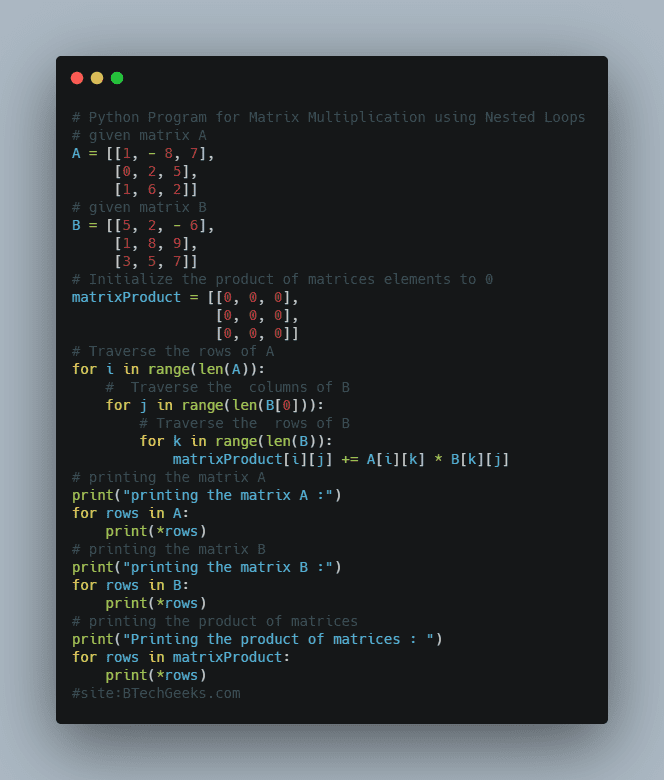
# given matrix A
A = [[1, - 8, 7],
     [0, 2, 5],
     [1, 6, 2]]
# given matrix B
B = [[5, 2, - 6],
     [1, 8, 9],
     [3, 5, 7]]
# Initialize the product of matrices elements to 0
matrixProduct = [[0, 0, 0],
                 [0, 0, 0],
                 [0, 0, 0]]
# Traverse the rows of A
for i in range(len(A)):
    #  Traverse the  columns of B
    for j in range(len(B[0])):
        # Traverse the  rows of B
        for k in range(len(B)):
            matrixProduct[i][j] += A[i][k] * B[k][j]
# printing the matrix A
print("printing the matrix A :")
for rows in A:
    print(*rows)
# printing the matrix B
print("printing the matrix B :")
for rows in B:
    print(*rows)
# printing the product of matrices
print("Printing the product of matrices : ")
for rows in matrixProduct:
    print(*rows)

Python Program for Matrix Multiplication using Nested Loops

Output:

printing the matrix A :
1 -8 7
0 2 5
1 6 2
printing the matrix B :
5 2 -6
1 8 9
3 5 7
Printing the product of matrices : 
18 -27 -29
17 41 53
17 60 62

Explanation:

To go through each row and column in our program, we used nested for loops. In the end, we add up the sum of the items.

This technique is simple, but it becomes computationally expensive as the order of the matrix increases.

We recommend NumPy for larger matrix operations because it is several (in the order of 1000) times faster than the above code.

Method #2: Matrix Multiplication List Comprehension Python

This program produces the same results as the previous one. To understand the preceding code, we must first know the built-in method zip() and how to unpack an argument list with the * operator.

To loop through each element in the matrix, we utilized nested list comprehension. At first glance, the code appears to be complicated and difficult to understand. However, once you’ve learned list comprehensions, you won’t want to go back to nested loops.

Below is the implementation:

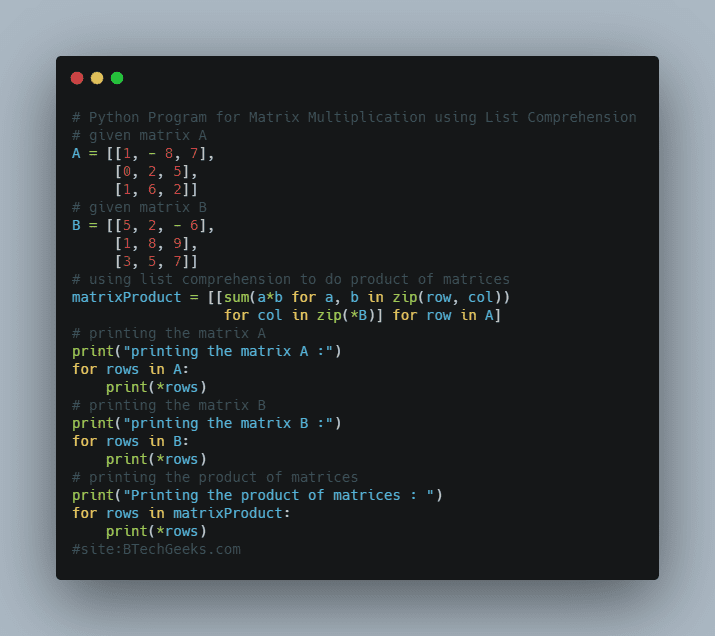
# given matrix A
A = [[1, - 8, 7],
     [0, 2, 5],
     [1, 6, 2]]
# given matrix B
B = [[5, 2, - 6],
     [1, 8, 9],
     [3, 5, 7]]
# using list comprehension to do product of matrices
matrixProduct = [[sum(a*b for a, b in zip(row, col))
                  for col in zip(*B)] for row in A]

# printing the matrix A
print("printing the matrix A :")
for rows in A:
    print(*rows)
# printing the matrix B
print("printing the matrix B :")
for rows in B:
    print(*rows)
# printing the product of matrices
print("Printing the product of matrices : ")
for rows in matrixProduct:
    print(*rows)

Python Program for Matrix Multiplication using List Comprehension

Output:

printing the matrix A :
1 -8 7
0 2 5
1 6 2
printing the matrix B :
5 2 -6
1 8 9
3 5 7
Printing the product of matrices : 
18 -27 -29
17 41 53
17 60 62

Method #3: Using Nested Loops in C++

We used nesting loops in this program to iterate through and row and column. In order to multiply two matrices, we will do the multiplication of matrices as below

Let us take dynamic input in this case.

Below is the implementation:

#include <iostream>
using namespace std;

int main()
{
    int A[100][100], B[100][100], product[100][100], row1,
        col1, row2, col2, i, j, k;

    cout << "Enter the number of rows and columns of the "
            "first matrix";
    cin >> row1 >> col1;
    cout << "Enter the number of rows and columns of the "
            "second matrix";
    cin >> row2 >> col2;

    // Initializing matrix A with the user defined values
    for (i = 0; i < row1; ++i)
        for (j = 0; j < col1; ++j) {
            cout << "Enter element A" << i + 1 << j + 1
                 << " = ";
            cin >> A[i][j];
        }
    // Initializing matrix B with the user defined values
    cout << endl
         << "Enter elements of 2nd matrix: " << endl;
    for (i = 0; i < row2; ++i)
        for (j = 0; j < col2; ++j) {
            cout << "Enter element B" << i + 1 << j + 1
                 << " = ";
            cin >> B[i][j];
        }

    // Initializing the resultant product matrix with 0 to
    // all elements
    for (i = 0; i < row1; ++i)
        for (j = 0; j < col2; ++j) {
            product[i][j] = 0;
        }

    // Calculating the product of two matrices A and B
    for (i = 0; i < row1; ++i)
        for (j = 0; j < col2; ++j)
            for (k = 0; k < col1; ++k) {
                product[i][j] += A[i][k] * B[k][j];
            }
    // printing matrix A
    cout << endl << " printing the matrix A" << endl;
    for (i = 0; i < row1; ++i) {
        for (j = 0; j < col1; ++j) {
            cout << A[i][j] << "  ";
        }
        cout << endl;
    }
    // printing matrix B
    cout << endl << " printing the matrix B" << endl;
    for (i = 0; i < row2; ++i) {
        for (j = 0; j < col2; ++j) {
            cout << B[i][j] << "  ";
        }
        cout << endl;
    }

    // Print the product of two matrices A and B
    cout << "Print the product of two matrices A and B"
         << endl;
    for (i = 0; i < row1; ++i) {
        for (j = 0; j < col2; ++j) {
            cout << product[i][j] << "  ";
        }
        cout << endl;
    }

    return 0;
}

Output:

Enter the number of rows and columns of the first matrix3
3
Enter the number of rows and columns of the second matrix3
3
Enter element A11 = 1
Enter element A12 = 2
Enter element A13 = 3
Enter element A21 = -5
Enter element A22 = 8
Enter element A23 = 7
Enter element A31 = 6
Enter element A32 = 4
Enter element A33 = 5

Enter elements of 2nd matrix: 
Enter element B11 = 2
Enter element B12 = 7
Enter element B13 = 9
Enter element B21 = 0
Enter element B22 = -8
Enter element B23 = 5
Enter element B31 = 6
Enter element B32 = -5
Enter element B33 = 2

printing the matrix A
1 2 3 
-5 8 7 
6 4 5

printing the matrix B
2 7 9 
0 -8 5 
6 -5 2 
Print the product of two matrices A and B
20 -24 25 
32 -134 9 
42 -15 84

How to Multiply Two Matrices in Python using Numpy?

import numpy as np

C = np.array([[3, 6, 7], [5, -3, 0]])
D = np.array([[1, 1], [2, 1], [3, -3]])
E = C.dot(D)
print(E)

''' 

Output:

[[ 36 -12]
[ -1 2]]

Explore more instances related to python concepts from Python Programming Examples Guide and get promoted from beginner to professional programmer level in Python Programming Language.

Related Programs:

Python Program for Multiplication of Two Matrices | How do you do Matrix Multiplication in Python? Read More »